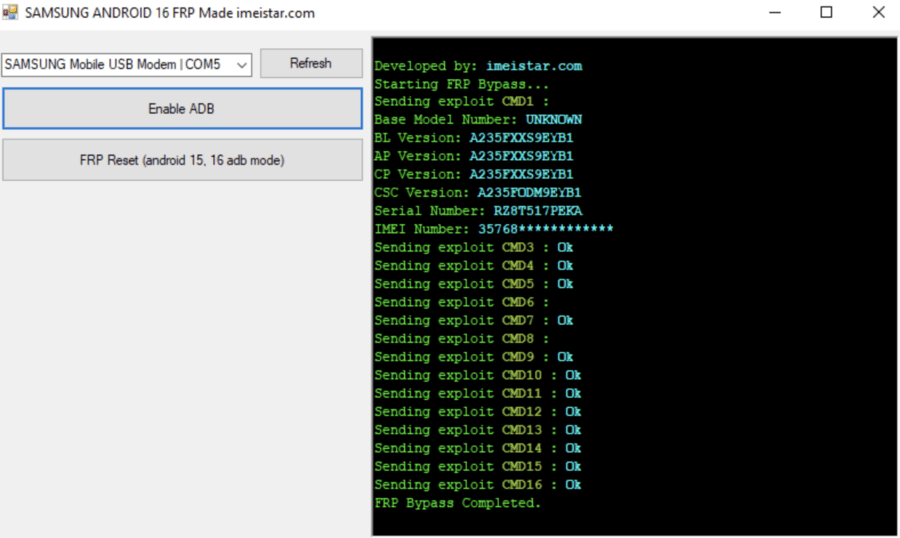
With the release of Samsung Android 16, Google has further strengthened device security through Factory Reset Protection (FRP). While FRP is designed to protect user data, it can become a problem for legitimate users who forget their Google account details after a reset.
To help beginners and mobile technicians, developers introduced the Samsung Android 16 FRP Tool by Easy Flashing, a free FRP reset utility designed to simplify Google account removal on supported Samsung Galaxy devices.
This article is a complete listicle-style guide that explains everything you need to know about the Samsung Android 16 FRP Tool, including features, compatibility, download guidance, USB driver setup, and step-by-step usage—written in simple, beginner-friendly English.
What Is Samsung Android 16 FRP Tool by Easy Flashing?
The Samsung Android 16 FRP Tool is a lightweight PC utility created to help users perform FRP unlock operations on Samsung devices running Android 16.
It focuses on:
- One-click FRP reset
- MTP mode-based connection
- No test point or special cable requirement
- Beginner-safe workflow
Because of this simplicity, many users search for Samsung Android 16 FRP Tool Free Download for Samsung devices when they face FRP lock issues.
ZeroKnox Removal 2.4 Latest Version
Why FRP Lock Exists on Samsung Android 16
Before using any FRP bypass solution, beginners should understand why FRP exists.
Purpose of FRP:
- Protects personal data
- Prevents unauthorized phone usage
- Links device to the last Google account
FRP activates automatically when:
- A Google account is added
- The device is reset improperly
The Samsung Android 16 FRP Tool by Easy Flashing is designed for legitimate repair and recovery scenarios only.
Samsung Android 16 FRP Tool (Quick Overview)
Here is a quick snapshot of what this tool offers:
- Supports Samsung Android 16
- Free tool download
- One-click FRP reset utility
- Works via MTP mode
- No test point required
- Beginner-friendly interface
- Compatible with many Samsung Galaxy devices
- Requires standard USB driver install
Samsung Android 16 FRP Tool Full Feature List
Below is a detailed listicle breakdown of the tool’s features.
1: One-Click FRP Reset Utility
The biggest advantage of this tool is its one-click FRP reset mechanism.
Users can:
- Connect the phone
- Click a single button
- Start FRP unlock process
This is ideal for beginners who want a Samsung FRP tool without complex steps.
2: Samsung Android 16 Security Patch Support
The tool is designed with:
- Updated security patch support
- Compatibility with recent Android 16 builds
- Improved success rate on newer firmware
This makes it more reliable than outdated tools.
3: FRP Unlock Without Test Point or Special Cable
Many advanced tools require:
- Test point access
- Special EDL cables
This tool allows Samsung Android 16 FRP bypass without test point or special cable, making it safer and easier for new users.
4: MTP Mode Based FRP Bypass
The tool uses MTP mode to communicate with the device.
Benefits:
- No disassembly required
- Standard USB cable works
- Lower risk for beginners
This is why users search Samsung Android 16 FRP unlock free tool via MTP mode one-click.
5: USB Driver Install Support
The tool provides guidance for:
- Samsung USB drivers
- Proper device detection
- Stable PC-to-phone connection
Correct USB driver install significantly improves success rates.
6: Google Account Removal (FRP Only)
The tool focuses on Google account removal related to FRP.
It does:
- Remove FRP lock
- Restore access after reset
It does NOT:
- Access user data
- Bypass screen security
This keeps the tool within safe and educational use.
7: PC Utility for Windows Users
The Samsung Android 16 FRP Tool works as a Windows-based PC utility.
Supported systems:
- Windows 10
- Windows 11
- 64-bit architecture recommended
8: Beginner-Friendly Interface
The interface is:
- Clean
- Simple
- Button-based
This makes it suitable for users with no prior Android repair experience.
9: Compatible With Many Samsung Galaxy Devices
The tool supports many:
- Samsung Galaxy A series
- Samsung Galaxy S series (supported models)
- Entry-level and mid-range devices
Actual support depends on firmware and security patch.
10: Works Alongside Other Android Repair Tools
Technicians often use it alongside:
- HalabTech tool
- imeistar FRP tool
- Other Samsung FRP utilities
This allows flexible repair workflows.
Supported Devices Overview (Samsung Galaxy)
The Samsung Android 16 FRP Tool generally supports:
- Devices running Android 16
- Samsung Galaxy phones with MTP access
- Devices with intact USB communication
Always verify model compatibility before use.
System Requirements for Samsung Android 16 FRP Tool
Before installation, ensure your PC meets these requirements:
- Windows 10 / 11
- Minimum 4GB RAM
- Stable USB cable
- Installed Samsung USB drivers
- Internet connection (for drivers/resources)
Samsung Android 16 FRP Tool Free Download – Safety Tips
Many users search Free Samsung Android 16 FRP Tool download link with setup steps.
Best Practices:
- Download from trusted sources only
- Avoid modified or cracked files
- Scan files before installation
- Verify extracted folders
Samsung Android 16 FRP Tool (FREE)
Safe downloading protects your system and reputation.
Step-by-Step Installation Guide
This section explains Samsung Android 16 FRP unlock tool download and USB driver instructions.
Installation Steps:
- Download the FRP tool package
- Extract files using WinRAR or 7-Zip
- Install Samsung USB drivers
- Restart your PC
- Run the tool as Administrator
This completes setup.
How to Remove FRP on Samsung Android 16 With Free Tool
If you’re searching How to remove FRP on Samsung Android 16 with free tool, follow these steps carefully.
Step-by-Step FRP Unlock Guide:
- Power on the Samsung device
- Connect phone to PC using USB cable
- Enable MTP mode
- Launch the Samsung Android 16 FRP Tool
- Click “FRP Unlock” or “Start”
- Wait for process completion
- Reboot device
The tool explains how to connect phone and start FRP unlock clearly inside the interface.
10: Samsung Android 16 FRP Bypass (How It Works)
Internally, the tool uses:
- Automated bypass script
- Predefined commands
- Safe communication methods
Users do not need to write or understand scripts.
Advantages of Samsung Android 16 FRP Tool by Easy Flashing
Pros:
- Free tool download
- No test point required
- MTP mode support
- Beginner-friendly
- Fast FRP reset
Limitations You Should Know
Cons:
- Not all models supported
- Requires correct drivers
- Depends on firmware version
Transparency helps user trust and SEO quality.
Samsung Android 16 FRP Tool vs Other FRP Tools
When compared to alternatives:
- Easier than manual ADB methods
- Simpler than server-based tools
- Safer for beginners than complex utilities
It complements tools like imeistar FRP tool and HalabTech tool.
Is Samsung Android 16 FRP Tool Safe and Legal?
From a content and compliance perspective:
- This article is informational and educational
- Tool is for legitimate device recovery
- No encouragement of misuse
- Aligns with Google Helpful Content guidelines
Always use tools only on devices you own or are authorized to repair.
External Learning Resources (For Beginners)
For better understanding:
- Samsung official support documentation
- Android developer guides on device security
- Community learning forums for Android repair basics
External learning improves skill and responsibility.
(FAQ)
Is Samsung Android 16 FRP Tool really free?
Yes, basic FRP reset features are free.
Does it work without special cables?
Yes, it supports FRP bypass without test point or special cable.
Can beginners use it?
Yes, the tool is designed for beginners.
Final Verdict:
If you are a beginner, mobile learner, or technician facing FRP lock issues, the Samsung Android 16 FRP Tool by Easy Flashing is a reliable and beginner-safe option.
It offers:
- Simple FRP unlock
- Free access
- Modern Android 16 compatibility
- Low technical risk
Used responsibly, it is a valuable Samsung FRP reset utility for learning and legitimate repair work.


