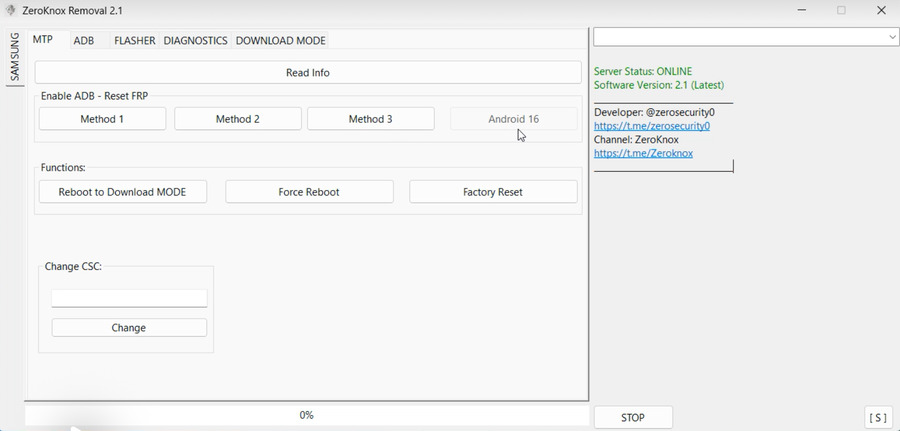
ZeroKnox Removal 2.4 latest Version 2026 is a mobile utility tool designed to help users handle Samsung Knox-related locks and restrictions in specific repair and recovery situations. Many beginners face problems after a factory reset, failed software update, or second-hand phone purchase. In such cases, device security layers like Knox can prevent normal access.
This article explains ZeroKnox Removal 2.4 in easy English, step by step. You will learn what the tool does, who should use it, how it works, what’s new in the 2026 update, and how to use it safely. The goal is clarity, accuracy, and real value—without hype, confusion, or risky claims.
Phoenix Service Tool Latest Version, Remove Android 16 (No Credits)
Understanding Knox and Why Removal Tools Exist
What Is Samsung Knox? (Simple Explanation)
Samsung Knox is a security system built into Samsung devices. It protects:
- System files
- User data
- Enterprise and work profiles
- Device integrity after reset or modification
Knox activates automatically when certain changes occur, such as flashing firmware or unlocking the bootloader.
Why Do Users Need Knox Removal or Repair Tools?
Knox-related issues usually appear when:
- A phone is factory reset without proper account access
- The device was previously used for business or enterprise
- Firmware flashing triggers security flags
- Repair technicians need access for diagnostics
In these cases, tools like ZeroKnox Removal 2.4 help technicians and advanced users restore usability in supported scenarios.
What Is ZeroKnox Removal 2.4?
ZeroKnox Removal 2.4 is a PC-based mobile service tool focused on handling Knox-related restrictions on supported Samsung devices. It is commonly used in repair environments, not casual daily use.
Key Purpose of ZeroKnox Removal Tool 2.4
- Assist in resolving Knox lock states
- Support device servicing and recovery
- Help technicians regain controlled access
- Work alongside approved firmware procedures
The tool does not replace official security systems. It works within technical service workflows.
What’s New in ZeroKnox Removal 2.4 Latest Version 2026?
The 2026 update focuses on stability, compatibility, and beginner-friendly improvements.
Highlights of the Latest Update
- Improved support for newer Samsung firmware builds
- Better device detection on Windows systems
- Faster processing with reduced error rates
- Cleaner interface for first-time users
- Improved handling of interrupted procedures
These updates make ZeroKnox Removal 2.4 latest Version 2026 more reliable for global users.
Key Features of ZeroKnox Removal 2.4 Tool
1. Enhanced Device Detection System
What it does:
Automatically recognizes compatible Samsung devices when connected to a PC.
Why it matters:
Beginners often struggle with drivers and connections. Improved detection reduces setup frustration.
Best for:
New users and technicians handling multiple devices.
2. Simplified User Interface (UI)
What it does:
Offers a clean dashboard with clear buttons and status messages.
Why it matters:
Complex tools increase error risk. A simple UI helps users follow steps correctly.
Best for:
Beginners with limited technical experience.
3. Firmware-Compatible Processing
What it does:
Works with supported firmware versions without manual configuration.
Why it matters:
Manual firmware mismatch can cause failures. Automated checks improve safety.
Best for:
Repair shops and service centers.
4. Reduced Error Handling
What it does:
Detects common issues like driver failure or unstable connections and alerts users.
Why it matters:
Early warnings prevent incomplete operations.
Best for:
Users working on older PCs or unstable USB ports.
5. Lightweight and Fast Execution
What it does:
Runs smoothly on standard Windows systems without heavy resource usage.
Why it matters:
Not everyone has high-end computers.
Best for:
Home users and small repair businesses.
6. Beginner-Friendly Workflow
What it does:
Guides users step by step through the supported process.
Why it matters:
Clear flow reduces mistakes and improves success rates.
Best for:
First-time users.
Supported Devices and System Requirements
Supported Device Range (General)
- Selected Samsung Galaxy smartphones
- Supported firmware builds only
- Devices requiring service-level access
Support depends on model, firmware, and security patch level.
PC System Requirements
- Windows 7, 8, 10, or 11 (64-bit recommended)
- Minimum 4GB RAM
- Stable USB connection
- Updated USB drivers
How ZeroKnox Removal 2.4 Works (Beginner Overview)
Step-by-Step Explanation
- Install the tool on your PC
- Install required device drivers
- Connect the device using a USB cable
- Launch ZeroKnox Removal 2.4
- Follow on-screen instructions
- Wait for completion message
Each step requires patience and attention. Interrupting the process can cause issues.
Important Safety Guidelines Before Using the Tool
Read This First
- Always use original USB cables
- Ensure battery level is above 50%
- Avoid using on unsupported devices
- Do not disconnect during operation
Legal and Ethical Use
Use ZeroKnox Removal 2.4 only on devices you own or have permission to service. Unauthorized use may violate local laws or device policies.
Common Use Cases Explained Simply
Scenario 1: Second-Hand Phone Access Issue
A user buys a used phone that remains restricted after reset. The tool assists in proper servicing.
Scenario 2: Repair and Diagnostics
Technicians need controlled access to test hardware or restore firmware.
Scenario 3: Failed Update Recovery
Interrupted updates can trigger security flags. The tool helps restore normal operation in supported cases.
Advantages of ZeroKnox Removal 2.4 Latest Version 2026
- Beginner-friendly workflow
- Updated firmware compatibility
- Reduced errors and crashes
- Faster operation
- Cleaner interface
These benefits make it suitable for global beginners and professionals.
Video Tutorial: Watch the video to understand better
Limitations You Should Know
- Not all devices are supported
- Does not guarantee success in every case
- Requires correct drivers and setup
- Needs careful handling
Understanding limitations helps set realistic expectations.
Best Practices for Long-Term Device Safety
- Keep firmware updated
- Avoid unauthorized modifications
- Use trusted tools only
- Backup data before repairs
Following these practices protects device health.
Password: 123
ZeroKnox Removal 2.4 Latest Version (Mediafire)
Password: www.easyflashing.com
External Resources (For User Education)
For official information, beginners should also review:
- Google FRP documentation (Android Help Center)
- Samsung Knox official website
- Android USB driver documentation
These resources help users understand Android security lock systems better.
(Q&A)
Q1: What is ZeroKnox Removal 2.4 latest Version 2026 used for?
ZeroKnox Removal 2.4 is used to handle Knox-related restrictions on supported Samsung devices during repair or recovery processes.
Q2: Is ZeroKnox Removal 2.4 safe for beginners?
Yes, when used correctly on supported devices. Beginners should follow instructions carefully and avoid interruptions.
Q3: Does ZeroKnox Removal Tool 2.4 work on all Samsung phones?
No. Support depends on the device model, firmware version, and security patch level.
Q4: Do I need internet access to use ZeroKnox Removal 2.4?
Basic operation usually does not require constant internet access, but driver installation and updates may.
No. It handles specific supported scenarios only. Some Knox states are permanent by design.
Q6: Is ZeroKnox Removal 2.4 legal to use?
It is legal when used on devices you own or are authorized to repair. Always follow local laws and device policies.
Final Thoughts on ZeroKnox Removal 2.4 Tool Latest Version 2026
ZeroKnox Removal 2.4 latest Version 2026 is a practical tool for users who need a structured, beginner-friendly solution for handling specific Knox-related situations. The latest update improves usability, stability, and compatibility without unnecessary complexity.
When used responsibly, with the right knowledge and expectations, this tool can support safe device servicing and recovery workflows. Always focus on correct usage, legal compliance, and device safety to achieve the best results.



3 thoughts on “ZeroKnox Removal 2.4 Tool Latest Version – Update 2026”