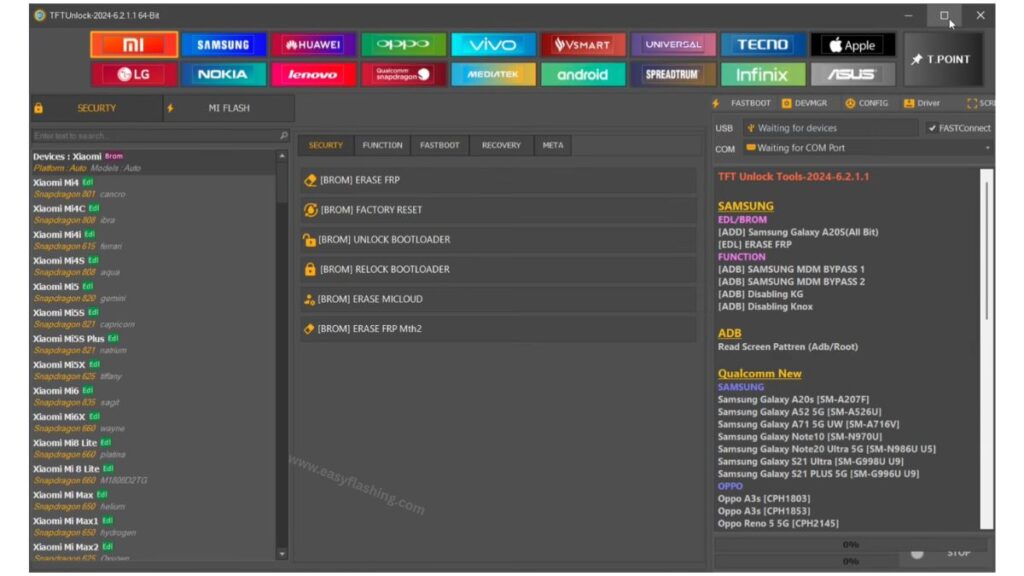
When you hear tft unlock tool, think of a professional software utility designed to help users unlock, repair, and manage Android devices at a deeper system level. This tool supports many operations like FRP bypass, screen lock removal, bootloader unlocking, and firmware flashing, all from a Windows PC environment. Within this article, I will try to give you complete information about the tft unlock tool so you can understand what it does, how it works, and how to use it safely.
1. What Is TFT Unlock Tool V6.2?
The tft unlock tool V6.2 Latest Version is the newest major update of the software in 2026. It brings support for hundreds of devices, improved unlocking methods, and broader chipset compatibility for Android repairs. Tried by many phone technicians, it’s now one of the most versatile unlocking utilities available for Windows PCs.
Key Concepts Explained:
- FRP (Factory Reset Protection): A Google security feature that locks a device after reset until the original account credentials are entered.
- Bootloader Unlock: A process that removes software restrictions from phone firmware, enabling deeper customization.
- IMEI Repair: Repairs or restores invalid IMEI numbers essential for mobile network connectivity.
- Firmware Flashing: Installing or updating the device operating system.
2. Main Features of TFT Unlock Tool V6.2
The tft unlock tool Latest Version stands out because it packs multiple powerful features in one package. Those who don’t know much about Android servicing will find this tool extremely useful when addressing common device problems.
FRP Bypass
This feature removes Google Factory Reset Protection locks on Android phones with a variety of chipsets, including Qualcomm and MediaTek.
Benefits:
- Regain access to devices after a reset
- Useful for tech repair shops handling second‑hand phones
Screen Lock Removal
Able to bypass PINs, Muster patterns, or even biometric locks like fingerprints, depending on the model and security level.
Practical Example:
A user forgets their lock pattern — tft unlock tool can help remove it without needing to enter the code.
Bootloader & Firmware Tools
Unlocking the bootloader opens up options like installing custom ROMs or repairing a corrupt system. This is essential for developers and advanced users.
User Benefit:
- Fix soft‑bricked devices using firmware flashing
- Restore a device stuck in boot loops
IMEI Repair & Network Fixes
When a phone’s IMEI becomes invalid, it can lose network connectivity. The tft unlock tool offers features that repair IMEI issues, restoring mobile network functionality in many cases.
Device Compatibility
Supports many brands like Samsung, Xiaomi, Oppo, Vivo, Realme, and more, including multiple chipsets like Qualcomm, MediaTek (MTK), UNISOC, and Spreadtrum.
Practical Tip:
Always check the compatibility list before using the tool to avoid errors or unintended issues.
3. TFT Unlock Tool V6.2 – System Requirements & Installation
To use this tool effectively, make sure your PC meets the basic minimum requirements:
Minimum Required System:
- Windows 7/8/10/11 (32/64‑bit)
- At least 4GB RAM
- USB Cable & Ports
- Around 300–500MB free storage
- USB Drivers installed (MTK, Qualcomm, Samsung)
Installation Overview:
- Download TFT Unlock Tool V6.2 Latest Version from an official source.
- Extract and run the setup file.
- Install USB drivers if not already installed.
- Launch the tool and select your device brand/model.
- Choose FRP, unlock, or repair feature as needed.
Note: Some installations may ask to disable antivirus software temporarily — this is often due to the nature of system‑level access.
4. How to Use the TFT Unlock Tool
Using tft unlock tool doesn’t require advanced coding knowledge. Here’s a straightforward workflow for first‑time users:
Step‑by‑Step Guide
- Install the tool and drivers on your PC.
- Connect your Android device using USB.
- Choose the operation you need (FRP Remove / Bootloader Unlock / IMEI Repair).
- Follow on‑screen instructions inside the tool interface.
- Wait for the tool to complete the job.
Tips:
- Backup your data before unlocking or flashing — because some functions may erase user data.
- Ensure your phone’s battery is above 50% to avoid interruptions.
TFT Unlock Tool Latest Features & Supported Models
TFT Unlock Tool V6.2 Latest Version 2026
FREE ( TOOL )
Password: TFT
FREE ( TOOL )
Password: 123
5. Safety & Legal Considerations
While the tool is powerful, safety and legality matter:
Safety Risks
Using tools like this improperly can lead to:
- Device bricking (software becoming unusable)
- Data loss
- Security warnings from antivirus software
Always download only from trusted sources, keep backups, and avoid using cracked versions that may contain malware.
Legal Note
Unlocking a phone without permission is illegal in many regions. Only perform unlocks on devices you own or have authorization for.
6. Alternatives and Backup Tools
If tft unlock tool doesn’t support your device or you encounter errors, you might consider alternatives specifically built for certain brands or newer devices with advanced security protections.
Example Alternatives:
- Brand‑specific unlocking tools
- Paid professional unlock suites
- Manufacturer service centers
This ensures that you still have options if your specific phone model isn’t compatible with TFT.
(Q&A)
1. What exactly does the tft unlock tool do?
It helps remove lock screens, FRP verification, and perform firmware repairs on Android devices. It also supports IMEI repair and bootloader tasks.
2. Is the TFT Unlock Tool safe to use?
It depends on where you download the software and how carefully you follow instructions. Always prefer official sources and totally back up your device before use.
3. Will TFT Unlock Tool work on the latest Samsung security versions?
Compatibility varies by model and security patch level. Newer security updates may not be supported immediately or at all.
4. Can this tool erase data on my phone?
Yes. Some operations like FRP bypass or firmware flashing may erase user data, so always back up first.
5. Is it free?
Download is often free, but full‑feature access may require official purchase or subscription from the tool’s developers.
Trusted External Link:
For detailed information about Android security features like FRP and why unlocking tools exist:
🔗 Wikipedia – Rooting (Android) (not related to TFT but gives context on device modification safety)
Conclusion
By reading this article, You now have a solid and practical understanding of the tft unlock tool V6.2 Latest Version in 2026. Whether you’re a beginner curious about Android repair tools or a technician needing reliable software, this guide offers professional and user‑friendly explanations. Always prioritize safety, legality, and data protection when using powerful utilities like TFT.


