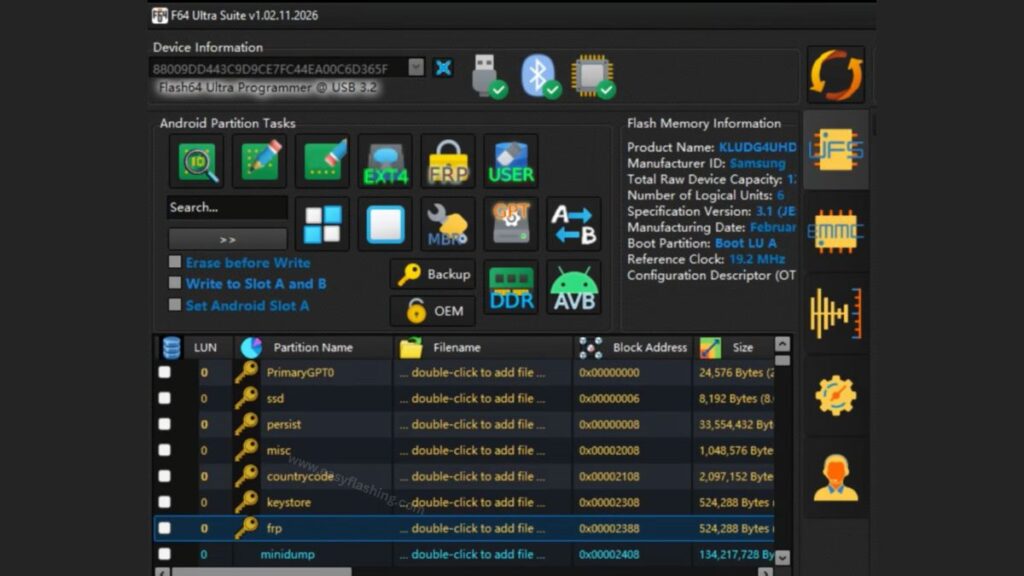
I will tell you today about Flash64 New Update – V1.02.11, the latest announced version of the Flash64 programming solution used by technicians and professionals for NAND/UFS/eMMC flash programming and device repair. Flash64 is known for supporting a wide range of flash memory formats and offering flexible storage-level access on many computing environments.
Within this article, I will try to explain everything you need to know about the Flash64 Latest Update, its key improvements, and how it fits into modern mobile tool workflows. Those who don’t know much about Flash64 will find this guide easy to follow and comprehensive.
1. What Is Flash64 and Why It Matters in 2026
Flash64 is a professional-grade NAND programmer and flash tool widely used in mobile repair and data recovery workflows. It provides technicians with the ability to access, read, write, and reprogram various storage types such as UFS and eMMC on devices from Samsung, Qualcomm, MediaTek, and others.
This suite typically works in conjunction with a hardware Flash64 box, which interfaces between the PC and the storage chip under repair.
Why Flash64 matters:
- It supports multiple flash file formats and partitions.
- It enables low-level NAND programming.
- It provides enhanced partition and boot handling tools.
- It continues to evolve with regular software and firmware updates.
By reading this article, you will understand not only what’s new but also how Flash64 fits into broader repair and development workflows in 2026.
2. Flash64 New Update – V1.02.11 (Anticipated Details)
Expected Areas of Improvement
- Stability and compatibility fixes for newer UFS/eMMC storage chips
- Enhanced support for updated phone and tablet firmware
- Improved rawprogram and partition management tools
- Better file format handling for emerging smartphone platforms
These updates typically focus on optimizing:
- Boot handling and slot control
- Secure partition read/write
- Compatibility with latest official firmware formats
Collectively, this makes Flash64 more reliable and effective, especially with newer 5G device architectures.
3. Features That Define Flash64 Across Versions

Even before V1.02.11, Flash64 has grown into a capable mount-level tool with several strong features:
1. Multi-Format Flash Support
Flash64 supports a wide array of flash file formats used in modern mobile devices, including:
- Binary files
- IMG files
- XML and scatter file formats
- Shell scripts (.sh) and batch files (.bat)
- Proprietary formats like Samsung TAR and Qualcomm XML formats
Benefit:
Technicians can work with most smartphone firmware types without switching tools.
2. UFS & eMMC Storage Handling
Flash64 offers nuanced support for flash memory:
- UFS (Universal Flash Storage) chips from multiple generations
- eMMC flash memory with partition and GPT handling
- Raw data read/write options
Benefit:
This flexibility helps when repairing deeply embedded storage issues.
3. Partition Table Management
Flash64 allows editing and provisioning partitions such as GPT, enabling:
- Adding or resizing partitions
- Fixing corrupted partition structures
- Handling dynamic partition maps
Benefit:
Better control over complex storage maps used in Android and modern OS devices.
4. Boot Slot and Bootloader Handling
Variants of Flash64 tools often include:
- Automatic A/B slot selection
- Bootloader correction tools
These features reduce errors during flash operations and ensure consistent boot behavior after firmware updates.
4. Flash64 V1.01.31.2026 – What It Tells Us About Future Updates
Before V1.02.11, V1.01.31.2026 provided significant improvements that hint toward the direction of V1.02.11:
- Multi-Box Support allowing up to 32 boxes connected to one PC
- RPMB Key Read for specific eMMC areas
- UFS Provision improvements
- Auto-Loading of single partition files
- Updated support for 2026 official firmware formats
These updates reflect a shift toward more robust multi-device workflows and compatibility with newer platforms.
5. Practical Benefits of Updating to V1.02.11
1. Better Device Compatibility
Flash64 constantly introduces new internal handlers for device partitions and flash file types as phone OEMs update firmware structures.
Example:
Support for the latest Samsung and Qualcomm boot architectures often appears first in newer Flash64 releases.
2. Enhanced Stability
Updates like V1.02.11 typically fix inconsistencies in older processing algorithms, reducing:
- Failure rates during flash operations
- Partition misreads
- Data integrity issues
Example:
Improved GPT handling prevents corrupted storage states after reprogramming.
3. Workflow Efficiency
With auto-loading and multi-box support, professional technicians can handle:
- Bulk flashing queues
- Multi-device setups
- Batch firmware operations
Example:
A repair shop handling dozens of devices per day benefits from increased throughput.
6. What’s New in Flash64 Update Cycles
Looking at previous releases reveals the evolution of Flash64 tools:
- V1.02.01.2025: Initial bug fixes and UFS skip options.
- V1.03.29.2025: Improved partition visibility and feature enhancements.
- V1.10.22.2025: Major RPMB, boot slot, and WriteBooster improvements.
- V1.11.27.2025: Updated Android Verified Boot support and extended file tools.
- V1.01.31.2026: Multi-box and firmware file enhancements.
This trend suggests that V1.02.11 will likely continue refining cross-device flexibility, safety, and support for emerging flash standards used by OEMs in 2026.
Video Tutorial: F64 box update error fix
7. How to Download Flash64 V1.02.11 Latest 2026 Safely
Downloading advanced programming tools requires caution:
1. Use Official or Reputable Sources
Some common download pages list older versions — always verify file legitimacy and checksums where available. Official Site/(flash64.com)
2. Update Firmware First
Flash64 software often expects the associated box firmware to be updated to match software capability. Failure to do so might cause communication errors.
3. Scan Before Use
Run downloads through reputable antivirus and file verification tools to ensure:
- No malware is present
- Files match expected checksums
Reminder:
Unauthorized copies or cracked versions can introduce security risks.
8. Best Practices When Using Flash64 Tools
Whether you are a newcomer or transitioning from simpler tools, follow these tips:
- Keep logs of all operations
- Backup storage before flashing
- Understand chip types (UFS vs eMMC)
- Use the latest drivers for hardware interface
- Update both software and box firmware
These practices reduce the risk of irreversible errors during programming cycles.
(FAQ)
Q1. What is Flash64 New Update – V1.02.11?
It’s the anticipated latest version of the Flash64 mobile programming software, continuing improvement in storage and flash workflows.
Q2. How does Flash64 differ from Flash64 Ultra?
Flash64 focuses on core programming and repair tasks, while Flash64 Ultra adds higher-end NAND support and faster IO performance.
Q3. Do I need special hardware to use Flash64?
Yes – Flash64 typically interfaces through a dedicated hardware programming box to connect to chips.
Q4. Is Flash64 safe for beginners to use?
With proper guidance and backups, yes. Always follow documented procedures and refer to trusted support resources.
Q5. Can Flash64 handle the latest Android 16 devices?
Recent updates like V1.01.31.2026 indicate increasing support for newer firmware formats, suggesting V1.02.11 will continue this trend.
For official Flash64 Ultra product details and capabilities, you can visit the manufacturer’s official product page: (flash64.com)
This article gives you a complete and in-depth understanding of Flash64 New Update – V1.02.11, its role, benefits, evolution, and safe use in 2026 repair workflows.


