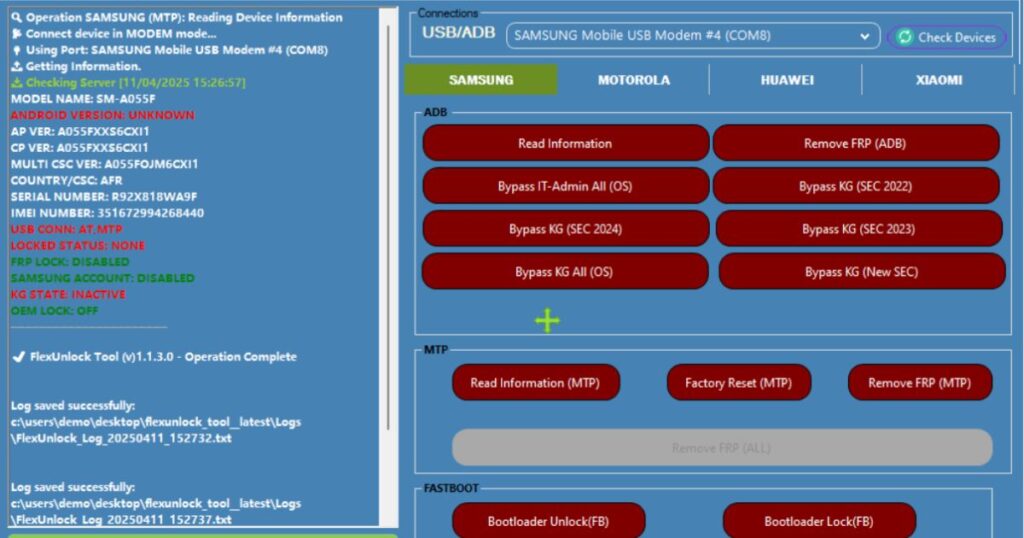
In the fast-growing world of mobile repair and Android unlocking, tools come and go—but only a few earn long-term trust. FlexUnlock Tool is one of those professional utilities that has gained massive popularity among technicians, beginners, and mobile repair shops worldwide.
The FlexUnlock Tool Latest Version 2026 is designed to handle complex Android security tasks such as FRP bypass, Knox Guard removal, MDM bypass, bootloader unlocking, and fastboot operations with ease. What makes it special is its simple interface, multi-brand support, and regular updates that keep it compatible with the latest Android security patches.
Download FlexUnlock Tool
Before using any mobile unlock software, it’s essential to understand what you’re downloading and why it’s safe.
FlexUnlock Tool latest version is a Windows-based Android unlock utility developed for professional and semi-professional use. It supports popular brands like Samsung, Xiaomi, Motorola, Huawei, Nokia, and many others.
Why Beginners Prefer FlexUnlock Tool
- Clean and easy user interface
- Step-by-step operations
- Clear error messages
- No unnecessary technical complexity
- Works with both old and new Android versions
This makes FlexUnlock Tool an ideal choice for beginners entering the mobile unlocking and repair field.
FlexUnlock Tool Latest Version
The FlexUnlock Tool V1.2.29 Latest Version brings major improvements in stability, security, and device compatibility. Compared to older releases, this version handles newer Android versions more efficiently while reducing failure rates.
Key Improvements in Latest Version
- Improved Samsung FRP bypass tool logic
- Faster Knox Guard removal
- Expanded fastboot unlock support
- Enhanced MTK functions
- Reduced error occurrence during ADB & MTP operations
These updates make the tool reliable for daily professional use.
FlexUnlock Tool v1.2.17 Released
The v1.2.17 release was a milestone update that introduced major structural improvements. Many of the current features in v1.2.29 are refined versions of what started in v1.2.17.
What v1.2.17 Introduced
- Stable Odin flash functions
- Initial MDM bypass software integration
- Improved device detection
- Faster USB handshake
Understanding previous versions helps users appreciate how mature and stable the tool has become in 2026.
FlexUnlock Tool Official Website
The FlexUnlock Tool official website is the most trusted source for:
- Tool updates
- Official changelogs
- Activation details
- Supported devices list
- Community support
For security reasons, always rely on official sources or trusted mobile repair communities. This protects your system from malware and ensures you receive genuine updates.
Features of FlexUnlock Tool
The strength of FlexUnlock Tool lies in its feature set, which covers almost every common Android unlocking scenario.
Core FlexUnlock Tool Features
- Android unlock utility for multiple brands
- Samsung FRP bypass tool
- Knox Guard removal
- MDM bypass software
- Bootloader unlock tool
- Fastboot unlock support
- Odin flash functions
- MTK and Qualcomm support
- ADB & MTP features
Each feature is optimized for speed, safety, and simplicity, making it suitable for beginners and professionals alike.
How to Download FlexUnlock Tool Latest Version
When beginners search for download FlexUnlock Tool latest version, they often encounter unsafe or modified files. To avoid this:
Safe Download Checklist
- Use official or trusted repair forums
- Avoid cracked or modified versions
- Verify file size and version number
- Disable antivirus only if necessary (false positives are common with repair tools)
Downloading the correct version ensures smooth installation and reliable results.
Supported Devices
One of the biggest advantages of FlexUnlock Tool is its broad device compatibility.
FlexUnlock Tool Supported Devices List
- Android phones & tablets
- Old and new Android security patches
- Devices with FRP, KG, and MDM locks
- MTK, Qualcomm, and Exynos chipsets
The supported devices list grows with each update, making this a future-proof investment.
Supported Brands
Multi-Brand Unlock Tool Support
FlexUnlock Tool works across many major manufacturers, including:
- Samsung
- Xiaomi
- Motorola
- Huawei
- Nokia
- Oppo
- Vivo
- Realme
- Tecno
- Infinix
This multi-brand unlock tool capability eliminates the need for multiple software solutions.
How to Use FlexUnlock Tool
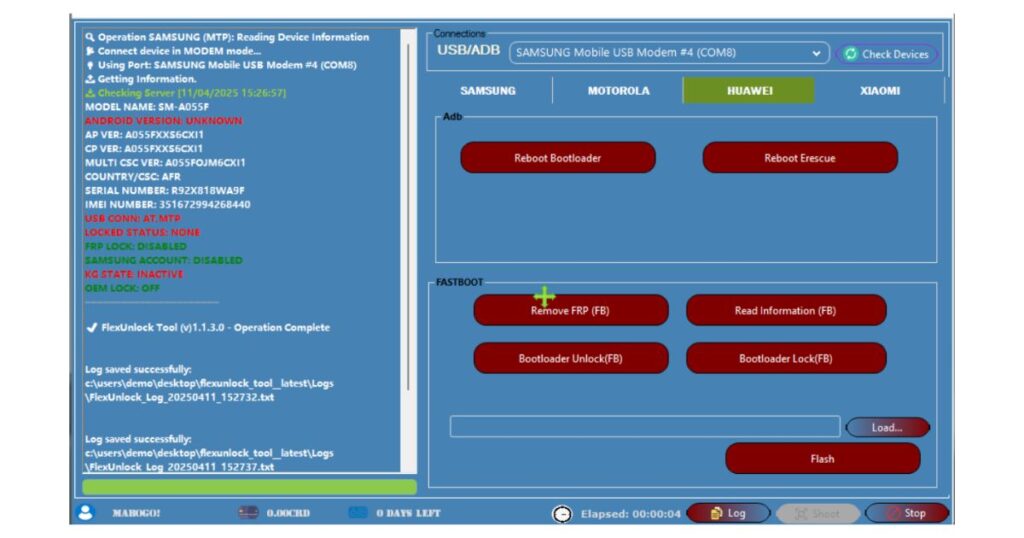
Beginner Workflow Overview
Using FlexUnlock Tool is straightforward if you follow the correct steps:
- Install the tool on your PC
- Install required USB drivers
- Connect the device in the correct mode
- Select the appropriate function
- Start the process and wait
Each module has built-in instructions to reduce mistakes.
Installation Guide
How to Install FlexUnlock Tool on PC
System Requirements
- Windows 7 / 8 / 10 / 11
- Minimum 4GB RAM
- Stable USB cable
- Internet connection (for activation)
Installation Steps
- Download FlexUnlock Tool latest version
- Extract the ZIP file
- Run the installer as administrator
- Install USB drivers when prompted
- Launch the tool
After installation, the tool automatically detects connected devices.
Samsung FRP & KG Removal
Samsung devices are among the most commonly locked phones worldwide.
How to Use FlexUnlock Tool for FRP Bypass (Samsung)
FRP Bypass Steps
- Boot Samsung device into Download Mode
- Connect to PC via USB
- Open FlexUnlock Tool
- Select Samsung FRP Bypass Tool
- Click Start and wait
FlexUnlock Tool Samsung KG Removal Steps
- Detect Knox Guard status
- Select KG Removal module
- Follow on-screen instructions
- Reboot device
This process works on many Android versions without flashing firmware.
Xiaomi Mi Account Unlock
Xiaomi Mi Account Unlock with FlexUnlock Tool
- Supports selected Xiaomi models
- Uses ADB and fastboot unlock support
- Requires proper device authorization
Always ensure the device is legally owned before performing account removal.
Motorola Fastboot Unlock
FlexUnlock Tool Fastboot Unlock Guide
Motorola devices often require fastboot-based operations.
Steps
- Boot device into fastboot mode
- Select Motorola Fastboot Unlock
- Execute unlock command
- Reboot device
This feature is especially helpful for technicians handling bootloader-locked devices.
Huawei ID Bypass
Huawei devices use a different security ecosystem.
Huawei ID Bypass Features
- Limited model support
- Requires specific Android versions
- Works best with official firmware
Huawei unlocking should always be handled carefully due to strict security layers.
Nokia Unlock Functions
FlexUnlock Tool supports basic Nokia unlocking operations.
Supported Nokia Features
- FRP removal
- Factory reset fix
- ADB-based operations
Nokia support continues to expand with newer updates.
ADB & MTP Features
ADB and MTP are critical communication modes.
ADB & MTP Features in FlexUnlock Tool
- Device information reading
- Debugging authorization handling
- Account removal assistance
- Secure command execution
These features improve success rates for advanced tasks.
Odin Flash Module
Odin Flash Functions
FlexUnlock Tool integrates Odin-based operations for Samsung:
- Firmware flashing
- Boot repair
- Soft-brick recovery
This reduces dependency on separate flashing tools.
MTK Functions
MediaTek devices are widely used globally.
MTK Functions Supported
- FRP bypass
- Auth bypass
- Boot repair
- Factory reset protection removal
MTK functions are optimized for speed and stability.
Latest Updates
FlexUnlock Tool Update and Changelog
Each update focuses on:
- Bug fixes
- New device support
- Improved success rate
- Enhanced security handling
Regular updates keep the tool relevant in 2026 and beyond.
FlexUnlock Tool V1.2.29 FREE 2026
Password: www.easyflashing.com
Pricing & Activation
FlexUnlock Tool Activation and License
FlexUnlock Tool typically offers:
- Free basic features
- Paid professional license
- Time-based or credit-based plans
Why Paid Activation Is Worth It
- Full feature access
- Priority updates
- Technical support
- Stable performance
Avoid cracked versions to protect your system and reputation.
Support & Forum
FlexUnlock Tool Support & Community
Reliable support is crucial for beginners.
Available Support Channels
- Official forum
- Telegram / community groups
- Documentation guides
- Video tutorials
Active communities help solve issues quickly.
Troubleshooting Errors
FlexUnlock Tool Error Fix Guide
Common Issues & Solutions
- Device not detected → Install proper drivers
- ADB authorization error → Enable USB debugging
- Operation failed → Retry with correct mode
- Antivirus block → Add exception
Most errors are user-side and easy to fix with patience.
Is FlexUnlock Tool Safe & Legal?
FlexUnlock Tool is intended for:
- Personal devices
- Authorized repair work
- Legitimate ownership cases
Always follow local laws and Google policies to avoid legal issues.
Is FlexUnlock Tool Worth Using in 2026?
For beginners and professionals alike, FlexUnlock Tool Latest Version 2026 is a powerful, reliable, and future-ready professional mobile repair tool.
Final Pros
✔ Beginner-friendly
✔ Multi-brand support
✔ Regular updates
✔ Advanced security handling
✔ Professional-grade features
Final Cons
✘ Some features require paid activation
✘ Not all models supported
If you’re serious about mobile unlocking, FRP bypass, and Android repair, FlexUnlock Tool V1.2.29 is absolutely worth considering.


