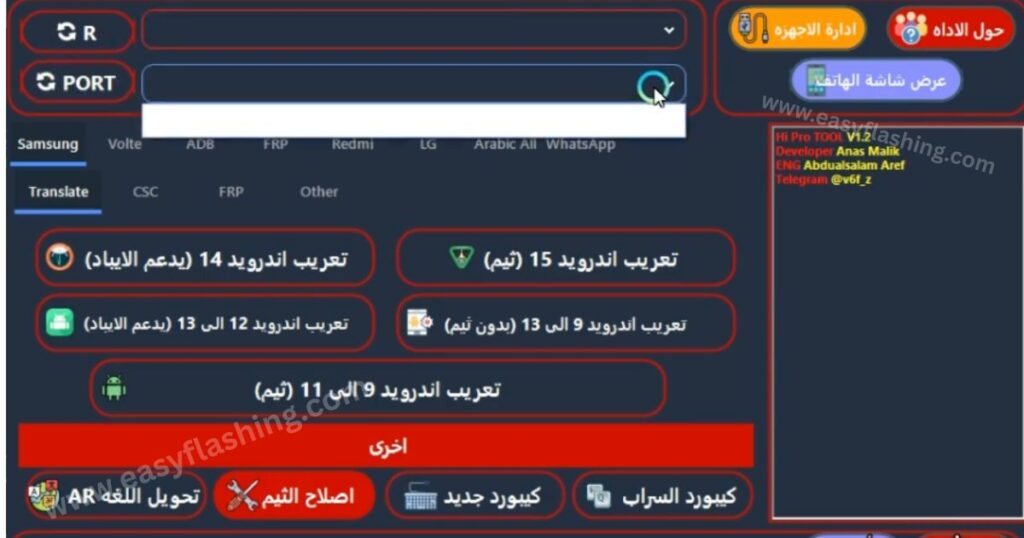
Hi Tool V1.2 Latest Version is a modern Android servicing and utility software designed to help users manage, repair, and customize Android smartphones with ease. It combines multiple technical features into one simple interface, making it suitable for both beginners and professional mobile technicians.
The latest version brings improved stability, wider device compatibility, and updated tools for modern Android versions. From FRP removal to VoLTE activation and system-level utilities, Hi Tool V1.2 offers everything in one place without complex commands.This guide explains the tool in simple Language, focusing on real use cases, clear explanations, and practical benefits.
What Is Hi Tool V1.2?
Hi Tool V1.2 is an all in one Android maintenance and servicing tool used to perform essential device level operations. It supports multiple Android brands and chipsets, helping users fix common problems without using separate tools.
It is commonly used for:
- Device unlocking
- Google account (FRP) removal
- Network and language configuration
- System diagnostics
- Android debugging and recovery tasks
The tool is designed to be lightweight, fast, and easy to use, even for beginners.
Why Hi Tool V1.2 Is Useful
Hi Tool V1.2 stands out because it simplifies advanced Android tasks that usually require technical expertise.
Key Benefits:
- Combines multiple tools into one platform
- Beginner friendly interface
- Supports newer Android versions
- Saves time during phone repair or setup
- Reduces the need for paid software
This makes it ideal for learning, troubleshooting, and professional mobile servicing.
Main Features of Hi Tool V1.2 Latest Version
Below is a detailed breakdown of the most important features, explained clearly for beginners.
1. FRP (Google Account) Removal
Factory Reset Protection (FRP) prevents unauthorized access after a phone reset. Hi Tool V1.2 helps bypass FRP on supported devices using safe and guided methods.
Benefits:
- Regain access to locked devices
- Helpful after forgotten Google account details
- Saves manual setup time
2. Samsung Language and CSC Tools
This feature allows users to modify regional and language settings on Samsung devices.
You can:
- Add or enable additional languages
- Change CSC settings for network compatibility
- Adjust regional features
Benefits:
- Better localization
- Improved carrier support
- Useful for imported devices
3. VoLTE and IMS Configuration
VoLTE (Voice over LTE) improves call quality on supported networks. Hi Tool V1.2 helps enable VoLTE and configure IMS settings where supported.
Benefits:
- Better call clarity
- Faster call connection
- Essential for modern networks
4. MTK and SPD Engineer Menu Access
Hi Tool V1.2 provides access to hidden engineering menus on MediaTek and Spreadtrum devices.
Benefits:
- Test hardware components
- Diagnose internal system issues
- Perform advanced system checks
This feature is especially useful for technicians.
5. ADB and Fastboot Utilities
ADB and Fastboot are powerful Android system tools. Hi Tool integrates them into a simple interface.
You can:
- Reboot devices
- Enable debugging options
- Perform resets
- Run basic system commands
Benefits:
- No command line knowledge needed
- Faster troubleshooting
- Safer system control
6. WhatsApp and App Management Tools
Hi Tool V1.2 includes options for managing applications such as WhatsApp.
You can:
- Backup and restore app data
- Reinstall apps safely
- Manage data during phone repair
Benefits:
- Prevent data loss
- Faster device recovery
7. Brand Specific Android Tools
Hi Tool V1.2 supports multiple Android brands with tailored features:
- Xiaomi / Redmi: Reset and account related utilities
- LG: Screen lock and network configuration tools
- ZTE: FRP and sideload options
This makes the tool flexible for mixed device environments.
System Requirements
Before installing Hi Tool V1.2, ensure your system meets these requirements:
- Windows operating system
- Minimum 4GB RAM
- USB drivers installed (ADB, MTK, Qualcomm)
- Reliable USB cable
- Basic storage space
Meeting these requirements ensures smooth performance.
How to Install and Use Hi Tool V1.2
Follow these beginner friendly steps:
- Download the Hi Tool V1.2 package
- Extract the files using any archive tool
- Install required USB drivers
- Run the tool as administrator
- Connect your Android device via USB
- Select the required function and follow on screen instructions
Always read instructions carefully before performing any operation.
Tips for Beginners
- Always back up important data
- Enable USB debugging when required
- Use the correct USB drivers
- Avoid interrupting operations
- Check device compatibility before advanced tasks
These tips help prevent errors and data loss.
Hi Tool V1.2 free Latest Version 2026
Free ( TOOL )
Trusted official Resource
For official Android security information, visit:
https://developer.android.com
(FAQs)
Is Hi Tool V1.2 free to use?
Yes, most features are available without paid activation.
Is Hi Tool V1.2 safe for beginners?
Yes, the interface is beginner friendly, but users should follow instructions carefully.
Does Hi Tool V1.2 work on all Android devices?
It supports many brands, but compatibility depends on model and Android version.
Can Hi Tool V1.2 remove FRP permanently?
FRP removal works on supported devices when used correctly.
What is the difference between ADB and Fastboot?
ADB works when Android is running, while Fastboot works in bootloader mode.


