
The MTK INJECTOR TOOL v4.0 is a powerful mobile utility designed for MediaTek (MTK) chipset devices. It helps users perform advanced software-level tasks that are normally difficult or impossible using standard phone settings. These tasks include unlocking, repairing, flashing, and servicing MTK-based smartphones safely and efficiently.
In recent years, MediaTek processors have become extremely popular in Android phones across all price ranges. Because of this growth, the demand for reliable MTK servicing tools has also increased. MTK INJECTOR TOOL v4.0 answers this demand by offering a stable, beginner-friendly, and feature-rich solution.
This article explains everything you need to know about MTK INJECTOR TOOL v4.0 latest version in simple English. Whether you are a beginner, a mobile technician, or a curious Android user, this guide will help you understand how the tool works, why it matters, and how to use it correctly.
What Is MTK INJECTOR TOOL v4.0?
MTK INJECTOR TOOL v4.0 is a Windows-based software that communicates directly with MediaTek-powered devices at a low level. It uses special boot modes and authorization methods to access protected phone functions.
Unlike basic flashing tools, this tool focuses on injection-based access, which allows it to bypass certain restrictions safely when used correctly.
Key Purpose of the Tool
- Access MTK devices in special boot modes
- Perform repair and maintenance tasks
- Help recover phones stuck in software issues
- Assist technicians with advanced servicing
The v4.0 version improves stability, compatibility, and ease of use compared to older releases.
Why MTK INJECTOR TOOL v4.0 Matters Today
Modern Android phones are more secure than ever. While this is good for users, it creates challenges when a device becomes locked, corrupted, or stuck after a failed update.
MTK INJECTOR TOOL v4.0 matters because it:
- Works with newer MediaTek security systems
- Reduces the risk of permanent device damage
- Simplifies complex technical processes
- Saves time during mobile repair tasks
For beginners, the tool offers clear options and structured steps, making advanced operations easier to understand.
Supported Devices and Chipsets
MTK INJECTOR TOOL v4.0 supports a wide range of MediaTek chipsets. Support depends on device security level, firmware version, and connection mode.
Commonly Supported MTK Chipsets
- MT6580 / MT6582 / MT6592
- MT6735 / MT6737 / MT6750
- MT6761 / MT6763 / MT6765
- MT6771 / MT6785
- MT6833 / MT6853
- MT6873 / MT6885
Device Compatibility Notes
- Works best with MTK-based Android phones
- Supports many budget and mid-range models
- Some newer devices may require updated loaders
- Results vary depending on firmware security
Always verify chipset details before using the tool.
Core Features of MTK INJECTOR TOOL v4.0
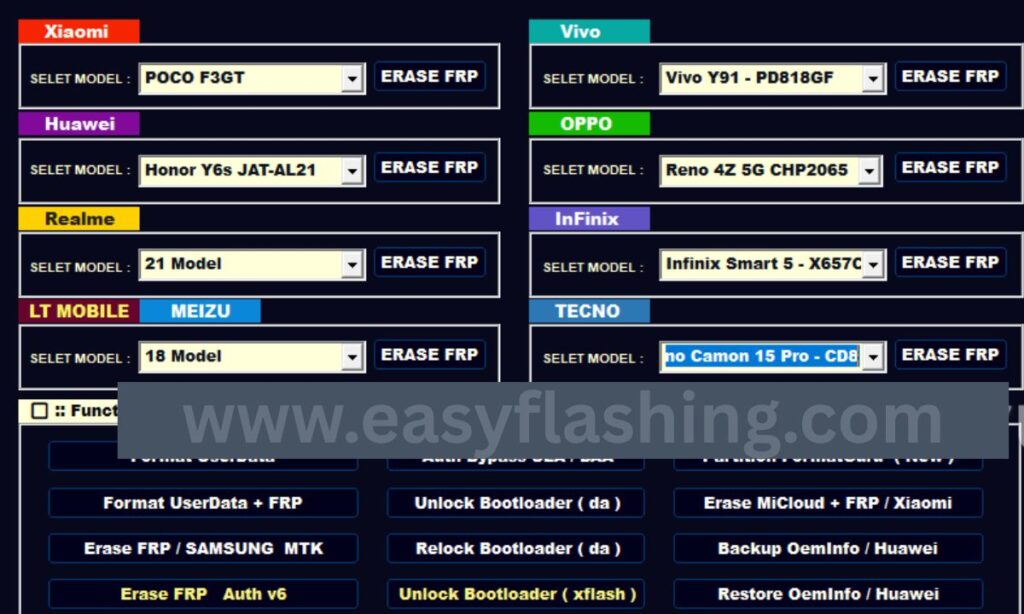
Below is a detailed listicle explaining the most important features of MTK INJECTOR TOOL v4.0, why they matter, and who they are best for.
1. Secure Boot Injection Support
What This Feature Does
This feature allows the tool to communicate with devices that have secure boot enabled. It injects a temporary method to access restricted functions without permanently altering the system.
Why It Matters
Modern MTK phones use secure boot to block unauthorized access. Injection support helps bypass this barrier safely during servicing.
Best For
- Mobile technicians
- Users repairing locked or bricked devices
- Devices stuck in boot protection
2. Preloader and Bootrom Mode Access
What This Feature Does
The tool can connect to phones in Preloader and Bootrom (BROM) modes. These modes allow deep-level communication even when Android does not start.
Why It Matters
If a phone does not power on properly, preloader and bootrom access can still allow recovery.
Best For
- Dead boot repair
- Software-corrupted devices
- Advanced troubleshooting
3. One-Click Unlock Functions
What This Feature Does
MTK INJECTOR TOOL v4.0 includes simplified unlock options such as:
- FRP reset
- User lock removal
- Pattern and PIN clearing
Why It Matters
Manual unlocking is complex and risky. One-click actions reduce errors and save time.
Best For
- Beginners
- Forgotten lock cases
- Second-hand device owners
4. FRP Reset for MTK Devices
What This Feature Does
This feature removes Google Factory Reset Protection after a reset, allowing users to set up the phone again.
Why It Matters
FRP lock is one of the most common issues after a factory reset.
Best For
- Users who forgot Google account details
- Technicians handling customer phones
5. Flashing Assistance and Partition Control
What This Feature Does
The tool helps manage partitions such as boot, recovery, and system with better control than standard flashing tools.
Why It Matters
Incorrect flashing can permanently damage a device. Controlled partition access reduces risk.
Best For
- Firmware repair
- Bootloop fixes
- Advanced software maintenance
6. Read and Write Device Information
What This Feature Does
MTK INJECTOR TOOL v4.0 can read important device data like:
- IMEI status
- Security state
- Chipset details
Why It Matters
Understanding device information helps avoid wrong operations.
Best For
- Diagnostics
- Device verification
- Professional repair work
7. Improved Compatibility with New Android Versions
What This Feature Does
Version 4.0 improves compatibility with newer Android releases and updated MTK security patches.
Why It Matters
Older tools often fail on updated phones. This version reduces compatibility issues.
Best For
- Modern Android users
- Technicians handling new devices
8. User-Friendly Interface for Beginners
What This Feature Does
The interface uses simple buttons, clear labels, and logical workflow.
Why It Matters
Complex tools discourage beginners. A clean interface reduces mistakes.
Best For
- New users
- Learning environments
- First-time MTK servicing
System Requirements
To run MTK INJECTOR TOOL v4.0, your computer should meet the following requirements:
- Windows 7, 8, 10, or 11 (64-bit recommended)
- Minimum 4GB RAM
- USB drivers for MediaTek devices installed
- Stable USB cable
- Administrator access
How MTK INJECTOR TOOL v4.0 Works (Simple Explanation)
The tool works by creating a communication bridge between your PC and the MTK chipset inside the phone.
Basic Workflow
- Phone connects in preloader or bootrom mode
- Tool detects chipset and security level
- Temporary injection method activates
- Selected operation executes safely
This process does not permanently modify hardware when used correctly.
Step-by-Step Usage Guide (Beginner-Friendly)
Step 1: Prepare the Device
- Charge the phone at least 50%
- Power off the device completely
- Install MTK USB drivers
Step 2: Launch the Tool
- Run MTK INJECTOR TOOL v4.0 as administrator
- Select the required function
Step 3: Connect the Phone
- Use a good-quality USB cable
- Follow on-screen connection instructions
Step 4: Execute the Task
- Wait for confirmation messages
- Do not disconnect during the process
Step 5: Reboot and Verify
- Restart the device
- Check if the operation succeeded
Common Mistakes Beginners Should Avoid
- Using incorrect chipset options
- Disconnecting the phone mid-process
- Ignoring driver installation
- Running the tool without admin rights
- Skipping device compatibility checks
Avoiding these mistakes increases success rate significantly.
Safety, Legal, and Ethical Use
MTK INJECTOR TOOL v4.0 should only be used on devices you own or have permission to repair.
Responsible Use Guidelines
- Do not bypass security on stolen devices
- Always respect local laws
- Use for recovery, repair, and learning
Following ethical practices builds trust and professionalism.
Performance Improvements in Version 4.0
Compared to earlier versions, v4.0 offers:
- Faster device detection
- Better error handling
- Reduced connection failures
- Improved success rate on secure devices
These improvements make it more reliable for daily use.
Who Should Use MTK INJECTOR TOOL v4.0?
This tool is ideal for:
- Beginners learning mobile repair
- Independent phone technicians
- Android enthusiasts
- Device recovery specialists
It is not recommended for users unwilling to follow instructions carefully.
MTK INJECTOR TOOL v4.0 Latest Free 2026

(Q&A)
What is MTK INJECTOR TOOL v4.0 used for?
MTK INJECTOR TOOL v4.0 is used to unlock, repair, and service MediaTek-based Android devices. It helps with FRP reset, boot repair, and accessing protected system areas.
Is MTK INJECTOR TOOL v4.0 safe for beginners?
Yes, it is beginner-friendly when used carefully. The interface is simple, and most functions are automated. Users should still follow instructions properly.
Does MTK INJECTOR TOOL v4.0 support new MTK phones?
It supports many new MediaTek devices, but success depends on chipset, Android version, and security patch level.
Can MTK INJECTOR TOOL v4.0 fix a dead phone?
In many cases, yes. If the phone can enter preloader or bootrom mode, the tool can help recover it.
Do I need internet access to use MTK INJECTOR TOOL v4.0?
Most functions work offline after setup. Some advanced features may require additional files prepared in advance.
Final Thoughts
The MTK INJECTOR TOOL v4.0 latest version is a reliable and powerful solution for MediaTek device servicing. It balances advanced capabilities with beginner-friendly design, making it suitable for both learning and professional use.
By understanding its features, limitations, and proper usage, users can safely handle common MTK software issues without unnecessary risk. With careful handling and ethical use, MTK INJECTOR TOOL v4.0 remains one of the most practical tools for modern MTK device management.


