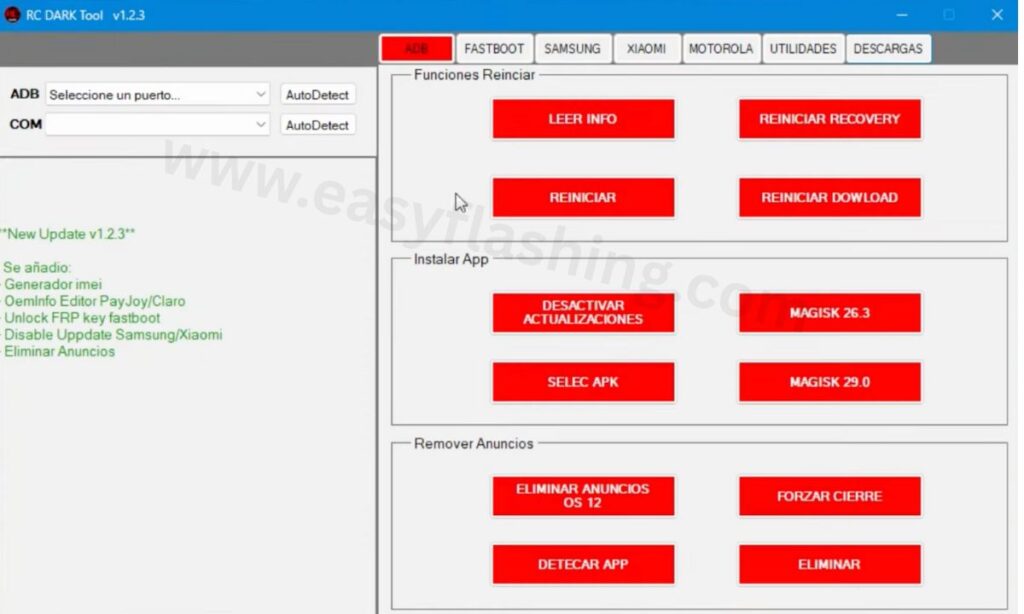
Within this article, I will try to Give you complete information about the RC Dark Tool Latest Version — specifically version v1.2.3, with a clear, professional, and beginner-friendly explanation of all its features, modules, and practical uses. Those who don’t know much about Android tools will find this guide both comprehensive and easy to follow.
What Is RC Dark Tool Latest Version?
The RC Dark Tool Latest Version (v1.2.3) is a Windows-based mobile servicing utility designed to help repair technicians, developers, and Android enthusiasts perform advanced tasks on mobile devices. It combines multiple Android management and repair functions into a single interface, reducing the need for multiple separated tools.
This tool is popular with mobile repair shops because it helps solve common problems like FRP lock, device info reading, disabling system updates, editing OEM info, and managing apps — all from one PC utility.
Why Beginners Should Care (Clear, Simple Explanation)
If you’re new to mobile repair or Android utility tools, RC Dark Tool Latest Version matters because:
- One application replaces many tools — you won’t need separate ADB, Fastboot, or IMEI tools.
- Login / Activation removed — no time wasted requesting credentials or waiting for approvals.
- AUTO-style modules simplify complex tasks like FRP unlock and IMEI generation.
- Beginner-friendly interface with tabs and labeled buttons for each major function.
In other words, even if you are just learning mobile servicing, this tool dramatically reduces manual command-line work.
What’s New in the Latest Version (v1.2.3)
The RC Dark Tool Latest Version build introduced several module upgrades and additions that improve performance and expand capabilities:
New or Enhanced Features
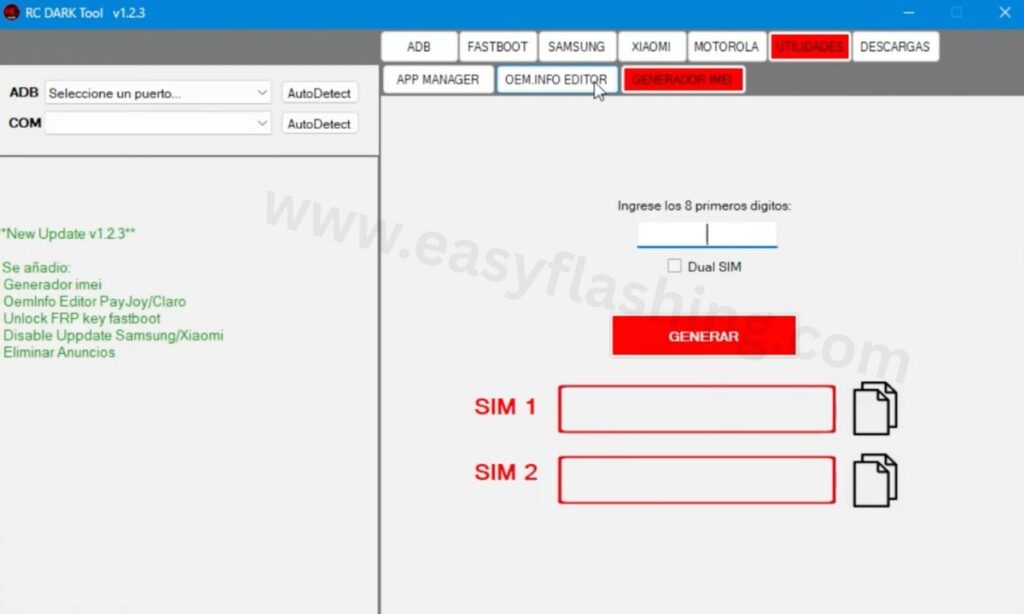
- IMEI Generator – produces valid IMEIs for testing and diagnostics (supports dual SIM).
- OEM Info Editor – lets you change certain OEM profile settings like PayJoy or Claro.
- FRP Key Unlock (Fastboot) – bypasses Factory Reset Protection quickly.
- Disable System Updates – works for Samsung & Xiaomi devices.
- Remove Ads – strips system ads on devices running Android 12+.
Not only are these features powerful, but they’re automated and accessible — meaning you can perform them without memorizing complex command lines.
System Requirements (Easy Reference)
To use the RC Dark Tool Latest Version, your Windows PC should meet these basic requirements:
- Operating System: Windows 7 / 8 / 10 / 11 (32-bit or 64-bit)
- RAM: Minimum 2 GB
- Software: .NET Framework 4.0 or higher
- Admin Access: Needed for full ADB & Fastboot control
This makes it compatible with most modern laptops, desktops, and service center PCs.
Core Modules Explained (Step-by-Step)
Here’s a beginner-friendly breakdown of each main tab/module in the Latest Version:
ADB Tab — Android Debug Bridge Mode
The ADB Tab allows communication with an Android device that has USB Debugging enabled.
Key Functions & What They Do:
- Read Device Info: Displays model, Android version, build number, serial number, battery level, and more.
- Reboot Options: Go into recovery, sideload, or Fastboot modes with a click.
- Disable Updates: Stops automatic OS updates.
- Install Magisk 26.3: Install the popular root manager.
- Remove Ads: Removes system ad frameworks on supported devices.
Why This Helps You:
This module turns what used to require multiple tools and manual commands into single-click actions.
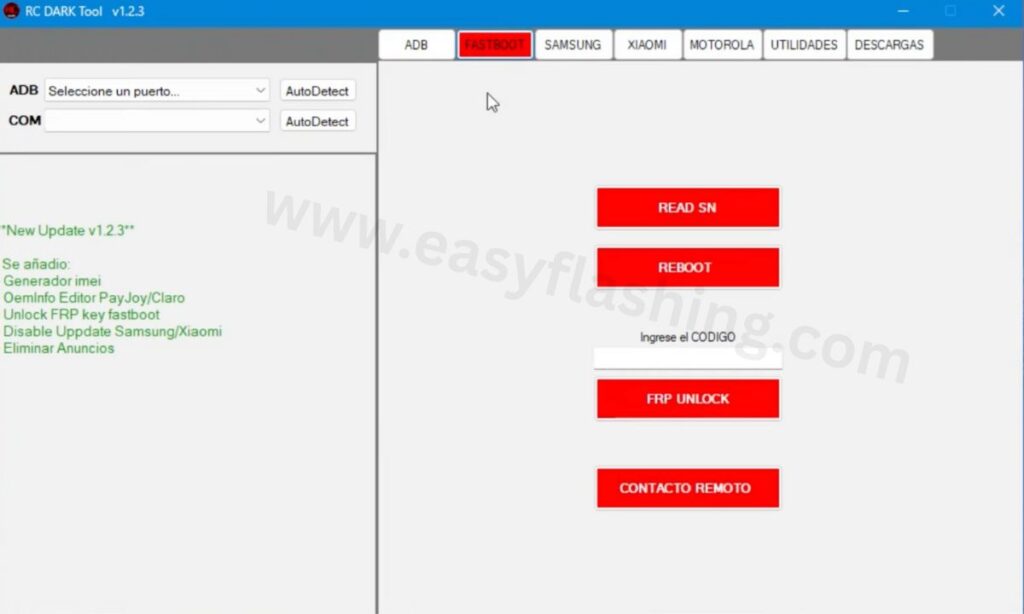
Fastboot Tab — Low-Level System Access
Fastboot is a special boot mode mostly used when the device is not fully booting or needs deeper interventions.
Core Features:
- Read Serial Number
- FRP Key Unlock — clears Google FRP locks with Fastboot.
- Quick Reboots
- Remote Contact Commands (advanced operations)
Practical Example:
You have a phone stuck at the Google FRP screen after a reset — this Fastboot unlock can clear that barrier and let you get back to setup.
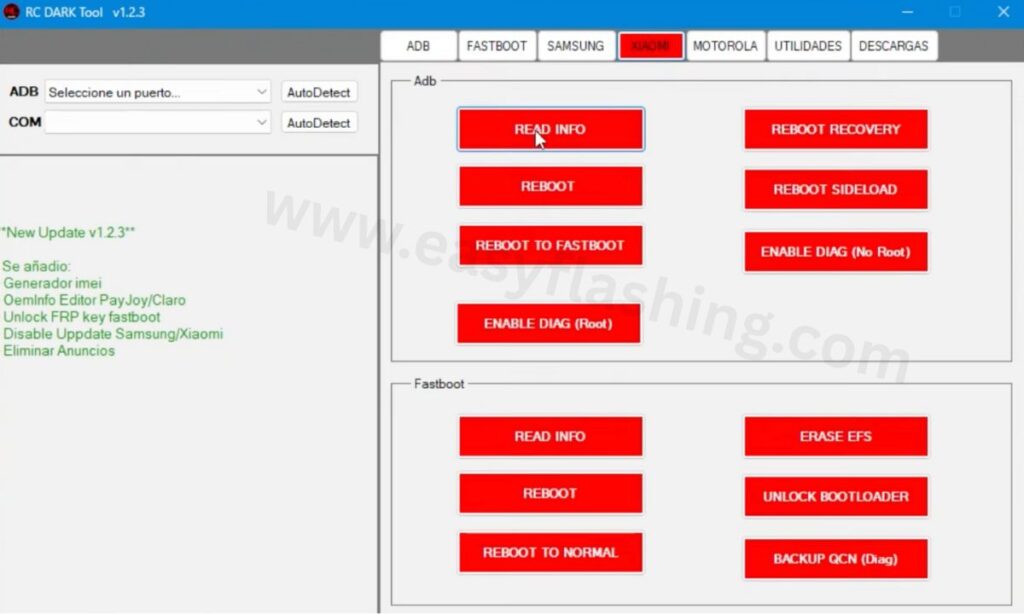
Xiaomi Tab — Brand-Specific Tools
This tab has specialized tools for Xiaomi models:
ADB Section
- Read info, reboot, enable DIAG (diagnostic mode) root/no-root
- Quick boots into various modes
Fastboot Section
- Erase EFS (network partition)
- Unlock bootloader
- Backup QCN (Qualcomm network configuration)
Benefit:
Xiaomi phones often require specific modes for Advanced tasks — this tab centralizes them.
Utilities Tab — App Management & More
The Utilities Tab handles installed apps:
- Detect Ports — connects your device for analysis
- List Apps — shows user and system apps
- Uninstall / Disable Apps — remove bloatware or unwanted programs
Note: Use this carefully — disabling system apps can affect core device behavior.
OEM Info Editor
This tool lets you edit OEM profile settings like PayJoy & Claro — often used for device branding and service-level configurations.
Example: Change an OEM locking profile to match a carrier requirement faster.
IMEI Generator
This function generates IMEI numbers for diagnostics and testing.
How It Works:
- Enter first 8 digits
- Check “Dual SIM” if needed
- Click “Generate” to produce SIM1 and SIM2 IMEIs
Important: Generating IMEIs should only be used for testing devices you own or are authorized to service. Altering real IMEIs can be illegal.
Installation Steps (Clear Walkthrough)
Here’s how to install RC Dark Tool Latest Version (v1.2.3) on your Windows PC:
- Download the setup archive (.zip/.rar) from a trusted source.
- Extract the contents using WinRAR or 7-Zip.
- Run the Installer and follow the onscreen steps.
- Apply Patch (optional/legal) — some versions remove login and activation delays.
- Launch the tool via desktop shortcut and connect your Android device.
Note: Always use legitimate and safe sources to avoid malware.
Pros & Cons (Beginner-Friendly Comparison)
Pros
- Lightweight and optimized for Windows.
- Combines multiple Android tools in one.
- No login hassles in patched versions.
- Friendly interface even for beginners.
Cons
- Windows-only — no macOS/Linux support.
- Some advanced features require technical understanding.
- Always verify legal and ethical use (especially IMEI tools).
RC DARK Tool v1.2.3 Tool solutions for Android Servicing
Ethical Use & Legal Notice
RC Dark Tool Latest Version is powerful — but you should always use it:
- On your own devices or with consent
- For legitimate testing or repairs
- Without altering real IMEIs illegally
Avoid unauthorized uses that can lead to legal issues. Supporting original developers helps sustain future updates.
RC Dark Tool Latest Version 2026
Tool (Free)
Password: 123
(Q&A)
Q1: Is RC Dark Tool Latest Version safe?
A: Yes, when downloaded from a trusted source and used responsibly, it’s a useful Android utility. Always scan with antivirus.
Q2: Do I need USB Debugging enabled?
A: Yes — for most ADB functions you must enable USB Debugging in developer options.
Q3: Can this tool fix all Android brands?
A: It supports many Android devices (Samsung, Xiaomi, and others). Some modules may have brand-specific workflows.
Q4: Does it work without a PC?
A: No — the tool runs only on Windows PCs.
Q5: Should I worry about malware?
A: Always use official or trustworthy sources — avoid unverified cracked downloads that may contain malware.
Trusted External Link (for Android ADB/Tools fundamentals):
Android ADB & Fastboot official guide:


