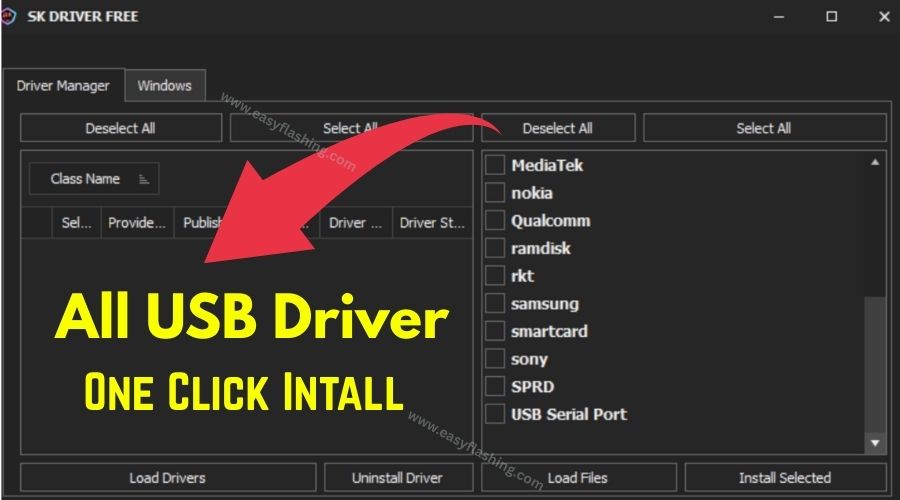
Inside this article, I will try to give you complete information about SK Driver Tool V1 — a one‑click solution for installing all mobile USB drivers on your Windows computer. Drivers are essential software that lets your PC recognize and communicate with your phone or tablet. Without the right drivers, your device may not connect properly, and tools for flashing firmware, file transfer, debugging, or unlocking won’t work.
SK Driver Tool V1 (Install all drivers in just one click) is designed to simplify this process by automatically installing, loading, or uninstalling essential drivers for most mobile devices — from Android ADB drivers to OEM USB drivers — without you needing to search for each one manually.
This beginner‑friendly guide Cover everything you need to know about the tool, how it works, and why it matters if you’re working with mobile devices on a PC.
1. Why You Need SK Driver Tool V1
What USB Drivers Actually Do
Mobile drivers allow your PC to talk to your phone. When a device is connected by USB, the driver acts as a translator between the device’s hardware and Windows. Without the correct driver:
- Your PC won’t recognize the device
- Tools like fastboot, ADB, or flashing software won’t work
- File transfers or debugging fails
Tools like SK Driver Tool help automate this process so everything installs correctly without manual driver searching.
Why Beginners Struggle Without All‑in‑One Drivers
Those who don’t know much about USB drivers often face errors such as:
- “Device not recognized”
- ADB or Fastboot not working
- Flashing tools showing errors because drivers are missing
SK Driver Tool stops these roadblocks by installing most drivers for you in one place.
2. Top Features of SK Driver Tool V1
All‑in‑One Driver Installation
This tool supports:
- ADB drivers for Android
- Qualcomm, MediaTek, and Spreadtrum USB drivers
- Samsung, HTC, Huawei, Nokia, Lenovo drivers
- Apple device drivers
- USB Serial Port and LibUSB drivers
These cover most popular mobile platforms and chipsets.
Benefit: No need to find separate drivers for every brand — SK Driver Tool handles them automatically.
One‑Click Install, Uninstall & Update
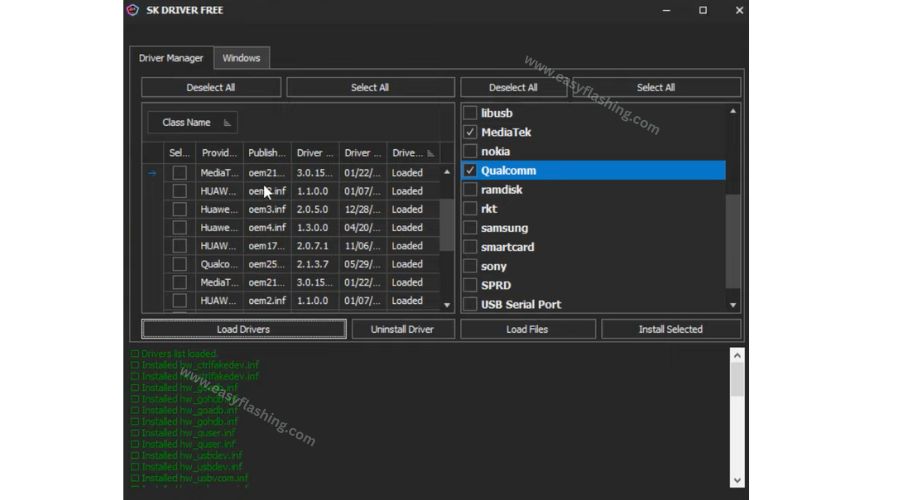
The tool’s interface provides options like:
- Load Drivers
- Install Selected / Select All
- Uninstall Old Drivers
Beginners can simply select all and click install for full driver coverage.
Benefit: Saves time and reduces confusion with manual driver problems.
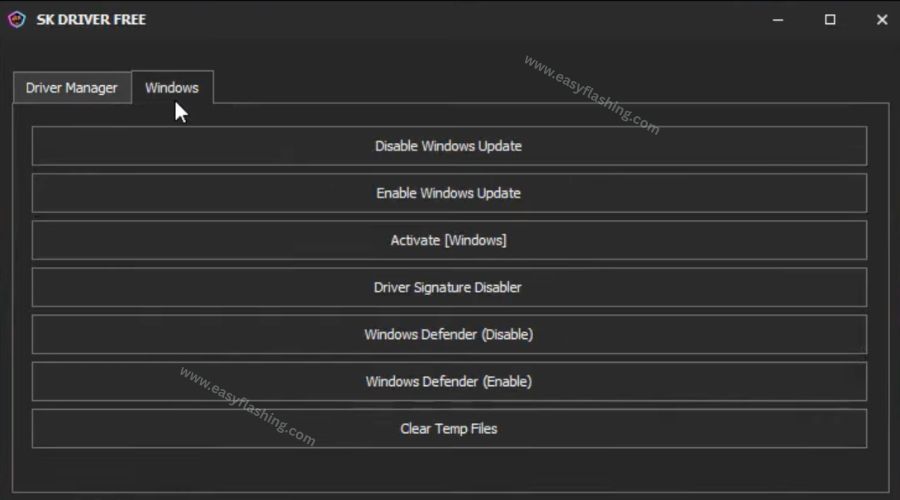
Built‑In Windows Tools Integration
SK Driver Tool includes optional options to:
- Disable/Enable Windows Update
- Disable driver signing (for unsigned drivers)
- Clear temp files
These options help avoid common driver installation errors on Windows systems.
Benefit: Forces driver installation when default Windows settings block it.
3. How to Download & Install SK Driver Tool V1
By reading this article, you will get clear steps on setting up the tool for everyday use.
Step‑by‑Step Guide
- Download the SK Driver Tool V1 archive from the trusted source.
- Extract the ZIP/RAR using WinRAR or 7‑Zip.
- Open the folder and run the tool as an administrator.
- On the main screen, choose drivers you need.
- Click “Install Selected” to begin automatic installation.
- Wait for the driver installation to complete.
- Connect your phone to check recognition.
Example: After installation, your Android device should appear in Device Manager with the appropriate interface (ADB, MTP, Fastboot).
Video Tutorial: How To Install SK Driver Tool
4. Common USB Driver Types Explained
ADB (Android Debug Bridge) Drivers
These allow communication between Windows and Android for:
- Debugging
- App installation
- Shell access
ADB drivers are essential for tools that operate via command line.
OEM and Chipset USB Drivers
Drivers vary by chip manufacturer:
- MediaTek (MTK) — supports SP Flash Tool and firmware flashing.
- Qualcomm — required for QPST, Edl mode utilities and more devices.
- Spreadtrum (SPRD) — enables SPD devices recognition.
Benefit: Automatically installing these prevents errors when using specific OEM tools.
5. Best Practices When Using SK Driver Tool V1
Use Official Driver Sources Whenever Possible
While SK Driver Tool aggregates drivers, using manufacturer sites like Samsung or Google USB drivers ensures authenticity and security. Official guides from Android Developers also explain how to install OEM USB drivers properly.
Backup Before Making System Changes
Installing or uninstalling drivers changes system configuration. Always create a Windows restore point before running bulk installers like SK Driver Tool.
Benefit: Revert easily if something doesn’t work as expected.
Use Trusted Software Only
Driver installers can contain unsigned drivers. Some antivirus programs may flag these tools. Always verify file integrity and source trustworthiness before installation to avoid malware.
6. Pros and Cons of Using SK Driver Tool V1
Pros
- Automatic & fast driver installation for multiple device types.
- Beginner‑friendly interface reduces technical barriers.
- Supports many OEM driver types in one place.
- Uninstall options help fix broken driver issues.
Cons
- Some drivers installed by the tool may be unsigned or trigger warnings.
- Windows default security settings may require modification.
- Not an official OEM package — exercise caution.
7. How SK Driver Tool V1 Helps Everyday Users
Faster Device Recognition
Whether you’re transferring files or flashing firmware, correct drivers reduce errors and allow tools to run properly.
Saves Time for Technicians
Instead of hunting for Qualcomm, MediaTek, or Samsung drivers individually, one installer covers everything.
Better Compatibility for Tools
Many advanced tools like unlockers, flash utilities, and debugging suites require all USB drivers to be installed and recognized by Windows properly. SK Driver Tool V1 simplifies this requirement.
SK Driver Tool V1 Latest Version 2026
Free (TOOL)

(Q&A)
Q1: What is SK Driver Tool V1 used for?
A1: SK Driver Tool V1 is used to install all necessary USB drivers for mobile devices on Windows with one click, including ADB and OEM drivers for Android and other smartphones.
Q2: Does SK Driver Tool install drivers automatically?
A2: Yes — it installs, loads, and can remove multiple drivers in one place, saving time and avoiding manual driver searches.
Q3: Can beginners use SK Driver Tool safely?
A3: Yes, it’s designed for beginners, but always download from trusted sources and follow safety practices when installing drivers.
Q4: What if Windows still doesn’t recognize my phone after installing drivers?
A4: Make sure USB debugging or appropriate mode (MTP/Fastboot) is enabled, reinstall drivers, and check Device Manager for driver status.
Q5: Are these drivers official?
A5: SK Driver Tool packages drivers for convenience; whenever possible, cross‑check with official OEM driver pages for authenticity.
Trusted Resource
For official guidance on installing USB drivers for Android development and device communication:
Android Developers – Install OEM USB Drivers Guide: (OEM USB DRIVER) (Android Developers)



2 thoughts on “SK Driver Tool — One Click USB Driver Installer”