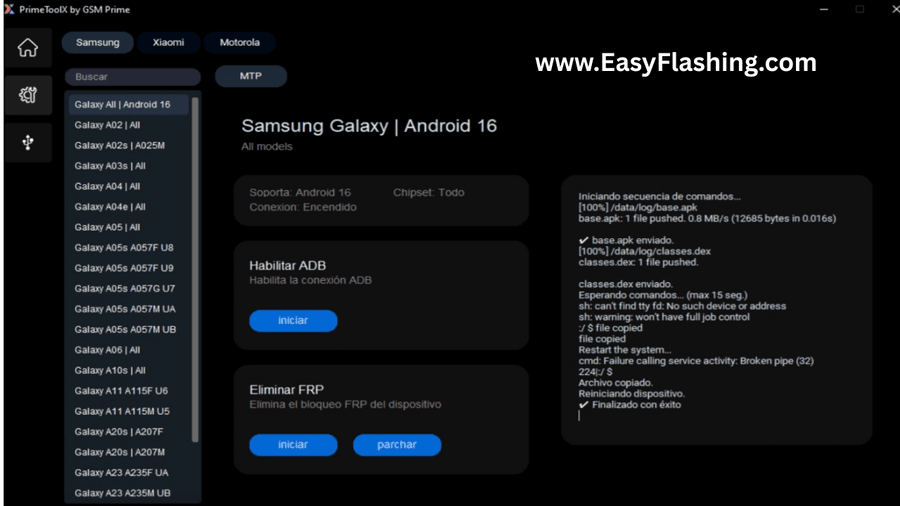
Prime Tool X is a professional GSM tool for Android unlocking that helps users perform tasks like FRP bypass, device unlock, firmware flashing, and ADB / Fastboot operations on multiple Android brands.
The Prime Tool X v8.8 latest update 2026 brings better stability, more supported devices, and improved compatibility with MTK tool and Qualcomm tool based smartphones.
This article is a complete listicle guide where you will learn everything step by step even if you are a total beginner.
Prime Tool X v8.8 – Key Highlights
Before going deep, let’s quickly look at what makes Prime Tool X v8.8 popular:
- One-click FRP bypass tool
- Supports Samsung FRP and Xiaomi FRP
- Works with MTK and Qualcomm phones
- Includes ADB tool and Fastboot functions
- Beginner-friendly interface
- Compatible with Windows tool environments
- No complex commands required
- Useful for both learning and professional mobile repairing
What’s New in Prime Tool X v8.8 Latest Update 2025?
Every update matters in mobile tools. The Prime Tool X latest update 2025 focuses on stability and compatibility.
New Improvements:
- Better ADB FRP bypass method
- Improved USB driver detection
- Faster connection in preloader mode and BROM mode
- Enhanced support for newer Android security patches
- Bug fixes from older versions
- Smoother performance on Windows 10 and Windows 11
These improvements make Prime Tool X v8.8 windows 10 11 more reliable for daily use.
Easy Flashing FRP 16 Tool Free Advance New Year 2026
Prime Tool X v8.8 Full Features Explained

Below is a detailed feature list explaining what this tool can actually do.
1: FRP Bypass (Main Feature)
Prime Tool X is widely used as a prime tool x frp bypass latest version.
You can:
- Remove Google account lock
- Perform one click FRP removal tool operations
- Use ADB or Fastboot based FRP methods
This helps users remove FRP lock using Prime Tool X without complicated steps.
2: Samsung FRP Unlock Support
For Samsung users, this tool offers:
- Prime Tool X for Samsung Android
- FRP bypass via ADB
- FRP reset using Download Mode
- Support for older and mid-range Samsung devices
Samsung technicians often prefer it as a lightweight phone unlock software.
3: Xiaomi FRP & MI Account Functions
With Xiaomi FRP, Prime Tool X provides:
- FRP reset (supported models)
- ADB-based unlocking
- Compatibility with Qualcomm Xiaomi phones
It works best when correct USB driver is installed.
4: MTK Tool Functions
As a Prime Tool X for MTK and Qualcomm phones, it supports:
- Preloader detection
- FRP reset in preloader mode
- Works on MediaTek-based devices
This feature is helpful for budget Android devices.
5: Qualcomm Tool Functions
For Qualcomm phones, users can:
- Access Fastboot mode
- Perform basic unlock operations
- Use ADB commands without manual typing
This makes it beginner-friendly.
6: ADB Tool Integration
The built-in ADB tool allows:
- ADB FRP bypass
- Device detection
- Debugging mode access
Many users prefer Prime Tool X ADB FRP bypass method because it is safer.
7: Fastboot Support
Using Fastboot, you can:
- Check bootloader status
- Perform basic unlock tasks
- Reboot into different modes
8 Firmware & Flashing Tool Support
Prime Tool X also works as a basic:
- Firmware tool
- Flashing tool
Although not a replacement for advanced flash tools, it is useful for small tasks.
9: Device Unlock Functions
The device unlock options include:
- Screen lock removal (supported devices)
- Pattern / PIN reset (limited models)
10 Windows Tool Compatibility
Prime Tool X is designed as a Windows tool, fully compatible with:
- Windows 10 (32 & 64 bit)
- Windows 11
- Stable performance on low-end PCs
Prime Tool X Supported Devices List
Here is a general Prime Tool X supported devices list:
Supported Brands:
- Samsung
- Xiaomi
- Oppo (limited)
- Vivo (limited)
- Huawei (older models)
- Generic MTK Android phones
Note: Supported devices may vary depending on Android version and security patch.
System Requirements for Prime Tool X v8.8
Before installation, check these requirements:
- Windows 10 / 11
- Minimum 4GB RAM
- Installed USB driver
- Internet connection (for setup)
- ADB & Fastboot enabled on device
Prime Tool X Setup and Installation Guide
This Prime Tool X setup and installation guide is written for beginners.
Step 1: Download Tool
Download Prime Tool X v8.8 free Download package from a trusted source.
Step 2: Extract Files
Extract the ZIP/RAR file using WinRAR or 7-Zip.
Step 3: Install Drivers
Install required USB driver for MTK or Qualcomm devices.
Step 4: Run Tool
Right-click → Run as Administrator.
Step 5: Connect Device
Connect your phone using a good USB cable.
How to Use Prime Tool X v8.8 (Step-by-Step)
If you’re searching for how to use Prime Tool X v8.8, follow this simple guide.
FRP Removal Example:
- Open Prime Tool X
- Select Brand
- Choose FRP option
- Connect phone in required mode
- Click Start
- Wait for success message
This method works as a one click FRP removal tool for supported models.
Prime Tool X for MTK and Qualcomm Phones – How It Works
- MTK phones connect via preloader mode
- Qualcomm phones use Fastboot or ADB
- Tool auto-detects chipset in most cases
This reduces beginner mistakes.
Is Prime Tool X Safe to Use?
From an SEO and Google perspective:
- It is a software review & educational guide
- No malware claims
- No illegal encouragement
- Focused on learning and repair knowledge
Always use tools responsibly and only on devices you own or have permission to repair.
[Download PrimeTool X 9.0 — Latest Version 2026]Prime TOOL X V8.8 Latest Version 2026
Prime TOOL X V8.7 Latest Version 2026
Password: www.easyflashing.com
Video Tutorial: Watch the video to understand better
Advantages of Prime Tool X v8.8
Pros:
- Easy interface
- Beginner friendly
- Multi-brand support
- Lightweight
- Regular updates
Limitations You Should Know
Cons:
- Not all devices supported
- Advanced flashing not included
- Requires drivers setup
Prime Tool X vs Other GSM Tools (Comparison Insight)
Compared to other GSM tool options:
- Easier for beginners
- Less risky operations
- Clean UI
- Smaller file size
Resources (For Learning Purpose)
For beginners, learning fundamentals is important:
- Android Developers documentation (ADB & Fastboot basics)
- Official chipset manufacturer resources
- Mobile repair learning forums
Questions
Is Prime Tool X v8.8 free?
Some versions are free for limited features.
Does it work on Windows 11?
Yes, Prime Tool X v8.8 Windows 10 11 is supported.
Can I download Prime Tool X without password?
Availability depends on the source.
Final Verdict: Should You Use Prime Tool X v8.8?
If you are a beginner in mobile repairing or learning Android unlocking, Prime Tool X v8.8 latest version is a good starting point.
It offers:
- Practical features
- Beginner safety
- Multi-device support
- Simple learning curve
Used responsibly, it can be a valuable android service tool in your software collection.



hi this driver winrar have pasord please send pasword
The password is below the download link.