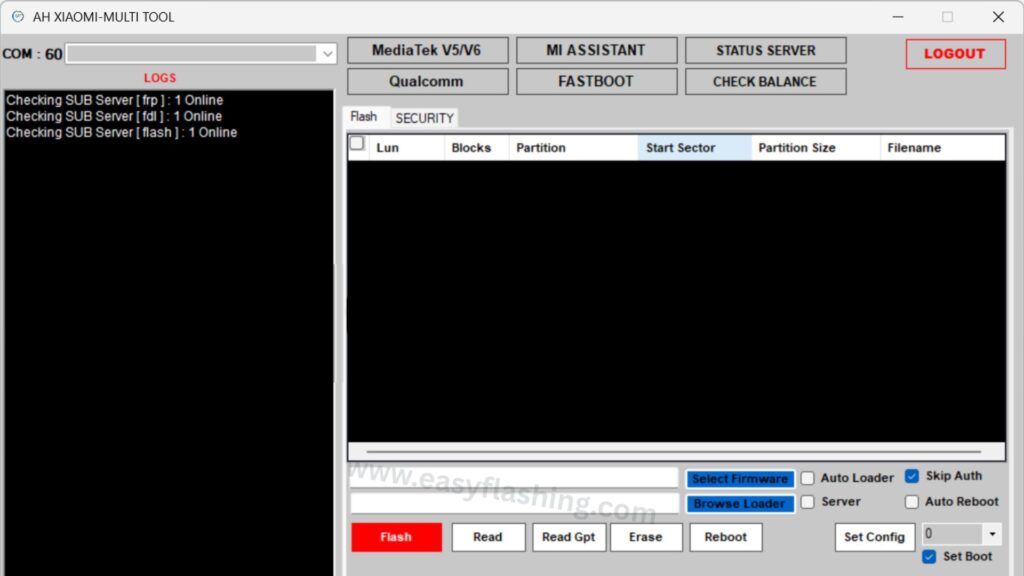
Smartphones from Xiaomi, Redmi, and POCO are hugely popular worldwide is but unlocking, flashing, and repairing them can be confusing for beginners. In this article, you to explore the AH-Xiaomi Tool is a powerful utility designed to assist with unlocking, flashing firmware, removing locks, and more — in a simple, professional, and beginner-friendly way.
What Is AH-Xiaomi Tool?
AH-Xiaomi Tool — sometimes called AH-Xiaomi Multi Tool — is a mobile utility software used for performing advanced operations on Xiaomi and other Android devices, a multi-function mobile servicing tool designed for Xiaomi devices.
In short, AH-Xiaomi Tool lets you:
- Remove locks (FRP & Mi Cloud)
- Repair network and IMEI issues
- Unlock the bootloader
- Flash firmware
- Perform factory resets — all from your computer.
How AH-Xiaomi Tool Works
AH-Xiaomi Tool communicates with your phone through modes like Fastboot, EDL (Emergency Download Mode), and Mi Assistant Mode. Each mode is a different way your computer talks to the phone to perform specific tasks:
Fastboot Mode
A protocol used to flash firmware, unlock bootloader, or change partitions from a PC.
EDL Mode
Emergency mode mainly used when the phone is bricked or won’t start.
Mi Assistant Mode
An easier connection method, often used for certain resets and lock removals.
Top Features of AH-Xiaomi Tool
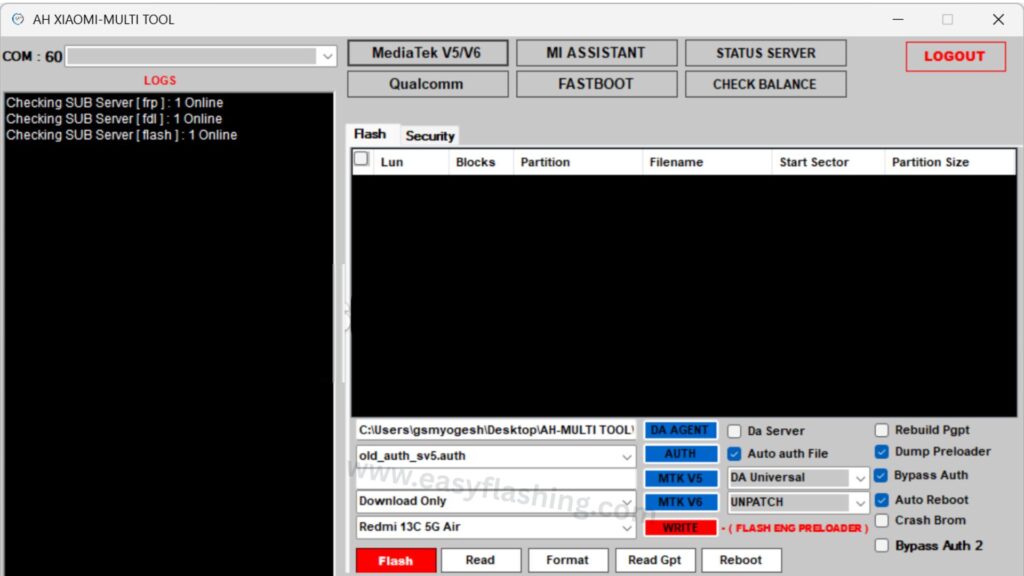
Here’s a breakdown of the most useful features you’ll find in AH-Xiaomi Tool. Each feature includes what it does and why it matters.
Flashing Firmware (MTK & Qualcomm)
What It Does:
Installs or rewrites your phone’s operating system (ROM) — useful when the device is stuck or needs a fresh system.
Why It Helps:
- Fixes boot loops
- Upgrades or downgrades Android versions
- Resolves system crashes
Example:
Your Redmi phone won’t start after a bad update — flashing correct firmware restores it.
Auth & Security Bypass (Google FRP & Locks)
What It Does:
Removes Factory Reset Protection (FRP) and Mi Cloud account locks.
Why It Helps:
- Useful when selling or buying a second-hand phone
- Helps regain access after a reset
Example:
You reset your Xiaomi but forgot your Mi account, this feature helps bypass that lock.
Bootloader Unlock & Relock
What It Does:
Unlocks your device’s bootloader to allow custom software and advanced modifications.
Why It Helps:
- Allows installation of custom ROMs
- Enables root access
- Supports advanced technical tuning
Example:
You want to install a custom Recovery — first, you unlock bootloader through the tool.
EFS/NV Repair & Backup
What It Does:
Manages critical network and IMEI data on your phone.
Why It Helps:
- Recover lost network signal
- Fix IMEI issues that prevent calls or data
Example:
Phone loses service after firmware change — EFS repair restores network data.
Mode Switching (Fastboot ↔ EDL)
What It Does:
Seamlessly switches between modes to carry out the correct type of repair.
Why It Helps:
Essential when normal Fastboot commands won’t work — EDL mode takes over.
Auto Loader & Server Status Features
What It Does:
Checks if certain services (like FRP or flash servers) are currently reachable.
Why It Helps:
Avoids failed operations due to connection issues.
Step-by-Step Example: Using AH-Xiaomi Tool
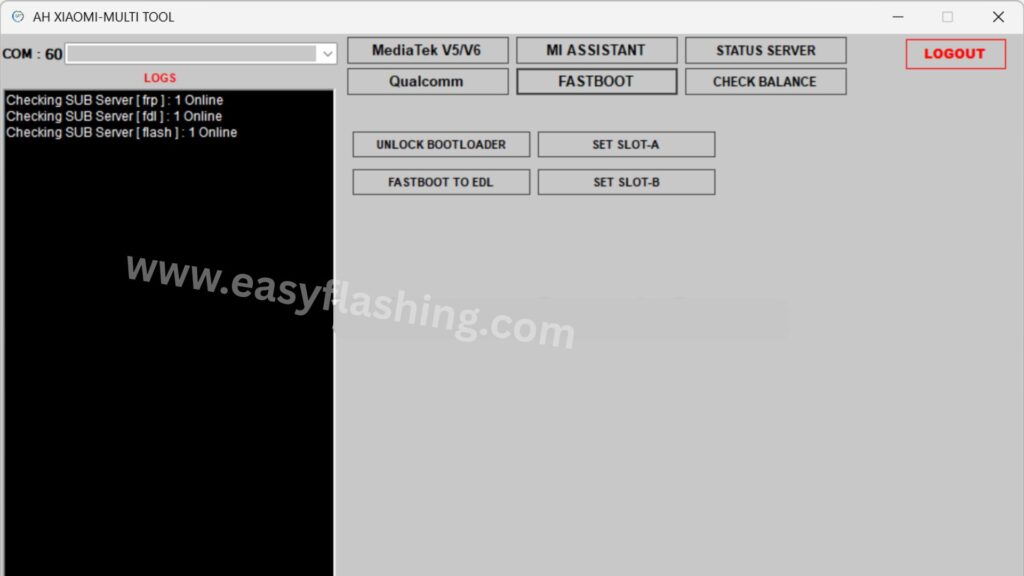
Here’s a real-world example of how you might use the tool:
Step 1: Connect Your Device
- Enable Developer Options on your phone
- Turn on USB Debugging
- Connect to your PC with a USB cable
Step 2: Launch AH-Xiaomi Tool
- Run the tool as Administrator
- Allow any driver installs if prompted
Step 3: Select Your Function
- Choose Unlock Bootloader or FRP Reset
- Follow on-screen prompts
Step 4: Wait & Reboot
- The phone will reboot when done
- Check functionality after restart
This example assumes you have proper drivers installed on PC.
Benefits for Beginners & Everyday Users
Here’s why AH-Xiaomi Tool is helpful even for beginners:
- All-in-One Solution: You don’t need multiple tools to do flashing, unlocking, and repairing.
- Time Saver: Auto options and simple menus make complex tasks quicker.
- Versatile: Works with multiple chipsets (MediaTek, Qualcomm).
- Cost-Effective: Free tools like AH-Xiaomi Tool can replace expensive hardware boxes.
Risks & Safety Tips (Important for Beginners)
Using advanced tools can be risky without knowledge. Here’s how to stay safe:
Always Back Up First
Before flashing or unlocking, save your data — most operations erase data.
Use Correct Firmware
Wrong firmware can brick your phone — same as official tools like Mi Flash Tool, which relies on correct fastboot files.
Bootloader Unlocking Erases Data
Official bootloader unlock tools (like Mi Unlock) wipe all user data — AH-Xiaomi Tool will do same.
Beware of Logins and Bypass Tricks
Some versions of AH-Xiaomi Tool may use login bypass methods that aren’t officially supported — use at your own risk.
AH-Xiaomi Tool Latest Version 2026
(Tool)

Alternatives Worth Knowing
While AH-Xiaomi Tool is powerful, there are other trusted tools you might encounter:
Mi Flash Tool
Official firmware flashing tool from Xiaomi — best for safe firmware installs.
Mi Unlock Tool
Official bootloader unlock utility, required for unlocking many devices before custom operations.
Android Auth Tool / Xiaomi Repair Tools
Other third-party suites with advanced features similar to AH-Xiaomi.
Asked Questions
Q1: Is AH-Xiaomi Tool safe to use?
A: The tool can perform powerful operations, but safety depends on correct usage and compatible firmware. Always back up data before using it.
Q2: Do I need to unlock bootloader first?
A: Yes, unlocking the bootloader (with Mi Unlock Tool) is required for many operations like flashing custom ROMs.
Q3: Does AH-Xiaomi Tool work for all Xiaomi models?
A: It supports many devices, especially older and mainstream Redmi/Xiaomi phones — but compatibility varies by version.
Q4: Will it fix FRP without data loss?
A: Generally resetting FRP will erase data — backup first.
Q5: Where can I find official Xiaomi firmware?
A: Trusted sources include Xiaomi’s official site or community ROM repositories used by tools like Mi Flash.
Trusted External Link:
For official Xiaomi flashing guidance, see Mi Flash Tool – Official Firmware Flashing Utility from the Xiaomi community.
By reading this article, You now have a clear understanding of AH-Xiaomi Tool — what it can do, how it works, and how to use it safely. Remember: practice caution and always back up data before advanced operations.



2 thoughts on “AH-Xiaomi Tool (Unlocking, Flashing, and Repairing Xiaomi Phones)”