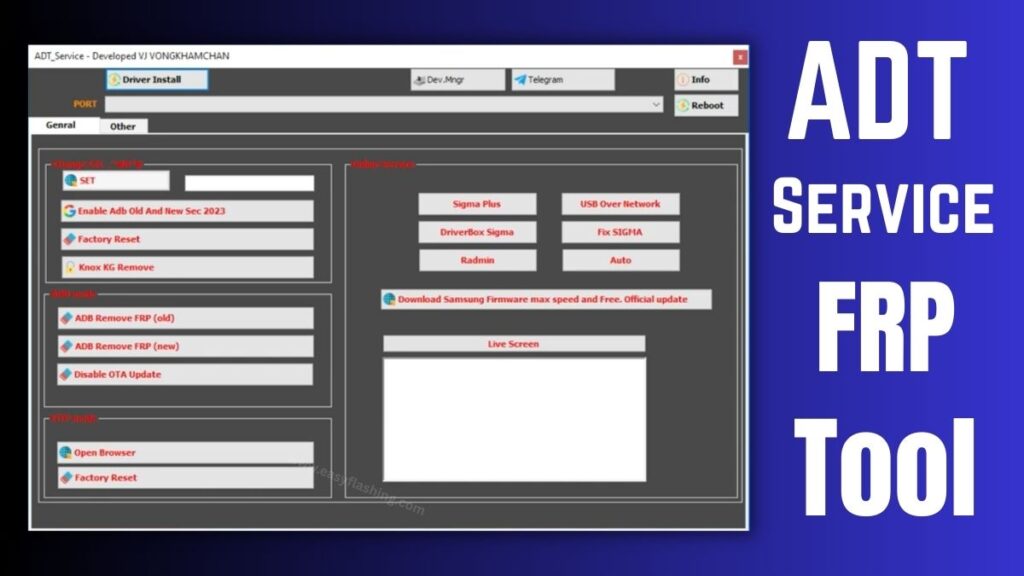
ADT Service Frp Tool has become one of the most talked-about utilities in the Android repair and device maintenance space. Those who work with smartphones or want to understand how Factory Reset Protection (FRP) solutions function often come across this tool.
I will tell you today how the tool works, what features it offers, and why beginners and technicians alike discuss it so frequently. Within this article, I will try to explain every concept in simple language so those who don’t know much about mobile repair can still follow along easily.
By reading this article, I will try to give you complete information about its capabilities, supported functions, and practical benefits while keeping the explanation clear, accurate, and trustworthy.
What Is ADT Service Frp Tool?
ADT Service Frp Tool is a Windows-based Android service utility designed to assist with device maintenance tasks such as FRP bypass, device communication via ADB mode, and system-level troubleshooting.
Key Concept Explained
- Factory Reset Protection (FRP): A security feature introduced by Google that prevents unauthorized access after a reset.
- The tool interacts with Android devices using communication protocols like ADB (Android Debug Bridge) and MTP mode.
Practical Benefit
For technicians and learners, it helps demonstrate how device security layers and system communication operate in real scenarios.
Why the Tool Is Popular Among Beginners
Many guides online assume prior technical knowledge. This tool, however, appears frequently in tutorials because it groups several maintenance functions into one interface.
Reasons for Popularity
- Beginner-friendly interface
- Multiple repair utilities in one place
- Works with many models, especially devices from Samsung
- Helps users understand FRP and system modes practically
Example
Someone learning mobile servicing can use it to explore how download mode, reboot options, and driver installation work together.
Core Features Explained
FRP Bypass Functions
The primary focus revolves around interacting with Google account protection layers after a reset.
Benefits
- Demonstrates how security mechanisms trigger
- Helps technicians test device behavior
- Useful in controlled repair environments
ADB Enable and Commands
The tool uses ADB commands to communicate with devices.
What this means
ADB acts as a bridge between a computer and an Android device, allowing actions such as:
- Opening device shell
- Rebooting the system
- Checking connection status
Practical Example
A learner can see how enabling USB debugging changes device access levels.
MTP Mode Utilities
MTP (Media Transfer Protocol) enables file and system interaction.
Benefits
- Allows browser access on certain devices
- Demonstrates file-level communication
- Helps understand data transfer layers
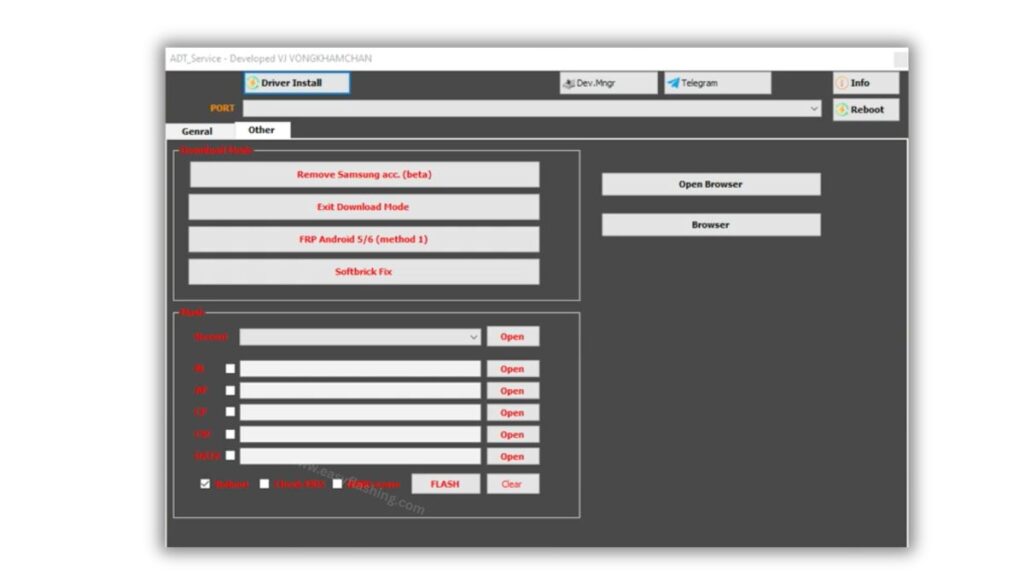
Firmware and Flashing Support
Some versions include options related to firmware operations.
Key Concepts
- BL, AP, CP, CSC file structure
- Device software restoration
- System partition understanding
Device Maintenance Tools
Additional utilities may include:
- Reboot to download mode
- Softbrick troubleshooting
- Driver installation assistance
These functions help beginners learn how different boot modes operate.
Supported Technical Concepts You Should Understand
ADB Mode
A command-line environment that enables system-level control. It requires enabling USB debugging.
Download Mode
A special boot state used for firmware installation and system repair.
Security Patch Levels
Android devices include security updates that may affect how system utilities interact with them.
Understanding these terms helps you interpret tutorials and repair guides more effectively.
How ADT Service Frp Tool Fits Into the Android Ecosystem
Android devices operate on layered security. Tools like this appear in educational and servicing contexts because they illustrate:
- Device authentication flows
- System communication protocols
- Firmware structure
- Security enforcement mechanisms
For deeper technical documentation, you can explore the official Android developer resources:
Trusted Resource:https://developer.android.com
Step-by-Step Overview
(Educational overview for understanding process flow)
- Install required USB drivers
- Connect device via USB
- Enable appropriate mode (ADB or MTP)
- Select desired function
- Execute command
- Reboot and verify
Why This Matters
This workflow helps beginners understand how software tools communicate with hardware step by step.
Advantages of Learning Through Tools Like This
Practical Understanding
Reading theory differs from seeing how commands affect a device in real time.
Skill Development
Users learn:
- Troubleshooting logic
- Device communication
- Firmware structure basics
Career Relevance
Mobile servicing remains a global industry, and understanding tools improves foundational knowledge.
Limitations and Considerations
No tool replaces proper technical training. Users should keep in mind:
- Device compatibility varies
- Security updates may change behavior
- Understanding system risks is essential
Important Perspective
Tools should always be used responsibly and in legitimate repair or learning scenarios.
Tips for Beginners Getting Started
If you are exploring Android servicing:
- Start by learning basic Android architecture
- Understand boot modes and security layers
- Practice with test devices
- Read official documentation alongside tutorials
You to focus on learning the concepts first rather than memorizing steps.
Future Trends in Android Service Tools
The mobile repair ecosystem evolves quickly. Trends include:
- Increased security hardening
- Cloud-based diagnostics
- AI-assisted troubleshooting
- Greater emphasis on authorized repair channels
Understanding tools like this today helps learners adapt to future technologies.
Video Tutorial: How To Install ADT Service Frp Tool
ADT Service Frp Tool Without Box 2026
( TOOL )
Password: easyflashing.com
(Q&A)
1. What is ADT Service Frp Tool used for?
It is mainly used in educational and servicing contexts to interact with Android devices, demonstrate FRP behavior, and perform maintenance-related functions.
2. Does it work on all Android devices?
Compatibility depends on the device model, chipset, and security patch level. Many tutorials focus on Samsung devices.
3. Is technical knowledge required to use it?
Basic understanding of Android modes, drivers, and USB debugging helps beginners use it more effectively.
4. What does FRP mean in Android?
FRP stands for Factory Reset Protection, a security feature that prevents unauthorized access after a device reset.
5. Where can I learn more about Android system tools?
Official Android developer documentation and mobile repair training resources provide reliable foundational knowledge.
Conclusion
ADT Service Frp Tool remains widely discussed because it brings several Android service functions into a single environment. Within this article, I tried to explain not only what the tool does but also the broader concepts behind it so beginners can build real understanding.
By reading this article, you now have a clearer picture of FRP, device communication modes, and how service utilities fit into the Android ecosystem. As you continue learning, focusing on fundamentals will help you adapt to any tool or workflow in the future.


