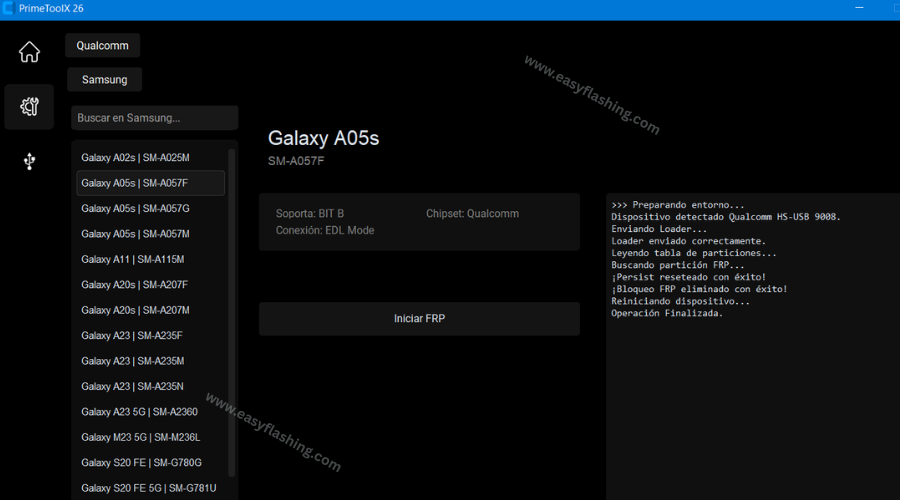
Prime ToolX V26 is the most powerful version of this free Android repair and FRP bypass tool yet, and this guide covers everything you need to download, install, and use it correctly. Whether you own a Samsung, Xiaomi, or Motorola device locked by Factory Reset Protection after a reset, V26 offers a professional-grade solution built specifically for 2026 security patches and Android 16.
Within this article, you will find the complete feature breakdown, full supported device list, step-by-step installation guide, and answers to the most common questions users ask. By reading this article, you will understand exactly what makes V26 different from older versions and how to use it without making costly mistakes. Those who are new to this topic will also find a clear explanation of what FRP is and why removing it legitimately is sometimes necessary.
What Is Prime ToolX V26?
Prime ToolX V26 is a free Windows-based desktop utility developed by GSM Prime for removing Factory Reset Protection locks on Android smartphones. FRP is a Google security feature that activates after a device is reset outside of the standard settings menu. [what Factory Reset Protection is and how it works] Once triggered, FRP prevents anyone from setting up the device without entering the original Google account credentials.
This creates a genuine problem for people who have forgotten their account password, purchased a second-hand phone still locked to a previous owner, or need to recycle a company device. Prime ToolX V26 addresses those situations by communicating with the phone at a hardware level, specifically through Preloader mode, Brom mode, and Qualcomm EDL mode, to clear the FRP lock without needing the original credentials.
V26 vs Earlier Versions: What Changed?
V26 is a complete professional rebuild of the earlier V9 series. The differences are significant:
- New design: Redesigned interface with a cleaner dashboard and PRO-grade layout
- Advanced mode: Added a dedicated advanced control panel for power users
- Qualcomm CPU support: Full EDL (Emergency Download Mode) support via Qualcomm HS-USB QDLoader 9008 port, with no Zadig tool required for newer Qualcomm models
- Android 16 compatibility: Full FRP removal support for all Samsung devices running the latest Android 16
- ADB Enable feature: One-click ADB activation added for supported Samsung models
- Expanded device coverage: New Samsung Galaxy high-tier models, POCO, OPPO, Realme, Google Pixel, OnePlus, and Infinix added to the supported list
- Faster processing: Rebuilt codebase removes the Community tab for a lighter, faster application
Key Features of Prime ToolX V26
Prime ToolX V26 is not a single-function tool. Here is what it can do:
- One-click FRP removal for Samsung, Xiaomi/Redmi, Motorola, POCO, OnePlus, OPPO, Realme, Infinix, Google Pixel, and Honor devices
- FRP bypass via EDL cable (Qualcomm Snapdragon CPU) without needing to open the phone from the back or use test points
- FRP bypass in Preloader and Brom mode (MediaTek CPU) for deep hardware-level access
- ADB Enable — one-click ADB activation for supported Samsung Galaxy models
- Patch Device — finalizes FRP removal and stabilizes ADB session post-unlock
- Bundled driver installation for MediaTek, UsbDk, Qualcomm 9008, and Zadig — all included in the setup package
- Free license — no activation fee, dongle, or subscription required
The tool handles the driver installation process inside its own interface. You do not need to search for driver packages on third-party sites.
[Enable ADB Failed, Solve Samsung Mobile Problem]Supported Devices and Android Versions
Prime ToolX V26 supports a broad range of Android brands. Below is the full confirmed device list based on the latest update.
Samsung Galaxy (Qualcomm and MediaTek)
| Model | Variant / Bit Support |
| Galaxy All models | Android 16 (Full support) |
| Galaxy A02 | All variants — Full Bit |
| Galaxy A02s | A025M — Bit 9 |
| Galaxy A03s | All variants — Full Bit |
| Galaxy A04 / A04e | All variants — Full Bit |
| Galaxy A05 | All variants — Full Bit |
| Galaxy A05s | A057F (U8/U9), A057G (U7), A057M (UA/UB/UC) |
| Galaxy A06 | All variants — Full Bit |
| Galaxy A10s | All variants — Full Bit |
| Galaxy A11 | A115F (U6), A115M (U5) |
| Galaxy A20s | A207F (Bit 5), A207M (Bit 4) |
| Galaxy A23 | A235F (UA), A235M (UB/UC/UD), A235N (U9) |
| Galaxy A32 | All variants — Full Bit |
| Galaxy S20 FE | G780G — Bit UH |
| Galaxy S24 Ultra | Confirmed (V26 official site) |
| Galaxy S23 FE | Confirmed |
| Galaxy A55 5G / A35 5G | Confirmed |
| Galaxy Z Fold 5 | Confirmed |
| Galaxy Tab S9 | Confirmed |
Xiaomi / Redmi / POCO
| Model | Android Version |
| Redmi A1 | Android 12 |
| Redmi A2 | Android 13 |
| Redmi A3 | Android 15 |
| Redmi 9A | Android 11 |
| Redmi 10 (2022) | Android 13 |
| Redmi 12C | Android 15 |
| Redmi Note 12S | Android 15 |
| Redmi 13C | Android 15 |
| Redmi 14C | Android 14 |
| Redmi Note 13 Pro+ | Confirmed (V26 official) |
| Xiaomi 14 Ultra | Confirmed |
| POCO F6 Pro / X6 Neo | Confirmed |
| Xiaomi Pad 6 | Confirmed |
Motorola
| Model | Android Version |
| Moto E22 / E22i | Android 12 |
| Moto G05 | Android 15 |
| Moto G15 | Android 15 |
| Edge 50 Pro / Edge 40 Neo | Confirmed (V26) |
| Moto G84 5G / Razr 50 Ultra | Confirmed |
| Moto G54 5G | Confirmed |
Other Brands (V26 Official Site Confirmed)
- Google Pixel 8 Pro
- OnePlus 12R
- OPPO Reno 11 Pro
- Realme GT5
- Infinix Note 40
System Requirements
Prime ToolX V26 runs on Windows only. Below are the minimum requirements:
- Operating System: Windows 7 / 8 / 8.1 / 10 / 11 (32-bit or 64-bit)
- Internet connection: Required for downloading the file and checking updates
- USB cable: Standard USB-A to Micro-USB or USB-C (depending on device)
- WinRAR or 7-Zip: Required to extract the RAR archive after download
- File size: Approximately 155–160 MB
- Drivers: Included inside the setup package (MediaTek, UsbDk, Qualcomm 9008, Zadig)
No Android phone app is required. The entire process runs from your Windows PC.
How to Download Prime ToolX V26
Follow these steps to download the tool safely:
- Visit the official Prime ToolX website at primetoolx.com or easyflashing.com use the MediaFire download link provided on the official page
- Locate the Download Center section on the official site
- Click only the direct download link (not any pop-up ads that may appear on mirror sites)
- Wait for the RAR file to download completely
- Install WinRAR if you do not have an extraction tool already
- Download the Samsung USB Driver and Qualcomm Driver separately if your device uses a Qualcomm CPU (links are provided on the download page)
Important: Always download from the official site (primetoolx.com Or easyflashing.com) And confirmed sources like MediaFire links posted directly by GSM Prime. Avoid downloading from random file-sharing sites that bundle malware with the installer.
How to Install and Use Prime ToolX V26
For MediaTek (MTK) CPU Devices
- Extract the downloaded RAR file to your C: drive using WinRAR
- Open the extracted folder and run PrimeToolX.exe as Administrator (right-click, then “Run as administrator”)
- Inside the tool, go to the Drivers tab
- Click Install next to MediaTek Driver and then UsbDk Driver — wait for each to complete
- Go to the Models tab and select your device brand (Samsung, Xiaomi, or Motorola)
- Click your specific model from the left sidebar
- Power off your phone
- Hold the required boot key combination while connecting the phone to your PC via USB cable
- The tool detects the device in Preloader / Brom mode
- Click Erase FRP
- Wait for the process to finish — the phone reboots automatically with FRP removed
For Qualcomm CPU Devices (V26 Specific)
- Extract and install the tool following steps 1–4 above
- Install the Qualcomm 9008 Driver from the Drivers tab (Zadig is no longer required for most new Qualcomm models in V26)
- Select your Samsung Qualcomm model
- Connect the phone in EDL Mode — use an EDL cable (no need to open the back panel; the cable shorts the required pins externally) or trigger test point if your model requires it
- The tool detects the device via Qualcomm HS-USB QDLoader 9008 port
- Click Remove FRP
- Wait for completion and device reboot
ADB Method (Samsung Android 16)
For Samsung Galaxy models on Android 16, V26 adds a three-step ADB flow:
- Click Enable ADB in the tool
- Click Remove FRP
- Click Patch Device to finalize and stabilize the session
Important Risks and Warnings
Understanding what can go wrong protects both your device and your legal standing. [understanding FRP security and its legal boundaries]
Warranty void: Prime ToolX uses low-level hardware access to clear FRP, Knox, and other device restrictions. This process voids the manufacturer warranty permanently.
Legal risk: Using this tool on a device you do not own, or do not have clear permission to repair, can result in serious legal consequences in many countries. Only use it on your own phone or on a device where you have the owner’s written authorization.
Device brick risk: Incorrect steps, wrong model selection, or interrupted USB connections during the process can cause the phone to enter a bootloop or become completely unresponsive. Follow every step exactly as described.
Data erasure: FRP removal resets the device to factory defaults. Back up all data before proceeding.
Security exposure: Removing security layers like Knox makes the device more vulnerable until a new Google account and screen lock are configured after the reset.
Expert Tips for Better Results
These tips address the problems most users encounter that standard guides do not cover.
Tip 1 — Always run the tool as Administrator. Windows UAC restrictions cause the tool to fail silently without admin rights. Right-click the .exe file and select “Run as administrator” every time.
Tip 2 — Use a data USB cable, not a charge-only cable. Many newer USB cables sold with budget Android phones are charge-only. They carry power but no data signal. The tool will never detect the device through a charge-only cable. Test your cable with a file transfer first.
Tip 3 — Disable Windows Defender or antivirus before extracting the RAR. Security software frequently flags GSM repair tools as false positives and deletes driver files during extraction. Temporarily pause your antivirus, extract all files, then re-enable it before running the tool.
Tip 4 — Select the exact model number, not just the series. Choosing “Samsung A05s” generically may load the wrong binary. Find your exact model number printed on the device label inside the SIM tray (for example, SM-A057M) and match it precisely in the tool.
Tip 5 — If the phone drops connection mid-process, restart the EDL/Preloader connection. Do not close the tool. Disconnect the USB cable, power off the phone completely, reconnect in the correct mode, and click the erase button again. Closing the tool mid-process increases the risk of a soft brick.
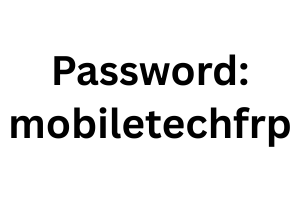
Prime ToolX V26 Latest Version 2026
Latest: ( TOOL )
FAQ
What is Prime ToolX V26 used for? Prime ToolX V26 is a free Windows utility for removing Factory Reset Protection locks on Samsung, Xiaomi, Motorola, and other Android devices. It works at the hardware level using Preloader, Brom, and EDL modes.
Is Prime ToolX V26 free to download? Yes, Prime ToolX V26 is completely free to download and use. No activation key, dongle, or paid subscription is needed to access its full features.
What is the difference between Prime ToolX V26 and V9? V26 is a professionally rebuilt version with a redesigned interface, advanced mode, full Android 16 support, expanded device coverage (including POCO, OPPO, Realme, and Google Pixel), and Qualcomm EDL support without requiring Zadig.
Does Prime ToolX V26 work on Android 16? Yes. V26 explicitly supports FRP removal on all Samsung Galaxy models running Android 16, including via the ADB three-step method (Enable ADB, Remove FRP, Patch Device).
What Windows versions does Prime ToolX V26 support? The tool is compatible with Windows 7, 8, 8.1, 10, and 11, in both 32-bit and 64-bit editions.
Will using Prime ToolX V26 void my phone’s warranty? Yes. The tool uses low-level hardware access that modifies device security partitions, which permanently voids the manufacturer warranty on most devices.
Do I need to install drivers separately? No. Prime ToolX V26 includes MediaTek, UsbDk, Qualcomm 9008, and Zadig drivers bundled inside the installation package. You install them directly from the tool’s Drivers tab.
Is it legal to use Prime ToolX V26? Using the tool on a device you own or have permission to repair is generally considered legal. Using it on a device belonging to someone else without consent is illegal in most countries and can lead to serious legal consequences.
Conclusion
Prime ToolX V26 stands as the most capable free FRP bypass tool available for Windows in 2026. The complete professional rebuild, full Android 16 support, expanded device compatibility across Samsung, Xiaomi, Motorola, POCO, OPPO, Realme, and Google Pixel, and the elimination of external Zadig dependency for Qualcomm models make it a significant upgrade over earlier versions.
Use it only on devices you own or have proper authorization to service. Always back up data before starting. Download from the official site (primetoolx.com Or easyflashing.com) to avoid counterfeit or malware-bundled versions. Follow the driver installation steps carefully and match your exact device model number for best results. If you found this guide helpful, share it with anyone in your network who handles Android device repairs.



3 thoughts on “Prime ToolX V26 Free Download (Latest Update-2026)”