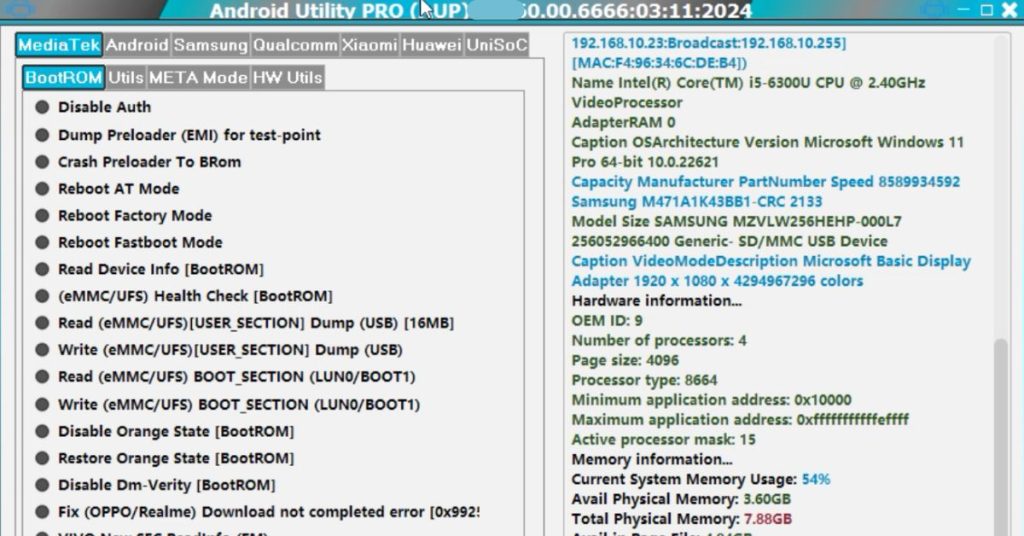
Android Utility V200 RV is a powerful all-in-one Android utility tool designed to help users manage, diagnose, and maintain Android devices in a simple and reliable way. The PRO V200 RV (Offline) edition focuses on stability, privacy, and usability without requiring a constant internet connection.
In 2026, Android devices are more advanced than ever. However, many users—especially beginners—still struggle with basic maintenance tasks like device recognition, system checks, backup preparation, or recovery support. That is where Android Utility PRO V200 RV (Offline) becomes useful.
This guide explains everything in easy English, step by step, with clear examples. You do not need technical experience to understand how this utility works or why it matters.
Read More: Ultimate Android Tool Latest Free 2026
Why Android Utility PRO V200 RV (Offline) Matters in 2026
Modern Android versions include many built-in protections. While this improves security, it also makes troubleshooting more complex. Users now need smarter tools that:
- Work with newer Android versions
- Do not rely on unstable internet connections
- Respect user privacy
- Offer clear guidance instead of confusing commands
Android Utility PRO V200 RV (Offline) addresses these needs by offering controlled, offline, and beginner-friendly features.
Key Highlights of Android Utility V200 RV
Before diving deep, here are some quick highlights:
- Offline functionality
- Beginner-friendly interface
- Broad Android device compatibility
- Organized tool categories
- Safer execution of commands
- Minimal system resource usage
- Designed for learning and practical use
1. Offline Operation and Why It Matters
What This Feature Does
Android Utility PRO V200 RV (Offline) works without an internet connection once properly installed. All essential modules run locally on your computer.
Why Offline Mode Is Important
- Prevents data leaks
- Avoids server dependency
- Works in low-connectivity regions
- Faster execution
- No background tracking
Best For
- Beginners who want safe, predictable results
- Users in areas with slow or unstable internet
- Professionals working in secure environments
2. Beginner-Friendly Interface Design
The interface is designed with simple labels, buttons, and sections. Each tool category is separated clearly so users do not feel overwhelmed.
Why It Matters
Many Android utilities fail beginners because of complex layouts. This tool focuses on:
- Clear naming
- Logical grouping
- Minimal technical jargon
Best For
- First-time Android utility users
- Students learning Android maintenance
- Non-technical users
3. Wide Android Device Compatibility
Supported Devices
Android Utility PRO V200 RV (Offline) supports:
- Most Android smartphones
- Many Android tablets
- Multiple chipset types
- Old and new Android versions
Why Compatibility Is Important
Android is fragmented. A good utility must recognize devices across brands and versions.
Best For
- Users with multiple Android devices
- Repair learners practicing on different models
- Long-term utility users
4. Device Recognition and Connection Stability
How It Works
The tool helps your computer recognize Android devices through stable connection handling.
Why It Matters
Unstable connections can cause:
- Incomplete operations
- Errors during diagnostics
- User frustration
Android Utility V200 RV focuses on connection consistency.
Best For
- Users struggling with device detection
- Beginners unsure about USB or system setup
5. Diagnostic and Information Tools
What You Can Check
- Device status
- System information
- Connection readiness
- Basic configuration details
Why Diagnostics Are Helpful
Before performing any maintenance task, users should understand their device state. This tool simplifies that step.
Best For
- Learning device basics
- Preventing mistakes
- Safe troubleshooting
6. Organized Utility Modules
Modular Design
Instead of placing everything in one screen, Android Utility PRO V200 RV (Offline) organizes features into modules.
Benefits of Modular Tools
- Less confusion
- Better learning flow
- Easier updates
Best For
- Step-by-step learners
- Users who prefer structured tools
7. System Preparation and Maintenance Support
What System Preparation Means
This includes preparing a device for:
- Maintenance
- Recovery workflows
- Backup readiness
Why It Matters
Preparation reduces risk. This tool helps users check readiness before taking action.
Best For
- Cautious beginners
- Long-term device care
8. Privacy-Focused Design
No Forced Online Sync
Android Utility PRO V200 RV (Offline) does not require cloud login or forced syncing.
Why Privacy Matters
- Personal data stays local
- Reduced tracking risk
- Greater user trust
Best For
- Privacy-conscious users
- Professional environments
9. Low System Resource Usage
Lightweight Performance
The tool runs smoothly on:
- Older computers
- Low RAM systems
- Entry-level laptops
Why This Is Important
Not everyone has high-end hardware. This utility remains accessible.
Best For
- Students
- Budget users
- Developing regions
10. Learning-Friendly Tool Structure
Educational Value
The tool helps users understand Android systems instead of blindly clicking buttons.
Why Learning Matters
Knowledge reduces mistakes and builds confidence.
Best For
- Beginners
- Self-learners
- Technical students
11. Stability Improvements in Version 2026
What’s New in 2026
- Better compatibility handling
- Reduced error prompts
- Improved offline reliability
- Cleaner interface flow
Why Updates Matter
Stable tools reduce user risk and improve trust.
Best For
- Long-term users
- Beginners needing reliability
12. Safe Use and Responsible Handling
Important Reminder
Android Utility PRO V200 RV (Offline) is meant for legitimate maintenance and learning purposes.
Safe Use Tips
- Always understand a feature before using it
- Do not rush operations
- Keep backups where possible
Best For
- Responsible users
- Educational use
How to Use Android Utility PRO V200 RV (Offline) Step by Step
Step 1: Prepare Your Computer
- Ensure system compatibility
- Install required drivers
- Restart if necessary
Step 2: Connect Your Android Device
- Use a reliable USB cable
- Allow device permissions
Step 3: Open the Utility
- Launch the software
- Confirm device recognition
Step 4: Choose the Required Module
- Read descriptions
- Proceed carefully
Common Mistakes Beginners Should Avoid
- Skipping preparation steps
- Using unknown cables
- Ignoring on-screen messages
- Rushing through options
Android Utility PRO V200 RV vs Generic Android Tools
Key Differences
- Offline reliability
- Beginner-focused layout
- Clear explanations
- Stable operation
This makes Android Utility PRO V200 RV more suitable for learning and long-term use.
Best Practices for Long-Term Use
- Keep the tool updated
- Learn one feature at a time
- Avoid unnecessary actions
- Respect device limitations
How To Enable ADB Mode With The Help Of Android Utility
- Download the Android Utility latest version tool from the link below
- Open the tool after following all the steps mentioned below
- Go to emergency dial option type #0#
- Connect your mobile with the computer with the help of USB cable
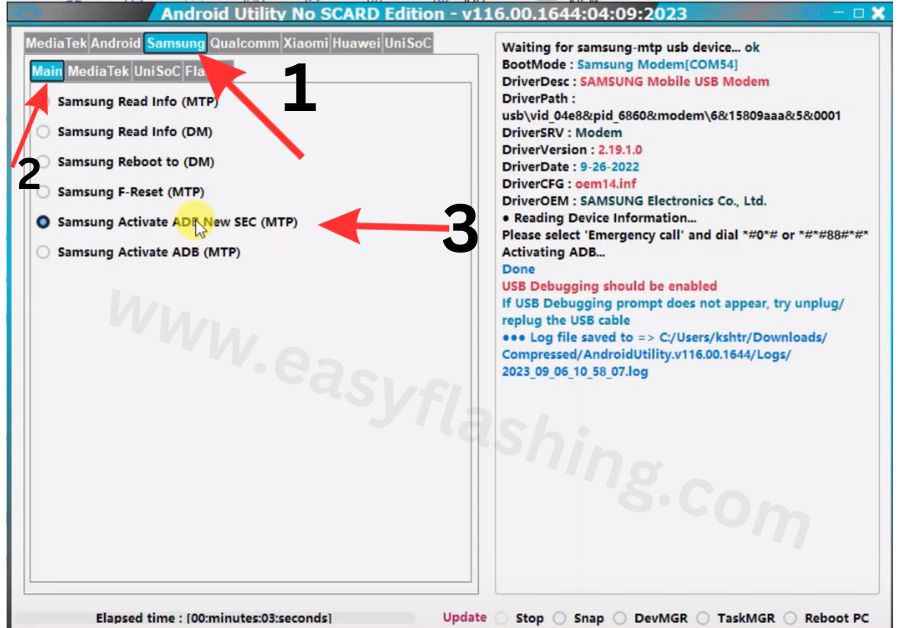
- Above the tool you will see Samsung option click on it then you will see main option click on it
- Click on Samsung Activate ADB option
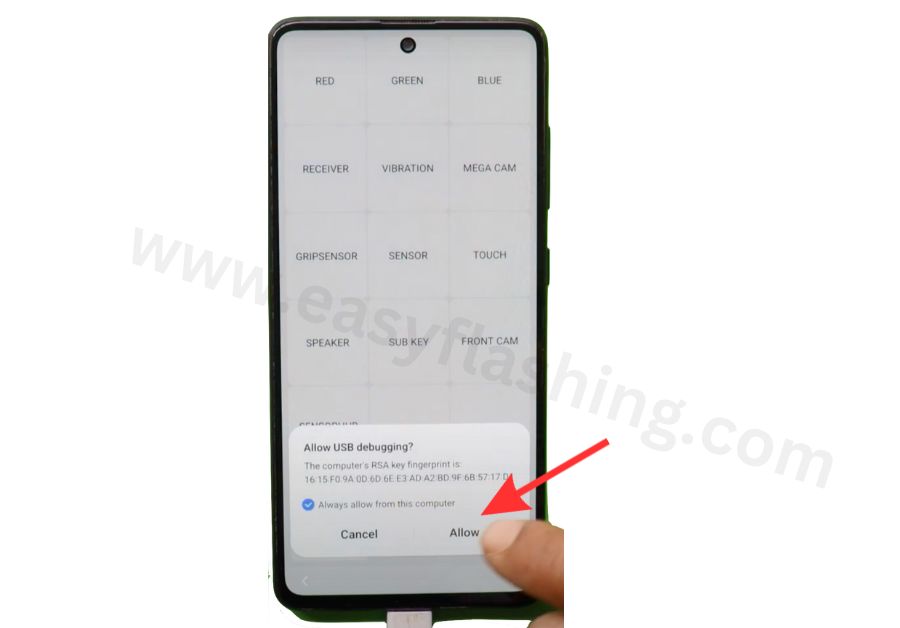
- Click on Allow USB debugging.
How to Bypass FRP of the help of Android Utility
- First download the Android Utility latest version tool
- Open the tool on your computer
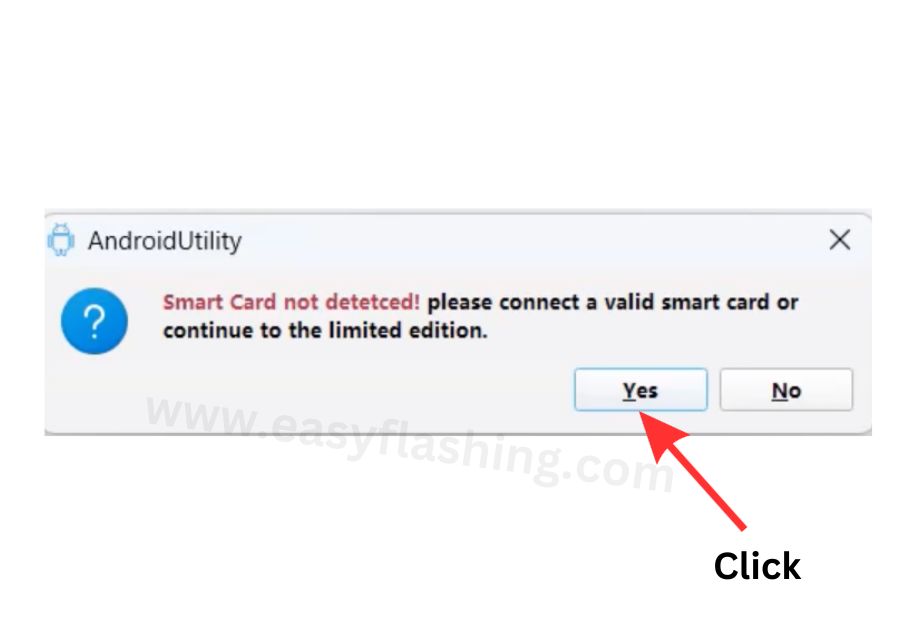
- When you open the tool it will ask you to enter any smart card then you have to click on yes option twice and your tool will open.
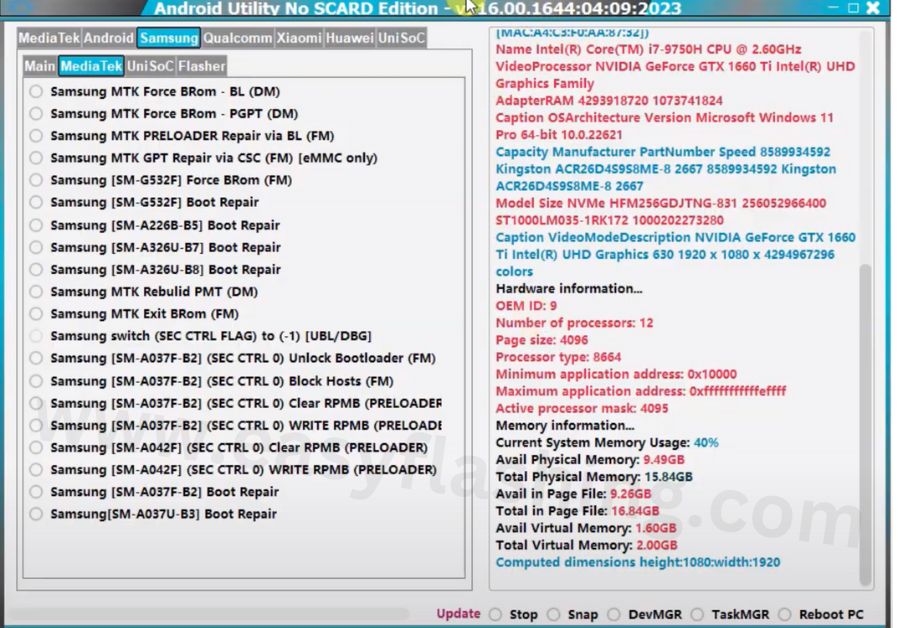
- Click on the main option of the tool
- Connect the mobile phone to the computer with the help of a USB cable
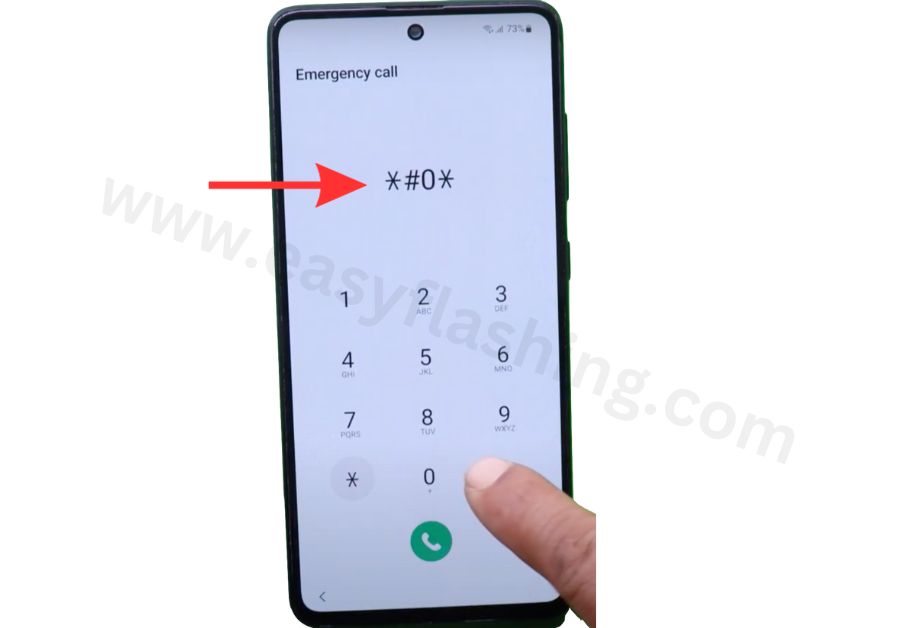
- Open Lock Mobile emergency deal option and type #0# on it.
- Click on the ADB Activate option of the tool
- After a few seconds you will see the option of Allow USB debugging will show on your mobile screen, enable it.
- Click on the Android option of the tool
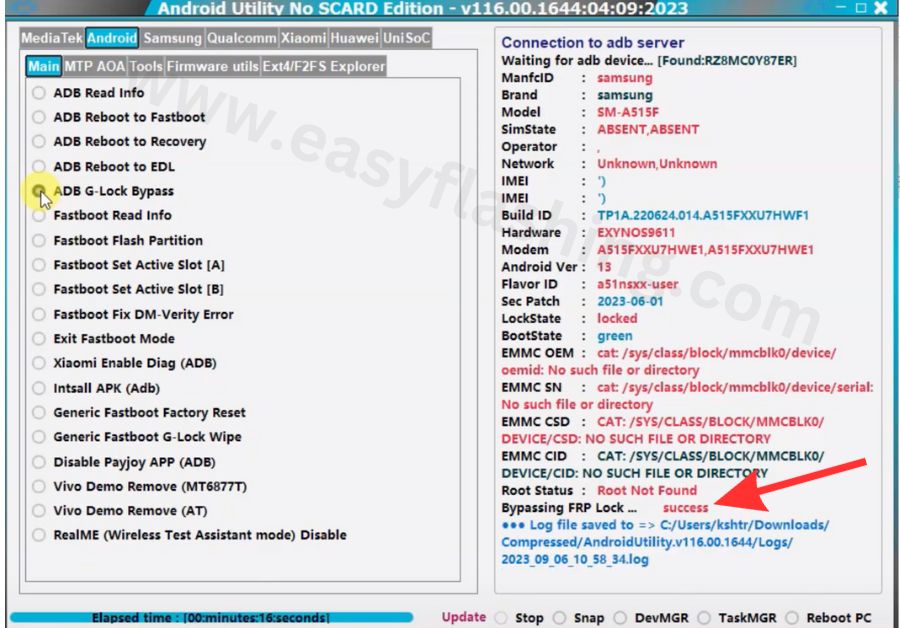
- Click On ADB G-Lock Bypass Option
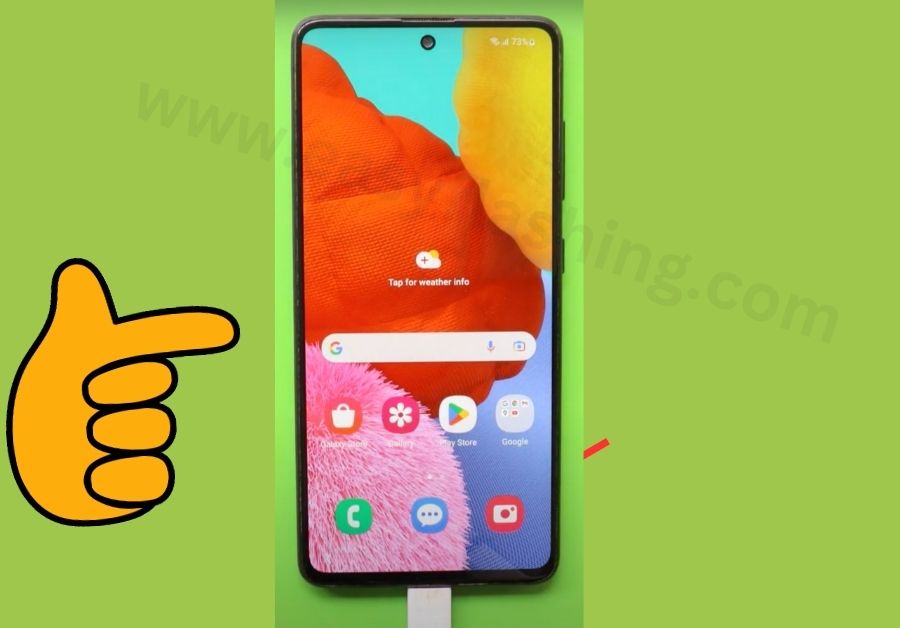
- After few seconds you will see that your mobile will get rid of FRP.
Video Tutorial: How To Use Android Utility Tool
Information of Android Utility latest version
| Name | Android Utility |
| Version | V200 |
| Size | 315 MB |
| Compatibility | Windows 7/8/9/10/11 with 32&64bit |
| File Price | Free |
| Password | mfdl |
| Credit | mfdl |
File Password : mfdl
Asked Questions:
Q1: What is Android Utility PRO V200 RV (Offline) used for?
Android Utility PRO V200 RV (Offline) is used for managing, diagnosing, and preparing Android devices for maintenance without needing an internet connection.
Q2: Is Android Utility V200 RV suitable for beginners?
Yes. It is designed with simple language, organized tools, and clear steps, making it beginner-friendly.
Q3: Does Android Utility PRO V200 RV work without internet?
Yes. The offline version runs locally after setup, which improves privacy and stability.
Q4: Is Android Utility PRO V200 RV safe to use?
When used responsibly and for legitimate purposes, it is considered safe. Users should always understand features before applying them.
Q5: Which Android versions are supported?
The utility supports a wide range of Android versions, including older and newer releases, depending on device compatibility.
Q6: Can Android Utility PRO V200 RV be used for learning?
Yes. Many users use it as a learning tool to understand Android systems and maintenance workflows.
Final Thoughts
Android Utility PRO V200 RV (Offline) Latest Version 2026 stands out as a reliable, beginner-friendly Android utility designed for safe and structured device management. Its offline capability, clear interface, and educational approach make it a valuable tool for users worldwide.If you are new to Android utilities and want a solution that focuses on clarity, privacy, and control, Android Utility V200 RV is a strong choice for 2026 and beyond.



6 thoughts on “Android Utility V200 RV (Offline) Latest Version 2026”