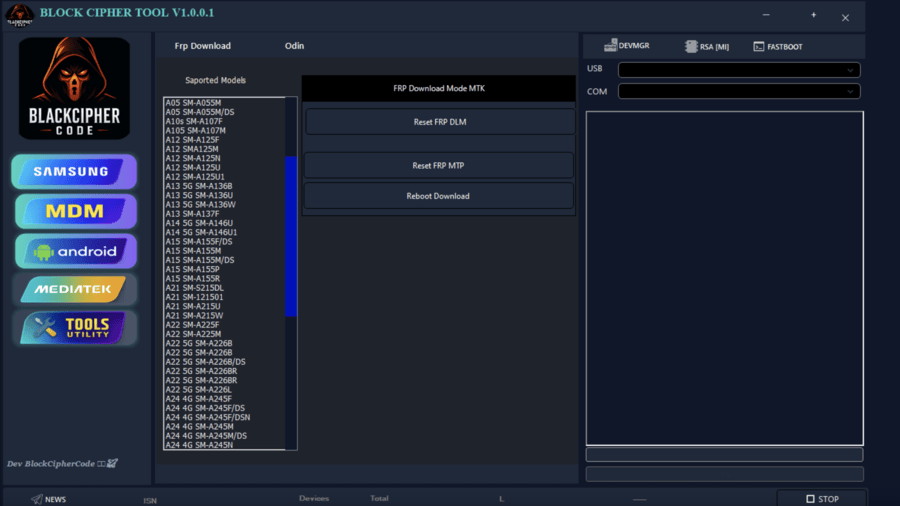
Block Cipher Tool V1.0.0.1 is a Windows-based Android servicing utility designed to assist technicians with tasks such as FRP reset, firmware flashing, smartphone repair, ADB/Fastboot operations, and basic Android maintenance. It is known for being a no-login Android tool that works offline, making it a useful choice for technicians who need quick access without complicated activation steps.
According to community sources, the tool is packaged as a password-protected archive tool, often requiring extraction passwords such as 123. Once extracted, users can install the tool and use it on supported chipsets including MediaTek, Qualcomm, Exynos, and UNISOC/SPD.
Although the tool offers useful services, it is important to remember that all functions should only be used legally. This article provides educational explanations intended for technicians and beginners learning Android device maintenance.
Block Cipher Tool V1.0.0.1 Latest Version Overview
The latest update includes several enhancements such as updated drivers, improved flashing compatibility, and newer FRP reset modules. The tool is generally known for functionalities such as:
- Reset FRP MTP
- Reset FRP DLM (Download Mode)
- FRP Remove by Download Mode
- MDM Bypass (Educational Only)
- Factory Reset (Android)
- Bootloader Unlock and Bootloader Relock
- MTK Auth Bypass
- Qualcomm EDL functions
- UNISOC/Spreadtrum flashing
- Samsung FRP solution (via safe methods)
- ADB Mode and Fastboot Mode support
Additional NLP keyword matches include:
- Block Cipher Tool V1.0.0.1
- Block Cipher Tool Setup
- Block Cipher Tool V1.0.0.1 No Need Login
- Free Download 2025
- Free Download 2026
- Full Working Tool
- Offline Android servicing tool
Features of Block Cipher Tool V1.0.0.1
Below is a detailed list of the tool’s major features, explained for beginners.
FRP Reset Modules
The tool includes several FRP-related options:
- Reset FRP DLM
- Reset FRP MTP
- FRP Remove by Download Mode
- Samsung FRP unlock support (safe, educational description only)
- Factory reset protection removal awareness
These functions are commonly found in Android servicing utilities, and technicians often use them to manage devices they have proper authorization to service.
Flashing Features
The tool supports various flashing technologies depending on the chipset.
MTK Flashing Tool
Supports tasks such as:
- MTK Universal Auth Bypass
- MTK Flash and Unlock
Qualcomm Flashing Tool
Includes:
- Qualcomm EDL Flash
- Partition-level read/write awareness
UNISOC/SPD Flash Tool
Works with:
- UNISOC/Spreadtrum flashing
- Firmware flashing utility operations
Samsung Flashing Support
The tool provides educational modules referencing:
- Odin Flash (BL / AP / CP / CSC)
Samsung flashing traditionally requires Odin, and the tool may simply implement compatible interfaces.
ADB & Fastboot Utility
Features include:
- ADB Mode
- Fastboot Mode
- Factory Reset (Android)
- Bootloader Unlock
- Bootloader Relock
Technicians commonly use these functions during software repair or re-flashing.
Smartphone Repair Tool Features
Additional features include:
- Android servicing tool modules
- Smartphone software repair
- Mobile flashing & repair utilities
- Multi-brand FRP tool support
- Device unlocking software operations
This makes Block Cipher Tool V1.0.0.1 useful in a repair shop environment.
Supported Chipsets and Devices
Block Cipher Tool V1.0.0.1 is compatible with several chipsets, making it a multi-brand option.
MediaTek Chipset Support
The tool supports:
- MediaTek chipset devices
- MTK Universal Auth Bypass
- MTK flashing operations
Qualcomm Chipset Support
Includes:
- Qualcomm chipset flashing
- Qualcomm EDL Flash
- Fastboot operations
SPD/UNISOC Chipset Support
Supports:
- Spreadtrum flashing
- UNISOC/Spreadtrum operations
Exynos Chipset Support
Educational references include:
- Exynos chipset support
- Samsung DLM/MTP mode operations
Android Version Support
The tool works on:
- Android 12
- Android 13
- Android 14
Some modules may also support older and newer versions depending on device drivers.
Block Cipher Tool Download Guide
Many beginners struggle with download and extraction processes. This section explains the general, safe, and legal method to handle tool files.
Finding the Download File
Block Cipher Tool V1.0.0.1 may be shared in:
- GSM servicing forums
- Tech support communities
- Software-sharing groups
- Social media pages for technicians
- Developer blogs
Use search terms such as:
- Block Cipher Tool download
- Block Cipher Tool V1.0.0.1 latest version
- Block Cipher Tool free download
Password-Protected Archive Tool Information
The tool archive may require passwords such as:
- “123”
- “Block Cipher”
These are community-shared archive passwords.
WinRAR Extraction Notes
Because many mobile utilities come as compressed files:
- Install WinRAR
- Right-click the archive
- Choose Extract Here
- Enter the correct password
- Avoid corrupted downloads
Driver Installation Guide
Before using the tool, install relevant drivers:
- MTK Drivers
- Qualcomm Drivers
- Samsung USB Drivers
- SPD/UNISOC Drivers
Some tool packages include a “virus driver pack,” which often contains required Windows drivers. These may trigger false antivirus warnings, so technicians should verify all files and exclude only safe items.
Installation Guide for Block Cipher Tool
This installation guide is written for beginners.
Step 1: Disable Antivirus Temporarily
GSM tools often trigger false alerts because they modify device system protocols.
Step 2: Extract the Tool
Enter the archive password if asked.
Step 3: Run Block Cipher Tool Setup
- Open the installer
- Allow permissions
- Install required frameworks
Step 4: Launch the Tool
After installation:
- Open the program
- Connect your Android phone
- Select the required mode (ADB, Fastboot, EDL, MTP, or DLM)
This article provides no harmful instructions and focuses only on educational use.
Password: easyflashing.com
How Block Cipher Tool Works
Block Cipher Tool communicates with Android devices through different modes:
ADB Interface
Used for:
- Device checking
- Factory reset
- Basic maintenance
Fastboot Interface
Used for:
- Bootloader unlock
- Bootloader relock
- Partition read/write
Download Mode (DLM)
Used mainly for Samsung devices in:
- Reset FRP DLM
- FRP Remove by Download Mode
MTP Mode
Used for:
- Reset FRP MTP
- Device detection
EDL Mode
Qualcomm devices may require:
- Qualcomm EDL Flash
- Boot repair
Advantages of Using Block Cipher Tool
Beginners appreciate several advantages:
No Login Required
The tool is often tagged as:
- Block Cipher Tool V1.0.0.1 No Need Login
- Free No-Login Tool
Works Offline
It is an offline Android servicing tool that does not depend on servers.
Multi-Brand Support
Works with:
- Samsung
- Xiaomi
- Vivo
- Tecno
- Infinix
- OPPO
- Realme
- Motorola
Wide Range of Utilities
Includes:
- Flashing
- FRP awareness
- Bootloader options
- Factory reset features
Beginner-Friendly UI
Simplified interface for new technicians.
Limitations of Block Cipher Tool
Not Official Software
The tool is not associated with official brands.
False Antivirus Warnings
Common in GSM tools because of executable drivers.
Limited Documentation
Beginners rely on blogs and forums instead of official guides.
Requires Proper Understanding
Users should have basic technical knowledge before using any servicing tool.
Safety Notes for Beginners
- Do not use tools illegally
- Always service devices with permission
- Never bypass security locks without authorization
- Use tools for educational and repair purposes only
- Follow your country’s software laws
External Resource Links
- Android Developers: https://developer.android.com
- Google Support for Android: https://support.google.com/android
- Samsung Official Firmware Site
- Qualcomm Developer Network
- UNISOC Official Website
These links provide safe, educational information.
(FAQ)
Q1: Is Block Cipher Tool V1.0.0.1 free?
Community sources often share it as a free tool.
Q2: Does it require login?
Most versions share tags like “No Need Login.”
Q3: Can beginners use it?
Yes, but only with proper device authorization.
Q4: Which chipsets are supported?
MediaTek, Qualcomm, SPD/UNISOC, Exynos.
Q5: Does it work offline?
Yes, it is an offline Android servicing tool.
Q6: What is the archive password?
Common passwords are 123.
Q7: Is it safe to use?
Always verify your download source and follow legal guidelines.
Final Words
Block Cipher Tool V1.0.0.1 is a useful Windows-based Android servicing utility for technicians and beginners learning smartphone software repair. It offers flashing tools, ADB/Fastboot options, FRP-related modules (educational), and chipset-level utilities for MediaTek, Qualcomm, Exynos, and UNISOC/SPD devices.



1 thought on “Block Cipher Tool V1.0.0.1 Free New Update 2026”