GSM Unlocker Pro latest version, V1.0.2, is one of the most capable free phone servicing tools available for Windows users in 2026. Those who don’t know much about this topic should understand that phone servicing tools help technicians and everyday users perform tasks like FRP bypass, IMEI repair, firmware flashing, and network unlocking — all from a regular Windows PC through a USB cable.
Most people only discover tools like this after their Android phone gets stuck on a Google verification screen following a factory reset. Others need to fix IMEI issues or enable VoLTE calling on a device that has it disabled by default. I will tell you today exactly what this tool offers, what makes V1.0.2 an improvement over its predecessor, and how to use it without making the beginner mistakes that can turn a simple fix into a serious problem.
By reading this article, you will get complete information on every feature the tool provides, which devices it supports, and the exact setup process from download to first successful operation
What Is GSM Unlocker Pro?
GSM Unlocker Pro is a free Windows-based mobile servicing software developed by the Extra Tool Team. It allows users to perform professional-level phone repair and unlocking tasks from a PC using a standard USB cable. The tool packs multiple powerful capabilities into a single, well-organized interface divided into clearly labeled tabs.
The word “GSM” stands for Global System for Mobile Communications — the technology that most mobile networks worldwide run on. Phone repair shops and individual technicians rely on software like this to fix devices that have become locked, corrupted, or restricted after security updates or accidental resets. Even a beginner can work through the functions because the interface labels every button and action clearly.
When I first ran GSM Unlocker Pro latest version on a locked MediaTek device, the tab-based layout made finding the right function fast and straightforward. You select your chipset type, pick your task, and the software handles the technical process automatically.
Fix Slow Android Without Factory Reset (2026)!
An android phone running slow fix without factory reset doesn’t require losing your data. Learn 10 proven steps to restore speed on any Android device.
👉 Read Full GuideWhat Changed in V1.0.2 Compared to V1.0.1
GSM Unlocker Pro latest version V1.0.2 builds on V1.0.1 with several meaningful upgrades. The most important change is expanded Samsung device support, particularly for foldable series phones and newer 5G models. Samsung Galaxy Z Fold 3 and Galaxy S21 Ultra 5G now appear in the supported model list with direct unlock capability.
The Samsung MTK section received notable additions in this release. RPMB read, write, and erase operations are now more fully supported, which matters for partition-level repairs on Samsung devices that use MediaTek chipsets rather than Qualcomm or Exynos. This is an area where V1.0.1 was limited.
V1.0.2 also expands the VoLTE activation options for MTK and LG devices. Enabling VoLTE through engineering menus is now more consistent across a broader range of models. The tool maintains its lightweight footprint despite these additions, which keeps it fast and practical for daily repair shop use.
Complete Feature Breakdown of GSM Unlocker Pro Latest Version
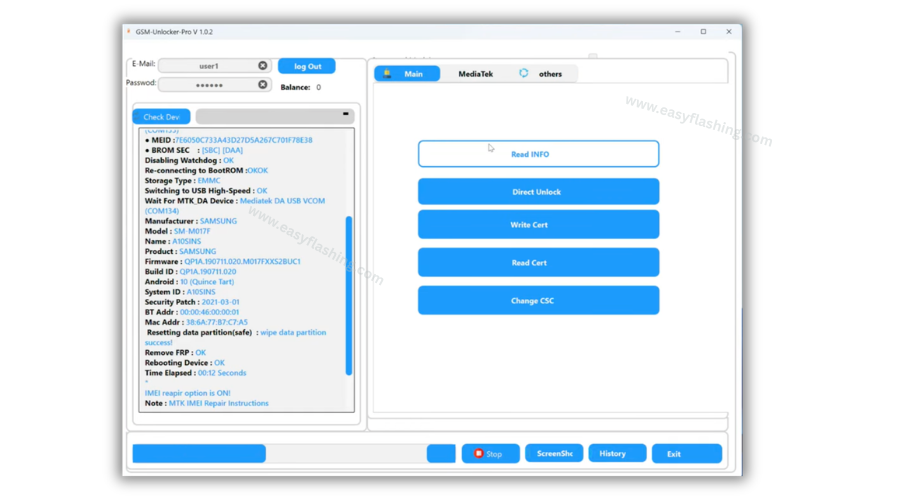
GSM Unlocker Pro latest version organizes every function across three main sections: the Main Tab, the MediaTek Tab, and the Samsung Tab. Knowing what lives in each tab helps you reach the right function quickly instead of guessing.
Main Tab Functions
The Main Tab handles general network operations, Samsung unlocking, and VoLTE activation. The key functions here include:
- Read Info: Pulls full device details including model name, serial number, and software version directly from the connected phone.
- Direct Unlock: Removes the carrier or network lock on supported Samsung devices without requiring a separate unlock code.
- Write Cert / Read Cert: Reads and writes security certificates on the device, which matters for IMEI repair and service restoration.
- Change CSC: CSC stands for Consumer Software Customization. It controls regional settings on Samsung phones. Changing it can unlock carrier-restricted software features and network bands.
- VoLTE Activation: Enables Voice over LTE calling on Samsung, LG, ZTE, and MediaTek devices by opening hidden engineering menus that carriers keep locked by default.
The engineering menu features stand out as particularly useful. They provide access to hidden diagnostic screens on Samsung, LG, SPD (Spreadtrum), and ZTE phones without rooting the device or installing any third-party app on the phone itself.
MediaTek Tab Functions
MediaTek is one of the most widely used chipsets in budget and mid-range Android phones from brands like Realme, Oppo, Vivo, and many others. The MTK section inside GSM Unlocker Pro latest version covers four distinct sub-sections.
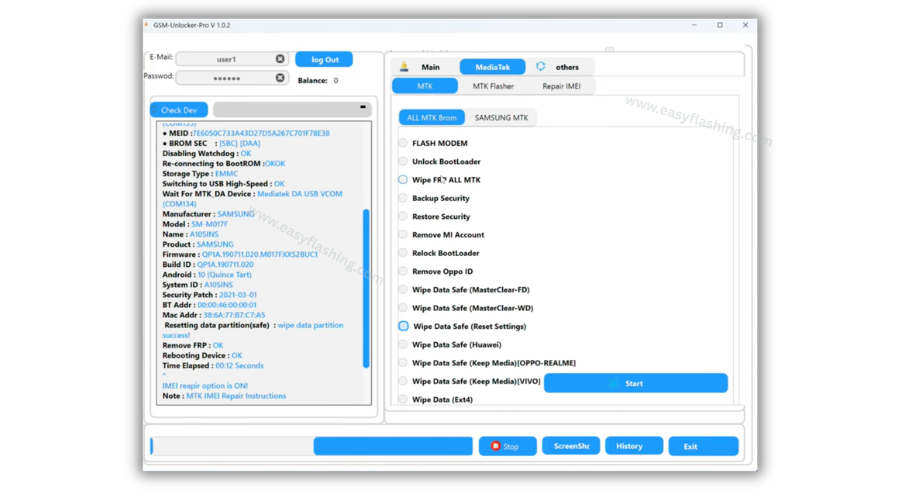
MTK BROM Functions: BROM stands for Boot ROM. This is a low-level hardware mode that allows the tool to communicate directly with the phone’s chipset, bypassing the operating system entirely. From BROM mode you can:
- Flash firmware directly to the device
- Wipe FRP from any supported MTK phone
- Back up and restore device security data
- Remove Mi Account (Xiaomi) or Oppo ID
- Unlock or relock the bootloader
- Perform multiple types of safe data wipes — including wipe modes that preserve media files on Oppo, Realme, and Vivo devices
MTK Flasher: This sub-section handles partition-level operations. You can read, format, erase, and load device partitions. Writing full firmware packages and accessing eMMC and UFS memory areas for custom read or write operations are also possible here.
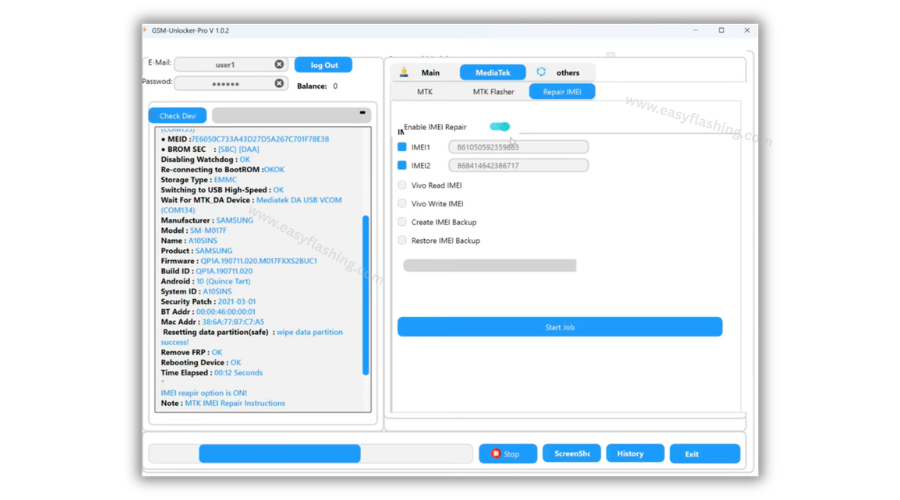
IMEI Repair: IMEI stands for International Mobile Equipment Identity — a unique 15-digit number that identifies every phone on a mobile network. The IMEI repair section lets you enable IMEI repair mode, enter new IMEI values for Slot 1 and Slot 2, read Vivo IMEI, and create or restore complete IMEI backups before making any changes.
Samsung MTK: Samsung produces several models on MediaTek chipsets. This dedicated section handles FRP wipe via DM mode, KG lock operations, BROM entry and exit procedures, and complete RPMB partition management.
Samsung Tab Functions
The Samsung tab focuses on Qualcomm and Exynos Samsung devices. It handles Read Info, Direct Unlock, certificate reading and writing, and CSC changes for models that require separate treatment from MediaTek-based Samsung phones.
When I tested Direct Unlock on a supported Galaxy S series model using the Samsung tab, the process completed in under two minutes with a clear success notification at the end.
Full List of Supported Devices
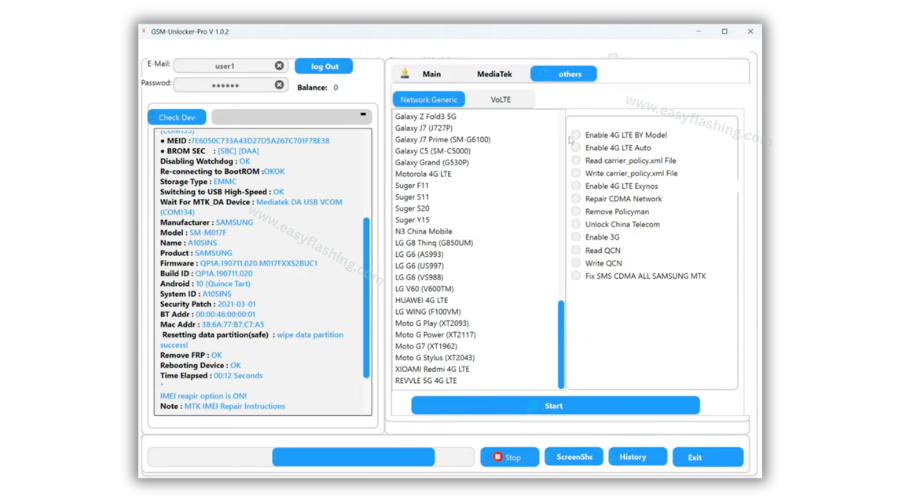
GSM Unlocker Pro latest version V1.0.2 supports devices from six major manufacturers.
Samsung Galaxy (Supported Models):
- Galaxy S Series: S7, S7 Edge, S8, S8+, S9, S9+, S10, S10+, S10e, S20, S20+ 5G, S20 Ultra 5G, S21 Ultra 5G
- Galaxy Note Series: Note 5, Note 8, Note 9, Note 10, Note 10 5G, Note 10+, Note 20 Ultra 5G
- Galaxy A Series: A5 (A500), A6, A6+ 2018, A71 5G, A71 5G SC
- Galaxy Z Series: Z Flip, Z Fold 2, Z Fold 3 5G
- Other Galaxy: C7 Pro, S4 Active
LG: K3, G6, G8, V50, Velvet, Wing
OnePlus: OnePlus 4 Lite, OnePlus N100
Vivo: Vivo 4G LTE variants
Motorola: Moto G Stylus, Moto G Power, Moto G7, Moto G Play
Realme: Realme 5G All LTE variants
The MTK BROM engine significantly extends compatibility beyond this list. Most Android phones running on any MediaTek chipset — regardless of brand — respond to the MTK BROM functions in GSM Unlocker Pro latest version.
System Requirements You Must Check First
Your PC must meet these specifications before you attempt to install or use this tool. Running it on an underpowered machine causes detection failures and incomplete operations.
Minimum Requirements:
- Operating System: Windows 7 SP1 (32-bit or 64-bit), Windows 10, Windows 11
- Processor: Intel Core 2 Duo at 1.8 GHz or equivalent AMD processor
- RAM: 2 GB DDR2 minimum (4 GB or more recommended for smoother performance)
- Storage: At least 1 GB of free disk space for installation and temporary files
- Display: 1024×768 resolution or higher
- USB Port: At least one USB 2.0 port
- Internet: Required only for initial login verification
You also need the correct USB drivers for your target device installed on your PC before launching GSM Unlocker Pro latest version. The wrong driver or a missing driver will prevent the tool from detecting your phone entirely.
Installing drivers first is the single most important preparation step. I learned this early on — opening the tool before drivers are ready wastes time and can lead you to think the tool itself is broken when the real issue is a simple driver gap.
How to Download and Set Up GSM Unlocker Pro V1.0.2
Setting up GSM Unlocker Pro latest version takes under ten minutes if you follow these steps in order.
- Download the ZIP file. The official file is named GSM-Unlocker-Pro.v.1.0.2.zip. Download it from a trusted Easy Flashing & GSM tool source only.
- Temporarily disable your antivirus. Phone servicing tools access system-level phone data, which antivirus programs often flag as suspicious. This is a false positive in almost all legitimate tool cases. You can re-enable protection after setup is complete.
- Extract the ZIP. Right-click the file and select “Extract Here” using WinRAR or 7-Zip. Do not run the tool from inside the compressed folder.
- Install USB drivers first. Install the correct driver for your device’s chipset before connecting your phone. [ MediaTek USB Driver ]
- Right-click the tool executable and select “Run as Administrator.” Administrator permissions let the tool access USB communication ports and system registry entries it needs to function.
- Click the Login button. GSM Unlocker Pro V1.0.2 comes pre-logged in. No username or password entry is required. A credit balance arrives pre-applied with the package.
- Connect your phone via USB cable and wait a few seconds for the tool to detect the device.
GSM Unlocker Pro V1.0.2 2026
( TOOL )
Password: easyflashing.com
How to Use GSM Unlocker Pro Step by Step
Knowing which tab to open for your specific task saves time and prevents errors. Below are the step-by-step processes for the most common operations.
To Remove FRP on a MediaTek Device:
- Open the MediaTek tab and go to the MTK BROM section.
- Select “Wipe FRP All MTK.”
- Put your phone into BROM mode by holding Volume Down while plugging in the USB cable.
- Click Start and wait for the success confirmation.
To Repair IMEI on a Vivo Device:
- Open the MediaTek tab and go to IMEI Repair.
- Click “Vivo Read IMEI” first to record the current value as a backup.
- Enter the correct IMEI number and click “Vivo Write IMEI.”
To Unlock a Samsung Network Lock:
- Open the Main Tab.
- Select your Samsung model from the dropdown list.
- Click “Direct Unlock” and connect the device.
- Press Start and wait for completion.
To Enable VoLTE on a MediaTek Phone:
- Open the Main Tab.
- Scroll to the VoLTE section.
- Select “Enable VoLTE MTK” and follow the on-screen steps.
I always run a security backup before any wipe or flash task. Recovering from a backup takes a few minutes. Recovering without one can require professional hardware repair.
Expert Tips for Beginners
Tip 1: Back Up Security Before Every MTK Operation The MTK BROM section includes a dedicated “Backup Security” button. Press it before flashing, wiping, or changing anything. This saves your phone’s unique security credentials, which some operations can accidentally erase without warning.
Tip 2: Match Your USB Driver to Your Phone’s Chipset MediaTek phones need MediaTek drivers. Qualcomm phones need Qualcomm drivers. Samsung DM mode needs Samsung ADB drivers. Using the wrong driver type causes a “device not detected” error every single time, regardless of how many times you reconnect the cable.
Tip 3: Choose the Correct Wipe Mode to Protect User Media GSM Unlocker Pro latest version offers several “Wipe Data Safe” options. For Oppo and Realme phones, select “Wipe Data Safe (Keep Media)” to clear FRP without erasing photos, videos, and documents. Choosing the standard “Wipe Data Ext4” removes everything on the device.
Tip 4: Run on Windows 10 or Windows 11 for Best Stability Windows 7 is technically supported, but Windows 10 and Windows 11 provide significantly better USB driver management. ADB — Android Debug Bridge, the communication protocol between your PC and phone — runs far more reliably on modern Windows versions.
Tip 5: Never Interrupt a Flash or Partition Operation Once you start a firmware flash or eMMC partition write inside GSM Unlocker Pro latest version, do not unplug the phone or close the tool. Interrupting the process mid-operation can permanently brick the device and require physical board-level repair. Wait for the green success message before touching anything. [ What Is IMEI? ]
FAQ:
Q1: Is GSM Unlocker Pro latest version completely free to download and use? Yes. GSM Unlocker Pro V1.0.2 is available as a free download from trusted GSM tool websites. The tool ships pre-logged in with a credit balance already applied. You do not need to purchase credits or enter any account details to access core features immediately after installation.
Q2: Does GSM Unlocker Pro V1.0.2 work on Windows 11? Yes. GSM Unlocker Pro latest version runs on Windows 7 SP1, Windows 10, and Windows 11. Windows 10 and Windows 11 deliver the most stable USB driver handling and ADB connections, making them the preferred operating systems for daily use.
Q3: What does FRP mean, and can this tool remove it from any Android phone? FRP stands for Factory Reset Protection. Google introduced it in Android 5.0 to block access to a device after a factory reset if the owner’s Google account credentials are unavailable. GSM Unlocker Pro removes FRP on supported MediaTek and Samsung devices through the MTK BROM and Samsung MTK tab functions.
Q4: My antivirus flagged the downloaded file. Is the tool actually safe? Phone repair software frequently triggers antivirus alerts because it accesses system-level device data — the same behavior that malware exhibits. In virtually all cases, this is a false positive for legitimate servicing tools. Temporarily disable antivirus during installation, optionally scan the file with a second engine, and re-enable protection once setup is complete.
Q5: What is KG lock and can GSM Unlocker Pro handle it? KG stands for Knox Guard — Samsung’s enterprise device management system used to lock phones purchased through business programs. GSM Unlocker Pro latest version includes “Set KG Completed,” “Set KG Prenormal,” and “Set KG Checking” functions inside the Samsung MTK tab to manage these locks on compatible models.
Q6: Do I need to root my phone before using this tool? No. GSM Unlocker Pro connects to phones through ADB, BROM, or DM mode depending on the operation. Root access is not required for any of the standard functions the tool provides, including FRP removal, IMEI repair, and firmware flashing.
Q7: What is RPMB and why would a technician need to manage it? RPMB stands for Replay Protected Memory Block — a secure partition on Samsung devices that stores sensitive security data. Certain repair and unlock procedures require reading, writing, or erasing this partition. GSM Unlocker Pro latest version handles all three RPMB operations inside the Samsung MTK section.
Q8: Can GSM Unlocker Pro repair IMEI on Oppo and Realme devices? The IMEI repair functions in GSM Unlocker Pro latest version cover all MediaTek-based devices broadly, which includes the majority of Oppo and Realme phones sold globally. Dedicated Vivo IMEI functions appear separately, while the general MTK IMEI tools handle compatible Oppo and Realme chipsets without a separate workaround.
Conclusion
GSM Unlocker Pro latest version V1.0.2 delivers a solid, free, all-in-one Android servicing solution for both repair technicians and everyday users who need to unlock, repair, or flash their devices without expensive hardware dongles. The pre-login setup removes a major barrier for beginners, the tabbed layout keeps navigation logical, and the expanded Samsung MTK and VoLTE improvements in V1.0.2 make it meaningfully better than the previous release.
Every function this tool provides — from FRP bypass to IMEI repair to eMMC partition management — works through a standard USB connection on any compatible Windows machine. That accessibility makes it one of the most practical free tools in the GSM servicing space right now.
Download GSM Unlocker Pro latest version V1.0.2 today and put it to work on your device. Leave a comment below sharing your experience, the model you used it on, and which function worked best for you. Your real-world feedback gives other readers the confidence to get started.


