
addROM Bypass APK Latest Version 2026 is a well-known Android utility app designed to help users access limited functions on an Android device that is locked by Factory Reset Protection (FRP). FRP is a Google security feature that activates automatically when a Google account is added to an Android phone.
When a phone is factory reset without removing the Google account, the device may ask for the previously synced account. In such situations, addROM bypass APK is often used as a temporary access tool to open browser settings or essential menus on supported devices.
Understanding FRP Lock in Simple Words
FRP stands for Factory Reset Protection. Google introduced this feature to protect user data if a phone is lost or stolen.
How FRP Works
- FRP activates when a Google account is added
- A factory reset triggers FRP verification
- The phone asks for the old Google account
- Without correct credentials, access is restricted
addROM FRP bypass APK is commonly discussed as a tool that helps users reach certain device settings in specific scenarios.
What Is addROM Bypass APK?
addROM Bypass APK is a small Android application that redirects users to hidden system activities, browser pages, or account settings on some Android devices.
Important points for beginners:
- It does not permanently remove Google accounts
- It does not unlock every Android phone
- Results depend on Android version and security patch
The tool is mainly used for learning, recovery, or device access purposes where ownership is legitimate.
All addROM One Click APK Latest Version 2026
- Open Google Search App

- Open Alliance Shield App
- Open Samsung my Files
- Open Set Screen Lock
- Open Package Disabler Pro

- Open YouTube App
- Open Galaxy Store
- Open Screen Smartlock
- Open Settings APP
- Open Home Launcher
- Open S9 Launcher
- Open Chrome App
- Open Calculator App

- Open Motorola Launcher
- Open Google Assistant
- Open Login Account
- Open ADB Settings
- Open USB Settings
- Open *#0*#
- Open GMAIL App
- Open Samsung Secure Folder
- Open Samsung Touch ID
- Open Samsung Smart Switch
- Open Mi File Manager
- All Tap to Open FRP APPS: Here
- Open Vivo EasyShare
- Open Xshare Mini
- Open Oppo Phone Clone
- Open Xiaomi Share ME


- Package Disabler APK Download
- Bar Setting APK Download
- Activity Launcher: Download
addROM Bypass APK Latest Version 2026 – Key Highlights
- Lightweight Android APK file
- No advanced technical knowledge required
- Simple interface
- Works on selected Android versions
- Used globally by mobile learners and technicians
Read More Article:
addROM Bypass Apk Latest Free 2026 – Key Features
Below is a detailed list of the main features of addROM Bypass APK Latest Version 2026, explained clearly for beginners.
1. Quick Access to Hidden Android Menus
The primary function of addROM bypass apk is opening restricted or hidden system menus.
Why this matters:
- Helps reach browser or settings
- Allows limited navigation on locked devices
- Useful for troubleshooting access issues
This feature works only on supported Android builds.
2. Simple User Interface for Beginners
The app has a very basic layout:
- Minimal buttons
- No confusing options
- Easy navigation
Even first-time users can understand how it works without guidance.
3. Lightweight APK File Size
addROM Bypass APK Latest Version 2026 is small in size and does not consume much storage.
Benefits include:
- Faster installation
- Works on low-storage devices
- Smooth performance on older phones
4. No PC Required for Basic Use
In many cases, the tool can be used directly on the Android phone.
This helps users who:
- Do not have access to a computer
- Want a quick solution
- Prefer mobile-based tools
However, results vary by device.
5. Supports Multiple Android Versions (Limited)
The app may work on:
- Older Android versions
- Some mid-range Android builds
- Devices with lower security patches
Newer Android versions may block this method due to enhanced security.
6. Works With Browser-Based Redirection
addROM FRP bypass APK often redirects users to:
- Browser pages
- Google account sign-in screens
- Device help menus
This behavior depends on system permissions.
7. Useful for Learning FRP Behavior
For beginners and mobile learners, the app helps understand:
- How FRP restricts access
- How Android security evolved
- Why newer versions block old methods
This makes it a learning-oriented utility.
8. No Root Access Required
Rooting is not required for addROM Bypass APK Latest Free 2026.
Advantages:
- No warranty risk
- No permanent system changes
- Safer than root-based tools
9. Offline Installation Possible
Once the APK file is available, installation can be done offline.
This is useful when:
- Internet access is limited
- Only local file transfer is possible
10. Global Popularity and Community Use
The tool is widely discussed in:
- Android learning communities
- Mobile repair forums
- Beginner-level tutorials
This makes troubleshooting easier due to shared knowledge.
System Requirements for addROM Bypass APK
Before using the app, ensure the following:
Android Device Requirements
- Android phone or tablet
- Supported Android version (varies)
- Touchscreen working properly
Basic Settings Needed
- Ability to install APK files
- Access to device menus or file manager (if available)
How to Install addROM Bypass APK
For beginner understanding, installation usually involves:
- Downloading the APK file
- Allowing unknown app installation
- Opening the APK
- Following on-screen options
Actual success depends on device security.
How To Install & Use AddROM Bypass APK (Step by Step)
addrom APK very easy to use, if you follow all the methods I mentioned, your mobile will get rid of FRP lock.
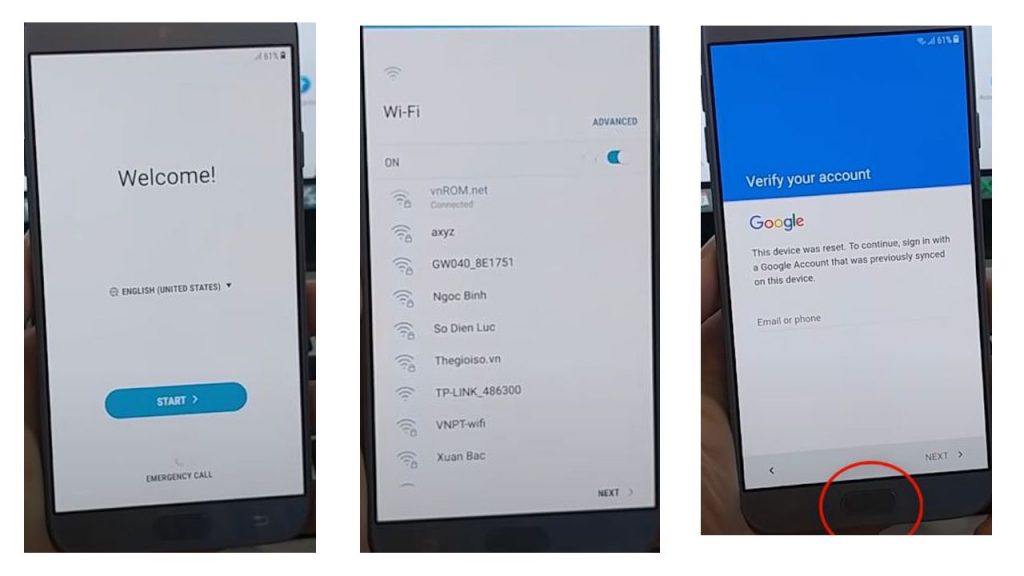
- This screen will be displayed in front of the mobile after a hard reset or software
- Connect mobile to Wi-Fi internet
- Click the Home button three times
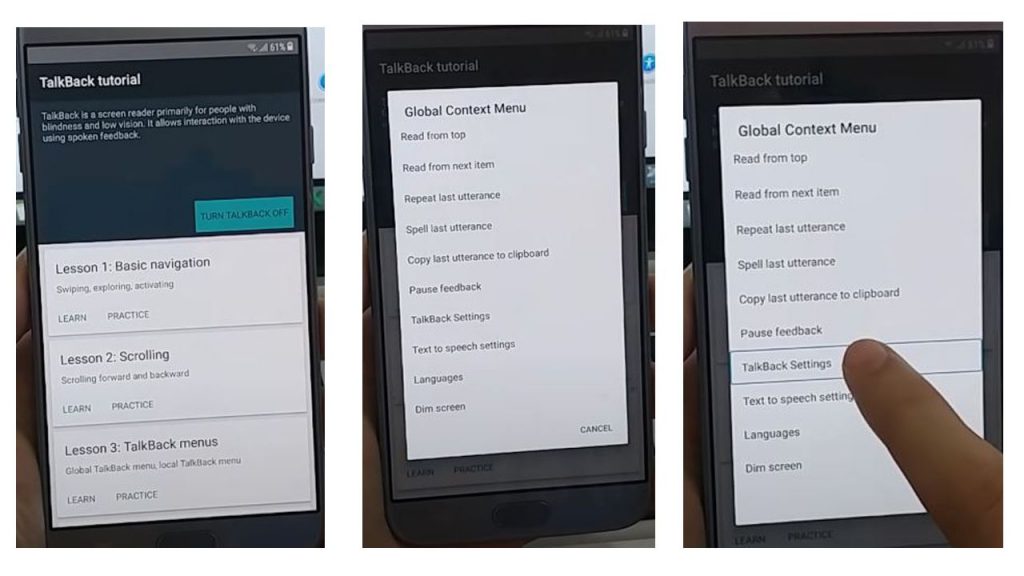
- The talkback option will be turned on
- You have to make their (L) on the screen
- There will be some option shown in front of you
- Click on Talkback Settings
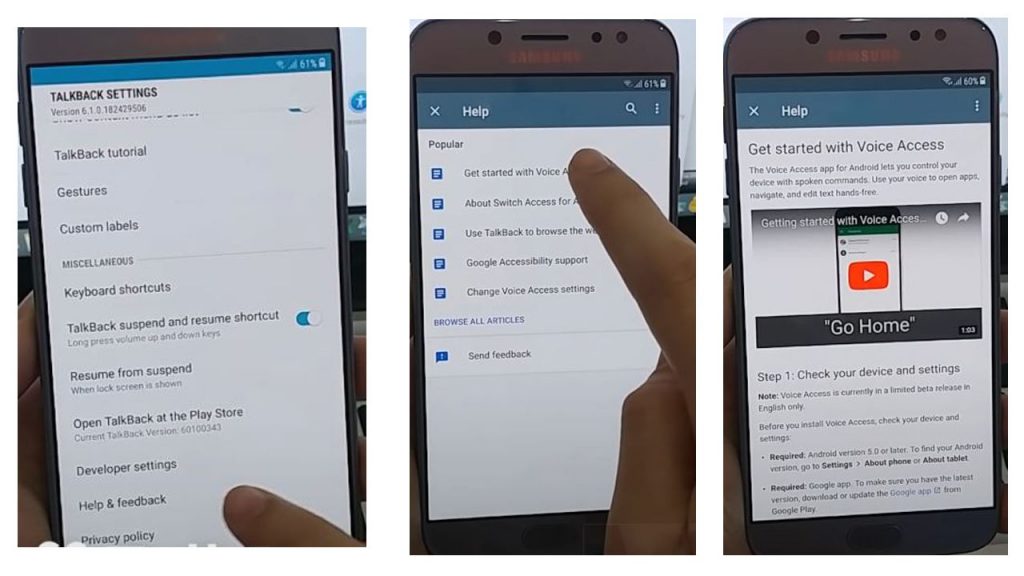
- Three times, click on the Home button to turn off the Talkback option
- Click Help for Feedback
- Click On Get started with voice option
- Play the YouTube video and then click on the link
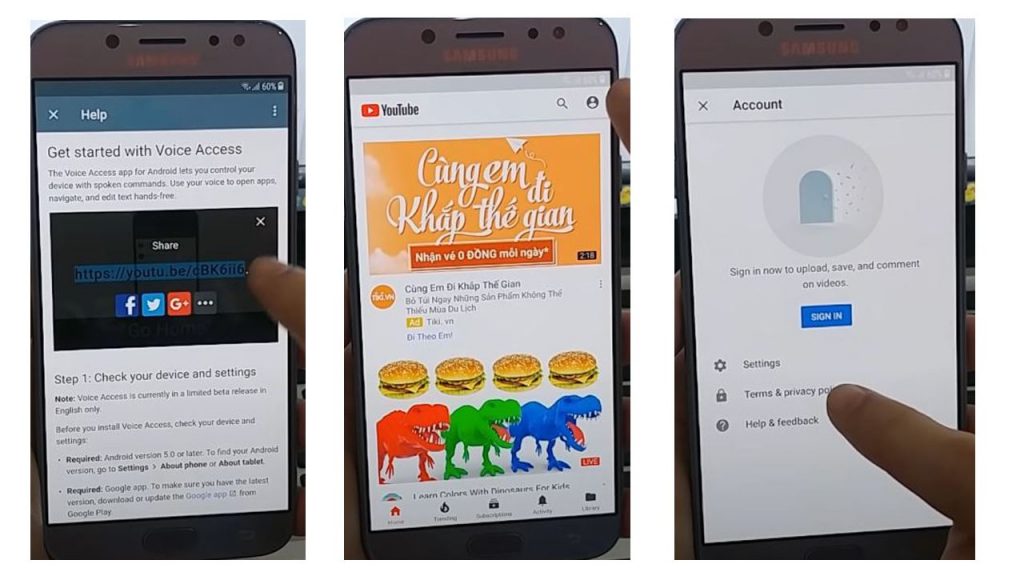
- Open a YouTube ID account
- Click Terms & privacy policy
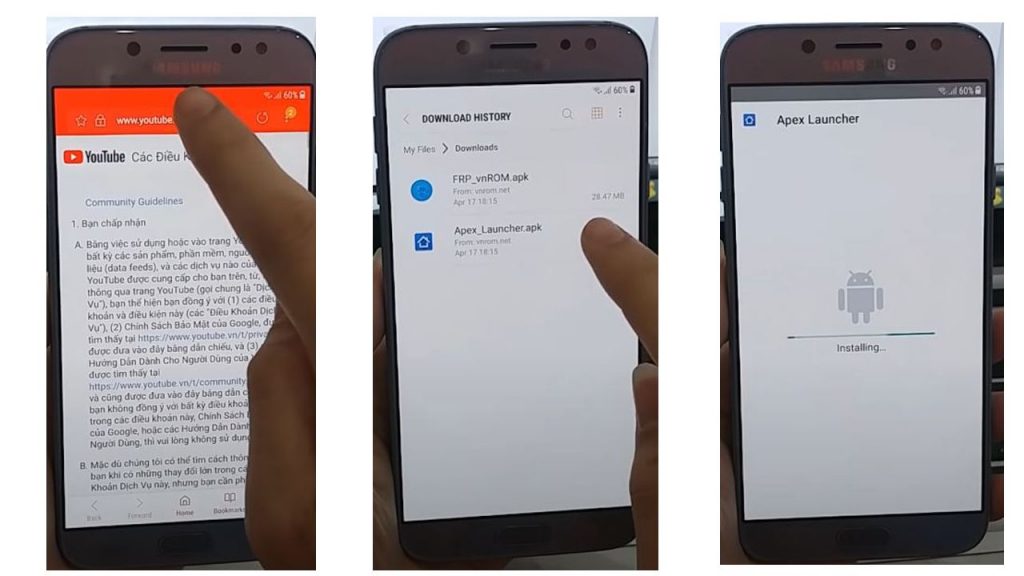
- Open the Easy Flashing website
- Download The Addrom Bypass APK & Apex launcher
- Open Apex launcher
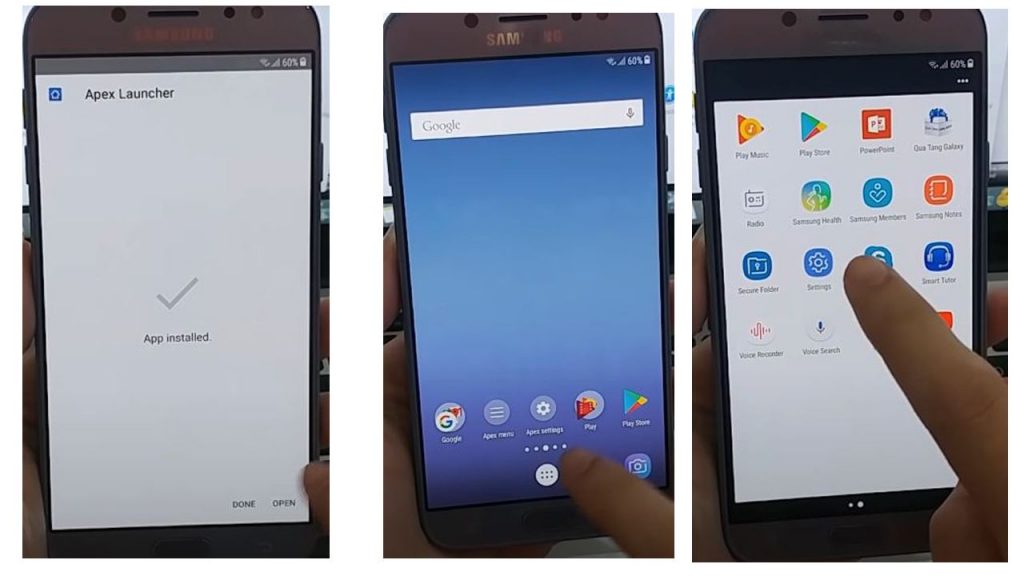
- Open mobile settings
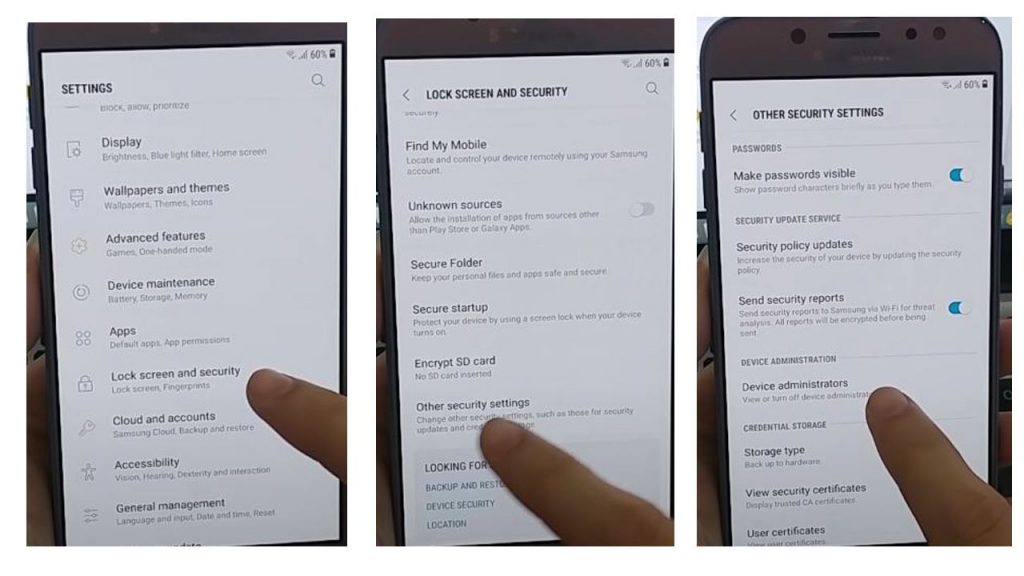
- Click on the lock screen and security
- Click on other Security Settings
- Click device administrator
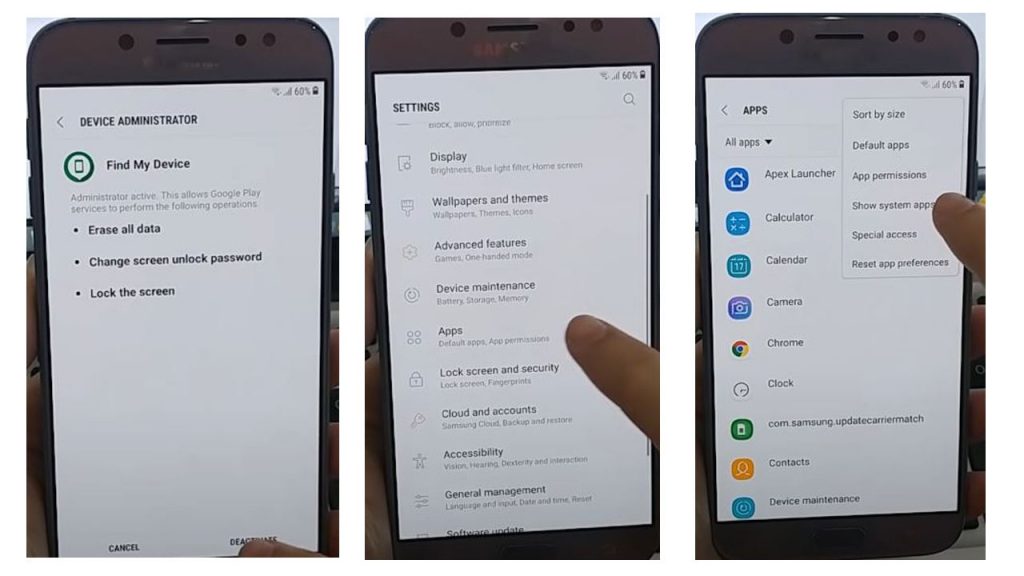
- device administrator, Click deactivate
- Open the application
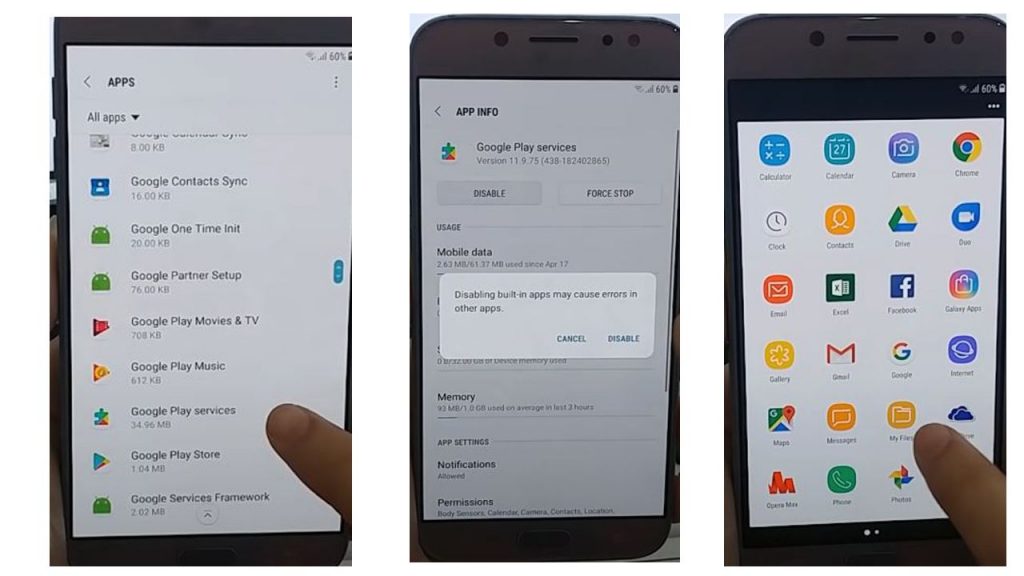
- Disable the Google Play Service
- Open the My File folder
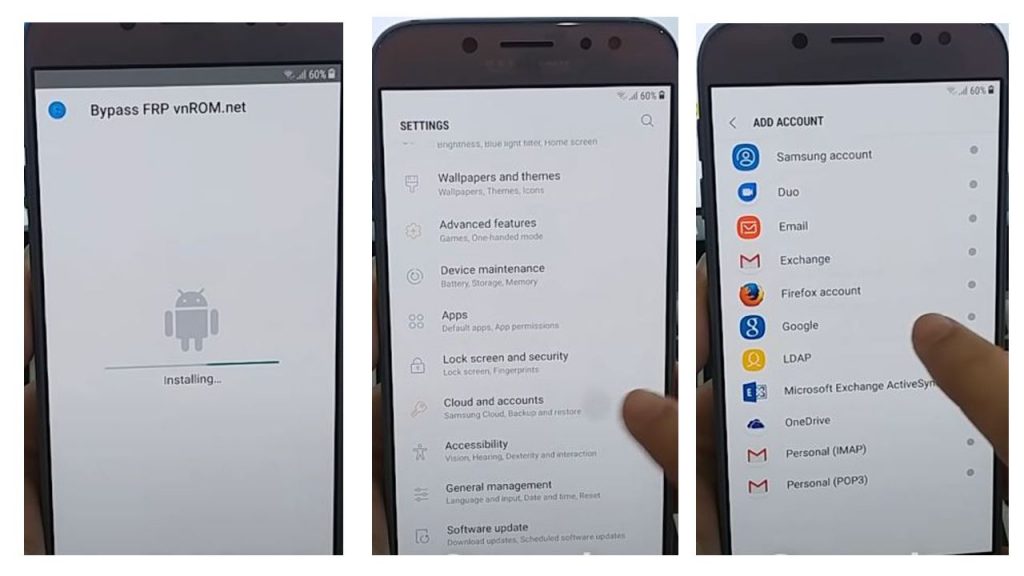
- install the Addrom APK
- Click Cloud & Accounts
- Click on Google
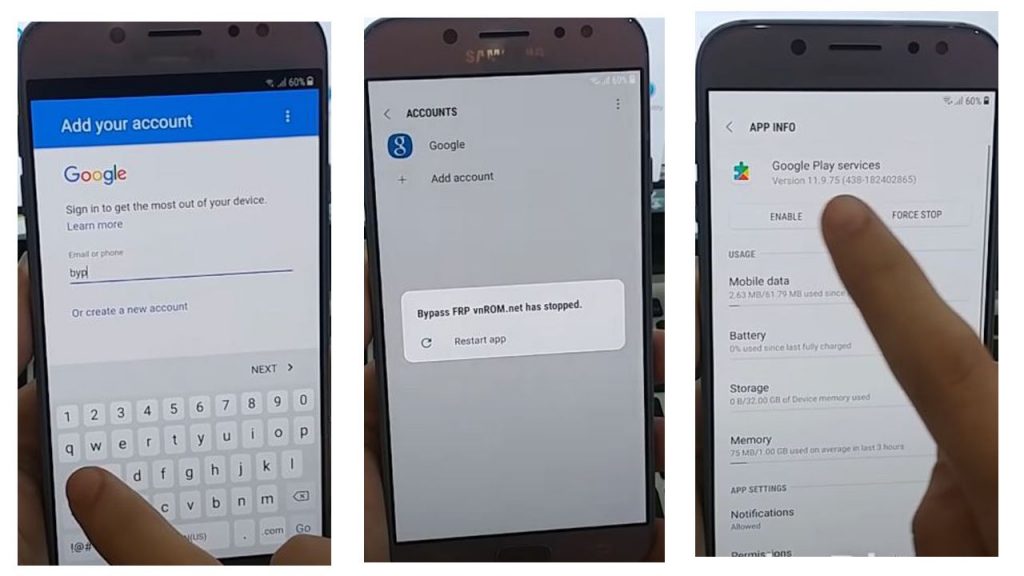
- Enter any of your Gmail accounts here
- Once the account has been added, open the application
- Google Play Services option Enable
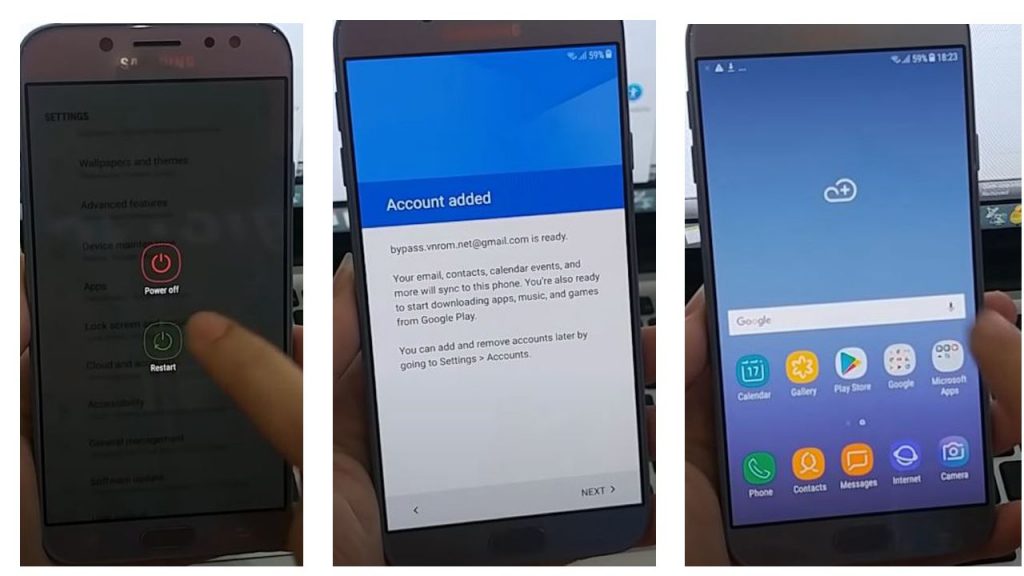
- Restart the mobile
- Google’s mobile account has been bypassed
Is addROM Bypass APK Safe to Use?
Safety depends on how and why the tool is used.
Safe Use Guidelines
- Use only on your own device
- Avoid unknown modified APKs
- Do not misuse for unauthorized access
- Always respect local laws
The app does not contain system-level malware when downloaded from trusted sources.
Limitations of addROM Bypass APK Latest Version
While popular, the tool has clear limitations:
- Does not work on all Android versions
- Blocked on newer security patches
- Not a guaranteed FRP removal method
- Temporary access only in many cases
Understanding these limits prevents false expectations.
addROM Bypass APK vs Modern Android Security
Android security has improved significantly in recent years.
Key changes include:
- Stronger FRP enforcement
- Restricted system activity access
- Google Play Protect enhancements
Because of this, older bypass methods may not work on newer devices.
Legal and Ethical Considerations
Using addROM Bypass APK Latest Version 2026 should always follow ethical guidelines.
Important reminders:
- Use only on devices you own
- Do not bypass security on stolen phones
- Respect privacy and data protection laws
Information of addROM APK
| Name | AddROM Bypass APK |
| Version | Latest |
| Size | 28 MB |
| Compatibility | Android 13/12/11/10/9/8/7/6 |
| File Price | Free |
| Password | No |
| Credit | AddROM APK Developer |
addROM Bypass APK Latest Version Free
DownloadApex launcher
DownloadExternal Learning Resources
For better understanding of Android security and FRP:
- Official Android security documentation
- Google Android Security Documentation
- Official Android Help Center
These resources explain why FRP exists and how Android protects users.
Asked Questions
Q1. What is addROM Bypass APK Latest Version 2026?
addROM Bypass APK Latest Version 2026 is an Android app that helps access limited device functions on some FRP-locked phones, depending on Android version and security level.
Q2. Is addROM bypass apk free to use?
Yes, the APK itself is usually available as a free download, but results are not guaranteed on all devices.
Q3. Does addROM Bypass APK remove Google account permanently?
No. It does not permanently remove a Google account. It may only provide temporary access in certain cases.
Q4. Can beginners use addROM Bypass APK?
Yes. The app is simple and beginner-friendly, but users should understand its limitations.
Q5. Does addROM FRP bypass APK work on Android 13 or newer?
In most cases, newer Android versions block this method due to improved security updates.
Q9. Is addROM Bypass APK legal?
Using it on your own device for recovery or learning is generally acceptable. Misuse on unauthorized devices is not recommended.
Q10. Is addROM Bypass APK still useful in 2026?
It remains useful for learning and older devices, but modern Android security has reduced its effectiveness.
Final Thoughts
addROM Bypass Apk Latest Free 2026 continues to be a widely discussed Android utility for understanding FRP behavior and device security. While it is not a guaranteed solution for every phone, it remains relevant for beginners, learners, and older Android devices.
Used responsibly, it helps users understand Android protection mechanisms, reinforces the importance of account management, and highlights how mobile security evolves over time.



6 thoughts on “addROM Bypass APK Latest Free 2026 –One Click App”